

Data Security is the set of technical and organizational measures that keep user data safe from unauthorized access, loss, or misuse when it is processed by AI search systems.
External context
For those managing digital pages, understanding data security means implementing protections that cover all aspects of your information. This includes securing not only the actual data and databases but also the underlying hardware, software, and administrative controls. Proper implementation ensures that content remains safe from destructive forces and unauthorized actions like cyberattacks or breaches.
Data security Wikipedia contributors, “Data security”, en.wikipedia.orgLicence01What it is and how it works
Data Security combines encryption, access controls, monitoring, and incident response. Encryption scrambles data at rest and in transit so only authorized keys can read it. Access controls assign roles (e.g., admin, analyst) and require strong authentication. Monitoring logs every read or write event, flagging anomalies for review. If a breach occurs, an incident response plan defines how to contain, investigate, and notify affected parties.
Data Security means keeping data safe from people who shouldn't see it.
02What to do about it
Take these actions this week to improve your brand’s data security in AI search:
- Enable HTTPS for every endpoint that receives or returns AI‑generated results.
- Rotate API keys and service‑account credentials at least every 90 days.
- Apply the principle of least privilege: give users only the permissions they need.
- Set up automated alerts for unusual query volumes or access from new IP ranges.
03How it is measured or noticed
Security teams look for compliance reports, encryption status, and audit logs. In the context of AI search, you can verify that data sent to a model is encrypted (TLS 1.2+), that the model does not retain personally identifiable information, and that access logs show who queried what and when. Tools like Google Cloud Security Command Center surface misconfigurations and expose gaps.
How the record puts it
Data security or data protection is the process of securing digital information to protect it from online threats.
04Common mistakes
- Storing API keys in plain‑text code repositories.
- Relying on default permissions instead of reviewing role assignments.
- Skipping regular key rotation because it seems inconvenient.
- Assuming the AI provider automatically deletes user data after processing.
05Limits
Data Security does not cover content quality or bias; those are separate trust signals. It also does not apply to publicly available data that users intentionally share. Confusing Data Security with Data Privacy is common—security protects the data, while privacy governs how data may be used.
06Worked example
"We moved our AI‑search endpoint to Cloud Run, forced TLS 1.3, and added a service‑account with read‑only access to the analytics bucket. After a week, the security dashboard showed zero unauthorized reads and our compliance report passed the internal audit."
The entry above is written by GetLoopLoop. What follows is what independent catalogues hold about the same term — none of it is the source of this page.
- Part of
- data security and protection, cybersecurity
The same term on Wikipedia
Catalogued in 23 languages07Frequently asked questions
How does Data Security differ from data privacy in AI search?
It depends. Data Security focuses on protecting data from unauthorized access, loss, or misuse through technical controls like encryption and monitoring, while data privacy deals with how personal information is collected, used, and shared in compliance with regulations.
Should we invest in encryption for our brand's AI search data now, or wait for regulations to catch up?
Usually, you should implement encryption now. Early adoption reduces risk, demonstrates responsibility to users, and positions your brand ahead of upcoming legal requirements.
Who is responsible for implementing Data Security measures in our AI search workflow?
It depends on your organization, but typically the security or IT team leads the technical implementation, while product owners ensure that policies align with brand goals and compliance requirements.
Does encrypting data guarantee protection against all breaches?
No, encryption is a key layer but not a complete guarantee. Breaches can still occur through misconfigured access controls, insider threats, or vulnerabilities in other parts of the system.
What are the signs that our Data Security controls have failed in AI search?
Usually, you will notice unusual login attempts, missing audit log entries, or alerts from monitoring tools. Unexpected data exposure or compliance reports flagging non‑encrypted assets are also clear indicators.
How long does it take to see the impact of new Data Security measures on AI search results?
Usually, technical controls like encryption take effect immediately, but measurable improvements in trust signals and compliance reporting may take a few weeks as audit logs are collected and reviewed.
Wikimedia Commons
Related visuals with source and licence credit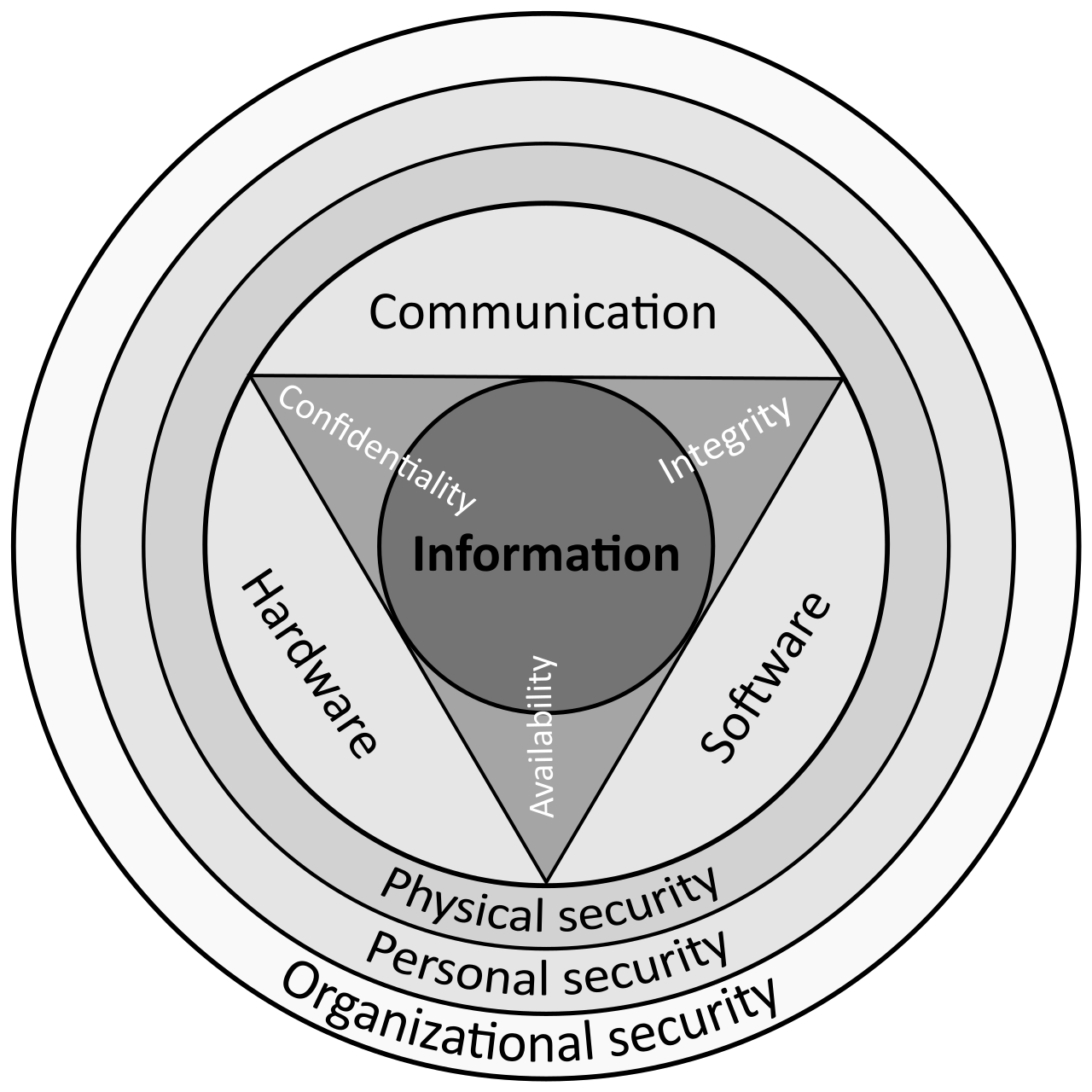

08Asked out loud
The same term in the words somebody uses speaking to an assistant rather than typing into a box — written from the situation, which is why each one carries the situation it came from.
Yes, you can verify the encryption status in the security dashboard, and look for a valid encryption certificate for the data stores used by the AI search tool.
Usually, a security alert means an anomaly was detected, but it doesn't automatically mean data was compromised. Check the alert details and review recent audit logs to confirm whether any unauthorized access occurred.
Usually, you can open the security console, navigate to the encryption status page, and confirm that the encryption toggle is on for all AI search data sources.