
01 What happens to a page before an AI assistant can quote it
Before an AI assistant can quote a page, a machine has to fetch it, reduce it to text, cut the text into passages and store some of them; the assistant then retrieves passages, not pages. That is the shape of retrieval-augmented generation as it was named in 2020: a retriever finds passages in an index and a generator writes from them [16]. The original paper split Wikipedia into 100-word passages before indexing anything [16].
The fetch is done by named crawlers that publish what they are for. OpenAI separates the bot that gathers training data from the one that finds pages for ChatGPT search and the one that fetches a page a user asked about [9]; Anthropic and Perplexity make the same distinctions for their own bots [10] [11]. Google says a page has to be indexed and eligible for a snippet to appear in its AI features [1], and Bing says Copilot rests on the same crawling and indexing as its search [14].
What the crawler keeps is text. Googlebot renders JavaScript in a later phase [7], but when Vercel measured its own network in December 2024, the major AI crawlers fetched JavaScript files without executing them [8], and Common Crawl says its CCBot does not execute JavaScript either [12]. Words that only exist after a script runs are, for those crawlers, words that do not exist.
- Fetch One GET of the HTML, as a crawler would. No scripts run.
- Text Menus, footers and markup removed; the readable text remains.
- Passages Cut at every h2, then into windows of about 2,000 characters.
- Cap At most 26 passages kept. Everything after is never stored.
- Retrieval A question is matched against passages, never against the page.
The cut and the 26-passage cap are the rules of our free Vectorscope and of this skill. No assistant publishes its own passage limit; 26 is a working model of a limit, not a number taken from any of them.
02 Why every passage has to stand alone
A passage that needs the passage before it to make sense cannot be quoted, because the retriever hands it over alone. Anthropic's write-up of contextual retrieval describes exactly this failure: once a document is split into chunks, an individual chunk can lose the context that said what it was about [18]. Pinecone's chunking guide states the working rule from the other side — if a chunk makes sense to a person without the text around it, it will make sense to the model too [19].
It also works offline. Pricing for this starts at the second tier, and it can be switched off per project.
Does the editor work offline? Yes — the desktop editor works offline. Offline mode is included from the second tier and can be switched off per project.
Position matters even after retrieval. Liu and colleagues found that language models often use information best when it sits at the beginning or the end of a long context, and markedly worse when it sits in the middle [17]. A page cannot choose where an assistant puts its passage; it can make sure the passage carries its own subject, so that wherever it lands it still says what it is.
Most pipelines cut by size first. The common default in RAG tooling is a fixed chunk size with an overlap, split at paragraph and line breaks where it can be [20]. A window cut that way does not know where your answer ends.
One honest caveat about Google: it says Google Search does not need content broken into small pieces, because its systems find the relevant part of a page on their own [2]. A Claude Code skill for AI search cannot change that, and this one does not try. It is about the retrievers that store passages, and Bing, for one, says a URL is more likely to be selected for grounding and citations when its content stands on its own [14].
03 What the skill does, step by step
A skill is a folder with a SKILL.md file of instructions that an agent loads. Claude Code finds skills in your personal and project skill folders, uses one when it is relevant, and lets you call it by name, here as /vectorscope [21]; other agents load the same folder from their own skill directories, listed further down. As a Claude Code skill for AI search, Vectorscope splits the work between two scripts that follow fixed rules and the steps that are the agent's judgement — made by the model your agent runs, which in Claude Code is Claude.
-
Read the page
dist/read.mjsfetches the URL with one plain GET and reads the site's robots.txt, refuses private and local addresses, extracts the visible text, cuts it at every h2 and then into windows of about 2,000 characters with 200 characters of overlap, applies the 26-passage cap and marks passages that look like link lists or small print. With--renderit also loads the page in a local Chrome, Chromium or Edge with a throwaway profile and reports how many words exist only after JavaScript runs; the reading itself stays the plain fetch. -
Group the passages
The agent reads every passage in full and writes
groups.json: at most six groups by subject, each named in the page's own language. This is a judgement — the web tool groups by embeddings, the skill by reading — and the next script refuses a grouping that leaves a passage out or counts one twice. -
Write the report
dist/lens.mjsvalidates the grouping, runs every check and writes a self-contained HTML report, Markdown and JSON; the report is always shown, not just named. Every section and number carries a tag — measured by the parser, derived by a fixed formula, or the agent's judgement — and a "?" beside each number opens its formula, unit, threshold and limits. The info panel at the top explains the tags and names the model that judged. EN | UK switch, two themes, and a content security policy that blocks every network request. -
Show where the text goes
A character waterfall follows the page from the raw HTML to the passages: removed by the cleaner, kept, in passages, past the cap. A table lists what the cleaner removed and why — the element, its CSS path, its characters, how its text begins — and a section map shows how much of each h2 reached a passage. Past the cap is counted from the unique text in passages: 55,001 characters for the Wikipedia example, where subtracting every stored character, overlaps and intro included, says 52,973.
The report also lists the page's own vocabulary, phrases first: two to four words the page writes together in at least two passages, then single narrative words no listed phrase already used. It is what the page says, not search demand; for how people ask, use the query test.
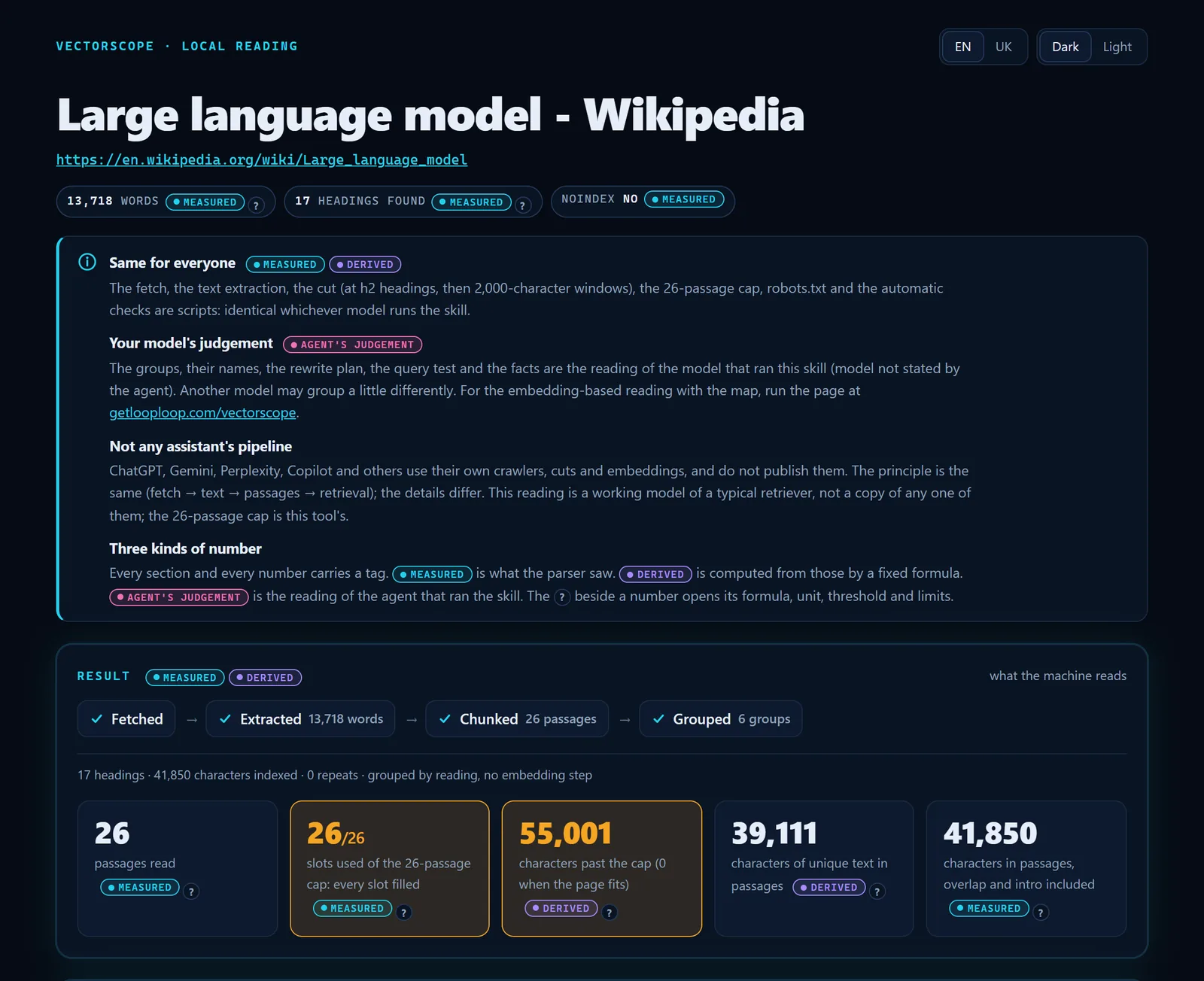
- A tag beside every number: measured, derived or the agent's judgement.
- The info panel says what each tag means.
- 55,001 characters past the cap, counted from unique text.
- Unique text in passages, beside the total with overlaps and intro.
- The "?" opens how a number is computed.
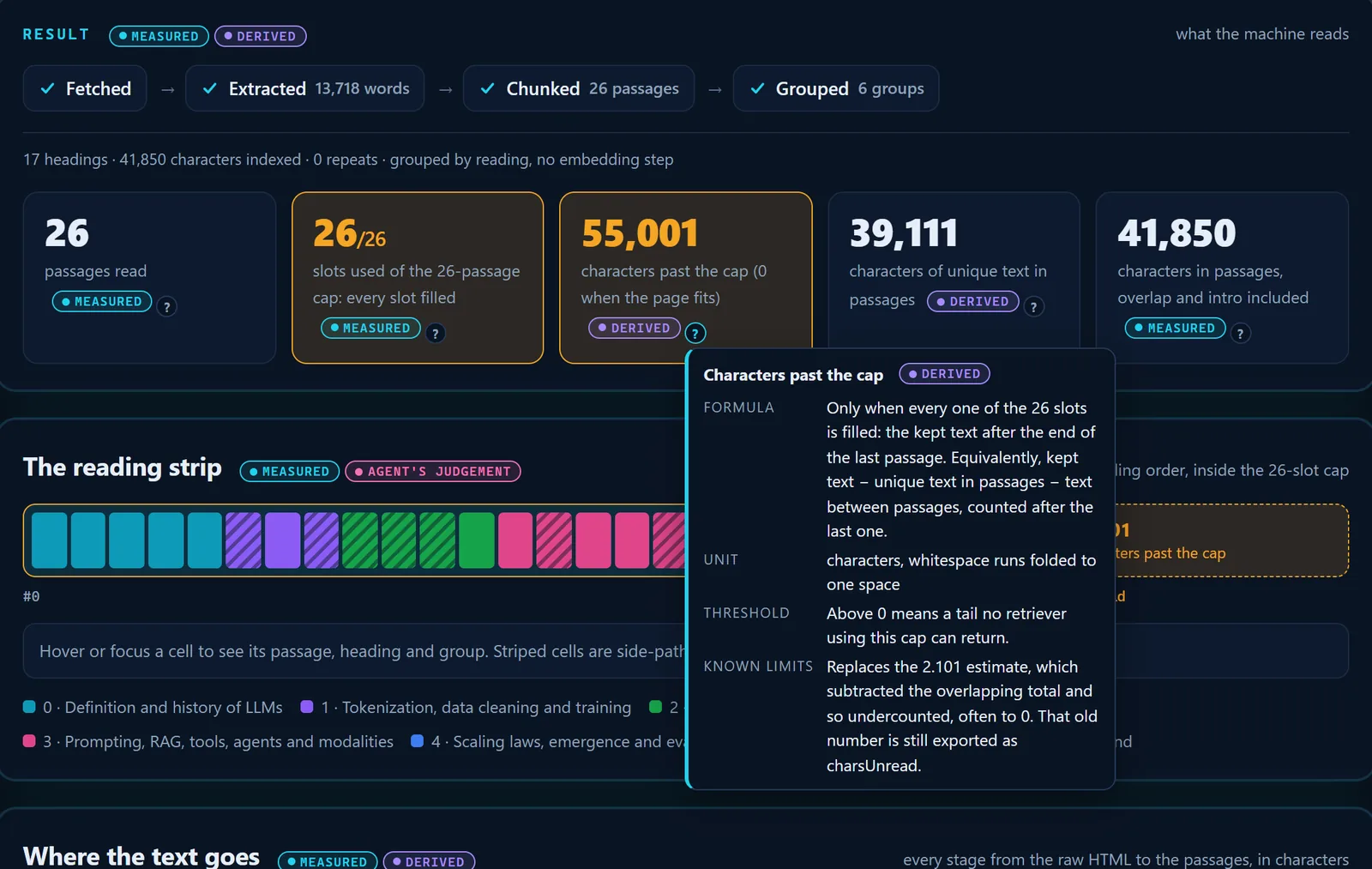
- The "?" beside the number.
- The formula, in words.
- Known limits, including what the old count did.
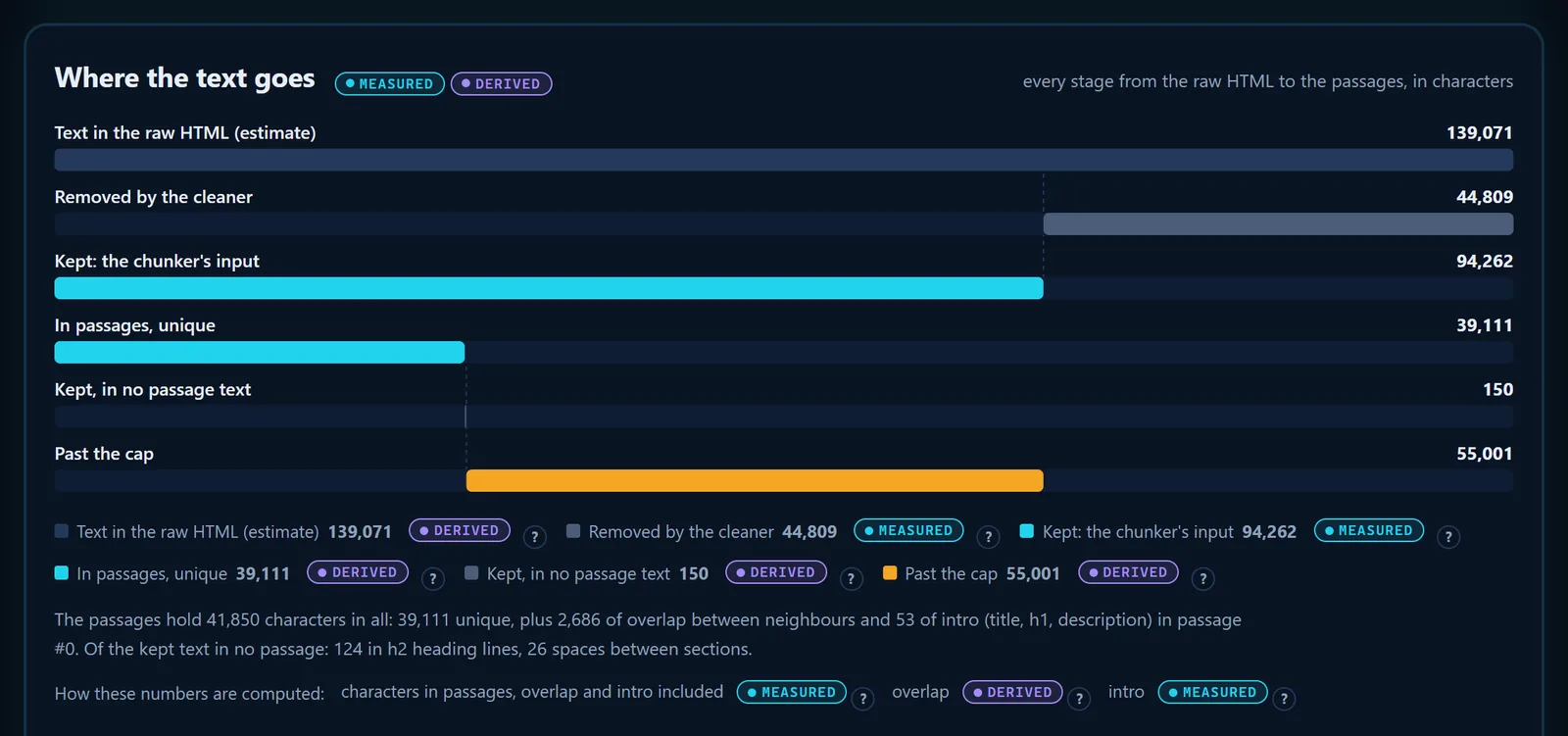
- What the cleaner removed: scripts, styles, navigation.
- Unique text that reached a passage.
- Past the cap: kept, but in no passage.
- The passage total split into unique, overlap and intro.
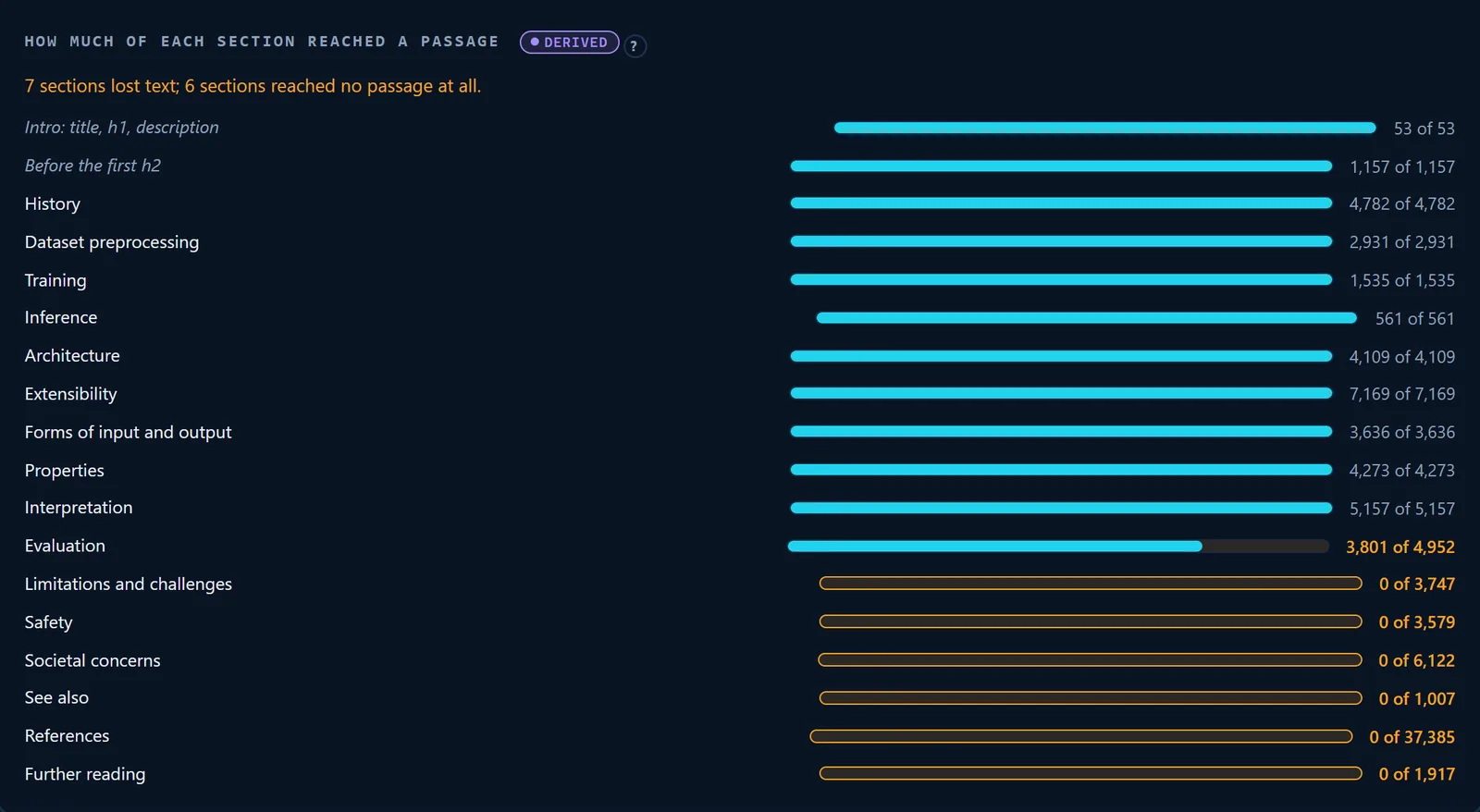
- Sections that lost text, and sections that reached none.
- A section the cap cut in the middle.
- Sections past the cap: 0 characters stored.
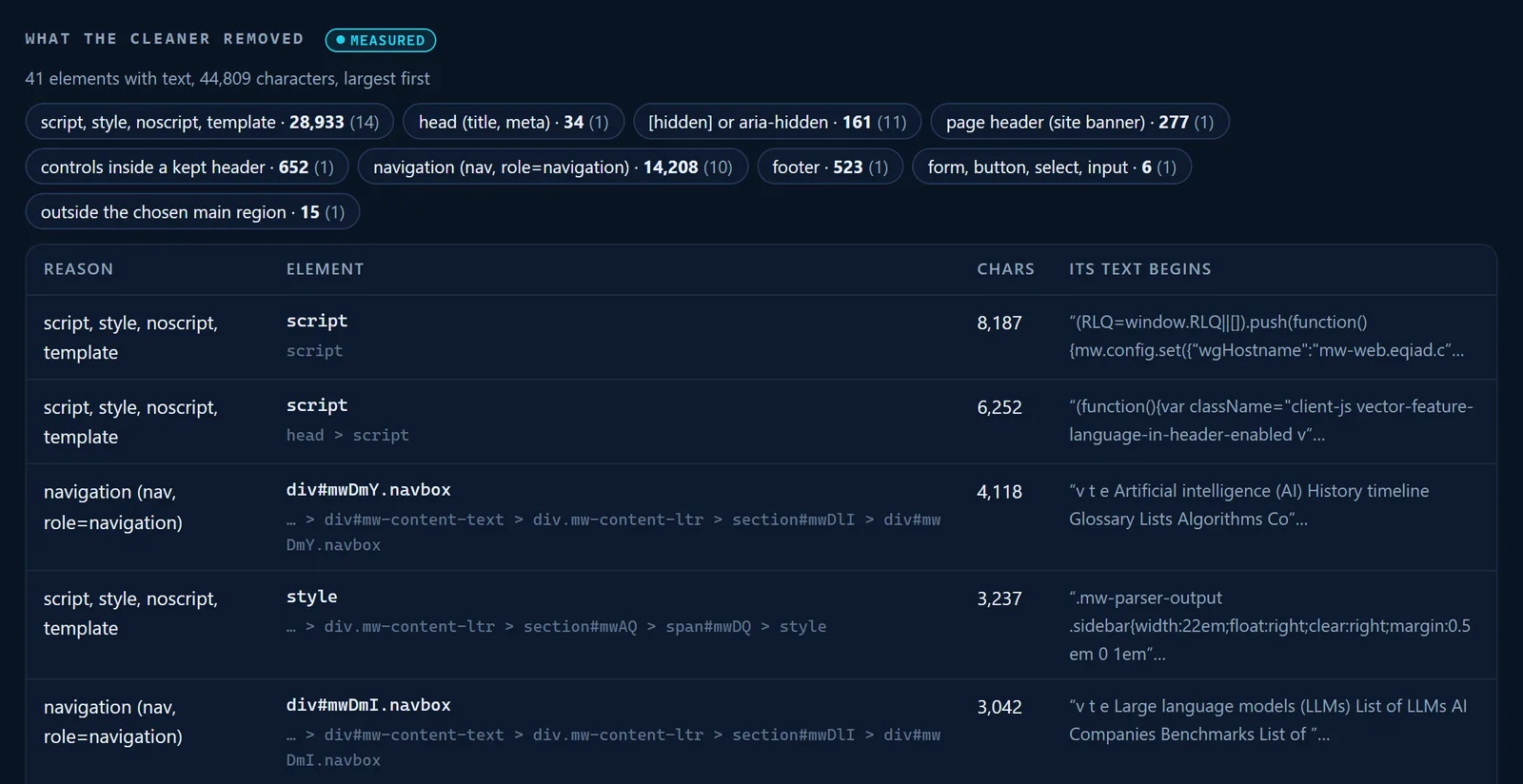
- Removed characters by reason.
- The element and its CSS path.
- Its characters, then how its text begins.
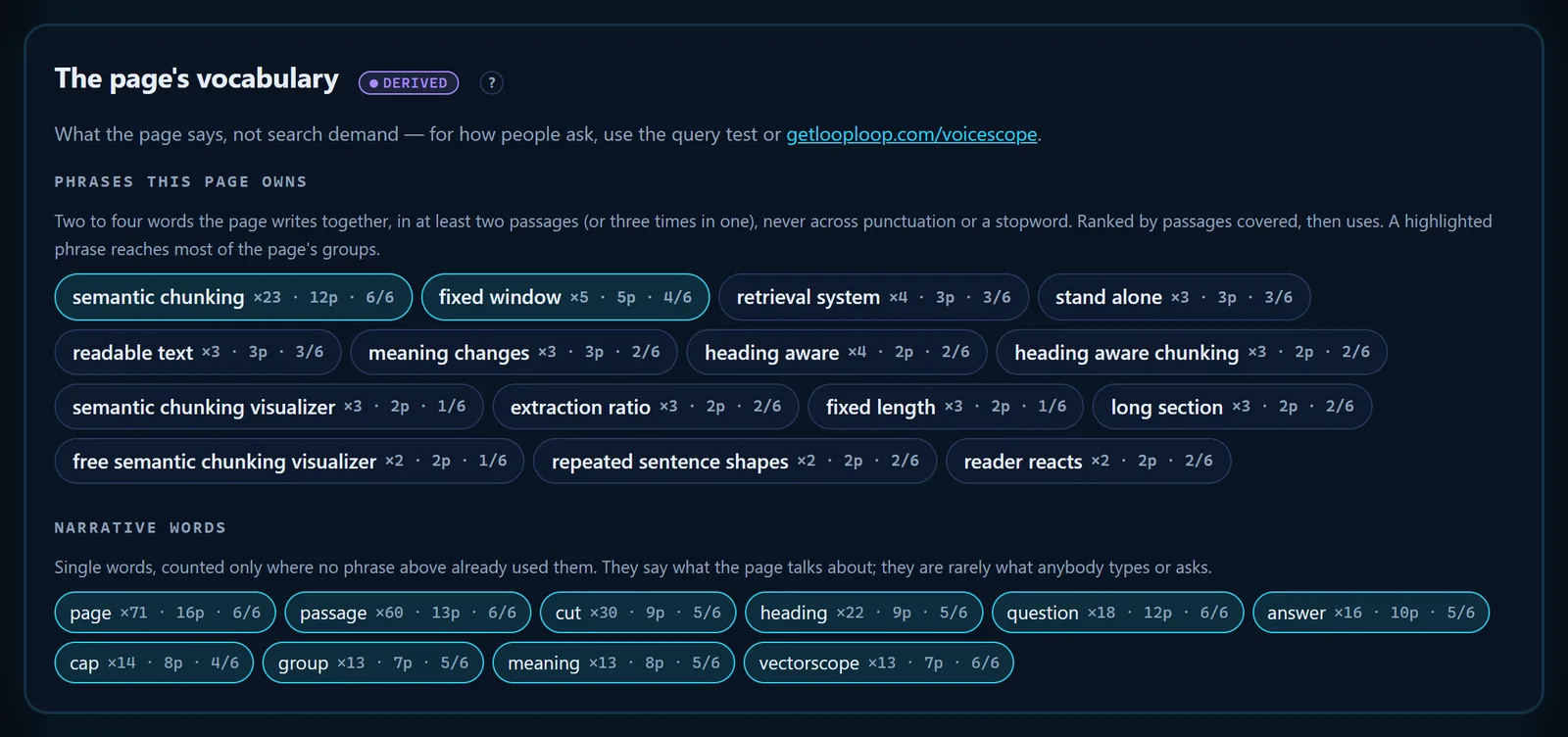
- Derived: counted by a fixed rule, not judged.
- What the page says, not search demand.
- A phrase the page owns: uses, passages, groups reached.
- Narrative words: single words no phrase already used.
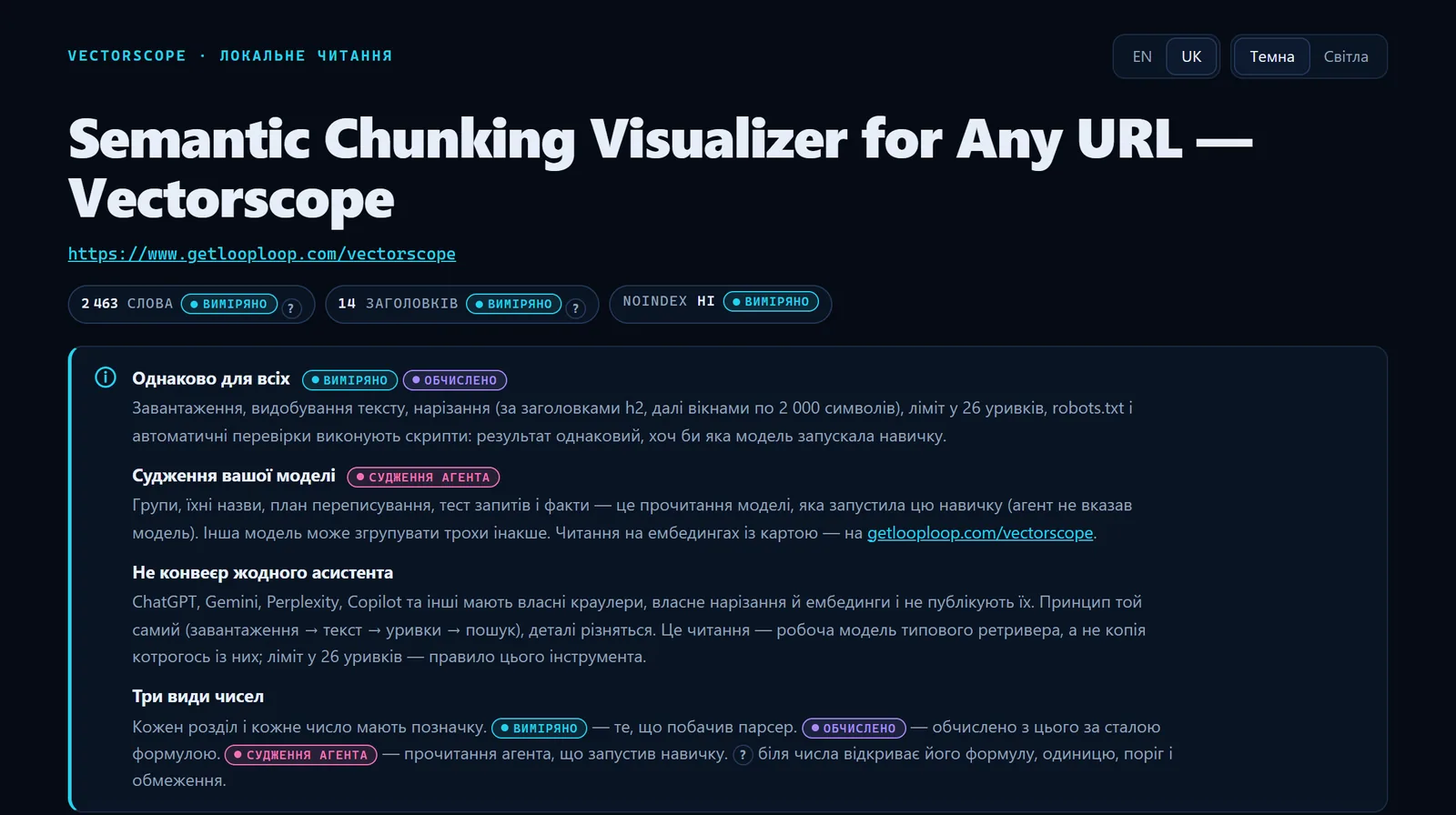
- The interface language switch.
- The tags and explanations, in Ukrainian.
- The page's own title is never translated.
04 The automatic checks, and why each one matters
After the reading, the Claude Code skill for AI search runs its checks with no judgement involved: each finding has a code, a severity, the passages it rests on and the evidence, and every threshold is a named constant in the skill's code. The report ranks them by severity, and crawler access comes first, because a blocked crawler makes the rest moot.
-
Answering crawlers blocked in robots.txt
ai_search_blockedThe skill reads /robots.txt on the page's own origin and matches it the way RFC 9309 describes for twelve crawlers. If a search or user-fetch crawler — OAI-SearchBot, ChatGPT-User, Claude-SearchBot, Claude-User, PerplexityBot, Perplexity-User, Googlebot or Bingbot — is disallowed, the report says so before anything else; Google's own advice for its AI features starts with the crawler not being blocked [5]. robots.txt is a request crawlers are asked to honour, not access control [13], and each operator documents its own agents [9] [10] [11]; fetchers acting for one user are a separate case, since OpenAI says robots.txt rules may not apply to ChatGPT-User and Perplexity says Perplexity-User generally ignores them. A robots.txt that answers 5xx or not at all is reported as
robots_unreachable. -
Only training crawlers blocked
ai_training_blockedGPTBot, ClaudeBot, Google-Extended or CCBot disallowed is usually deliberate and does not stop an assistant citing the page today, so it is a low finding. Google says Google-Extended does not affect inclusion in Google Search [4], and robots.txt controls crawling rather than whether a page appears in results [3]; Common Crawl's CCBot reads robots.txt first [12].
-
The page asks not to be indexed
noindexA meta robots noindex means the search indexes assistants answer from will drop the page. Google's AI features show only pages that are indexed and eligible for a snippet [1].
-
Text that exists only after JavaScript
js_dependentWith
--render, a page where JavaScript adds 50% more words or more (and at least 150) is flagged. When Vercel measured its network in December 2024, the major AI crawlers fetched JavaScript files without executing them [8], so they read the smaller number. -
Text past the 26-passage cap
cap_overflowAll 26 slots are filled and text is left over. Whatever comes after the 26th passage is never stored by this pipeline, so no question can bring it back. The cap is ours, not any assistant's.
-
FAQ answers that lost their questions
lost_faq_questionsThree or more sentences open with "Yes." or "No." while the page has fewer question marks than half of them: the questions sat in buttons or accordions that did not survive extraction, and each answer has lost its address. Google retired FAQ rich results in May 2026 [6], so the markup was never the point — the text is.
-
One heading holding over 30% of the text
dominant_headingThe chunker splits only at h2, so a section that large is cut by length alone; its subheadings are h3 or styled text, and neither makes a cut.
-
Passages that open mid-sentence
mid_sentence_startA passage that starts in lowercase or on punctuation was cut by the 2,000-character window. It opens without its subject — the failure described in the stand-alone section [18].
-
Navigation inside the content
nav_in_contentFour or more consecutive lines of one or two words inside the main text: menus, tag lists or label tables became passage text and spent passages. Google asks for important content to be available as text [1]; chrome that reads as text is spent as content.
-
Thin sections
thin_sectionA heading with fewer than 150 characters under it is too short to answer anything on its own.
-
Truncated teasers
truncated_teaserLines ending in "…" or "..." (code samples excluded) hand a retriever half a claim; three or more raise the severity to medium.
-
The same claim in every section
repeated_claimThe same four-word phrase — with grammar in it, not code — in at least half the groups. Repetition spends passages on what was already said.
Then the markup: a canonical that is missing, relative, duplicated or pointing at another URL; JSON-LD that does not parse or is absent; and a meta description that is missing, under 70 or over 160 characters, because the chunker puts the description into passage #0.
robots.txt first: which AI crawlers may read the page
The table is the robots.txt verdict from a real run of the skill on the web Vectorscope's own page: twelve crawlers, each with the rule that decided it. On this page every one of them is allowed.
| Crawler | Vendor | What it is for | This page | Deciding rule |
|---|---|---|---|---|
OAI-SearchBot | OpenAI | search answers | allowed | Allow: /vectorscope |
ChatGPT-User | OpenAI | a fetch a user asked for the vendor says robots.txt may not apply to it | allowed | Allow: /vectorscope |
GPTBot | OpenAI | training data | allowed | Allow: /vectorscope |
Claude-SearchBot | Anthropic | search answers | allowed | Allow: /vectorscope |
Claude-User | Anthropic | a fetch a user asked for | allowed | Allow: /vectorscope |
ClaudeBot | Anthropic | training data | allowed | Allow: /vectorscope |
PerplexityBot | Perplexity | search answers | allowed | Allow: /vectorscope |
Perplexity-User | Perplexity | a fetch a user asked for the vendor says robots.txt may not apply to it | allowed | Allow: /vectorscope |
Google-Extended | Gemini training and grounding | allowed | Allow: /vectorscope | |
Googlebot | web search index assistants answer from | allowed | Allow: /vectorscope | |
Bingbot | Microsoft | web search index assistants answer from | allowed | Allow: /vectorscope |
CCBot | Common Crawl | open web corpus | allowed | Allow: /vectorscope |
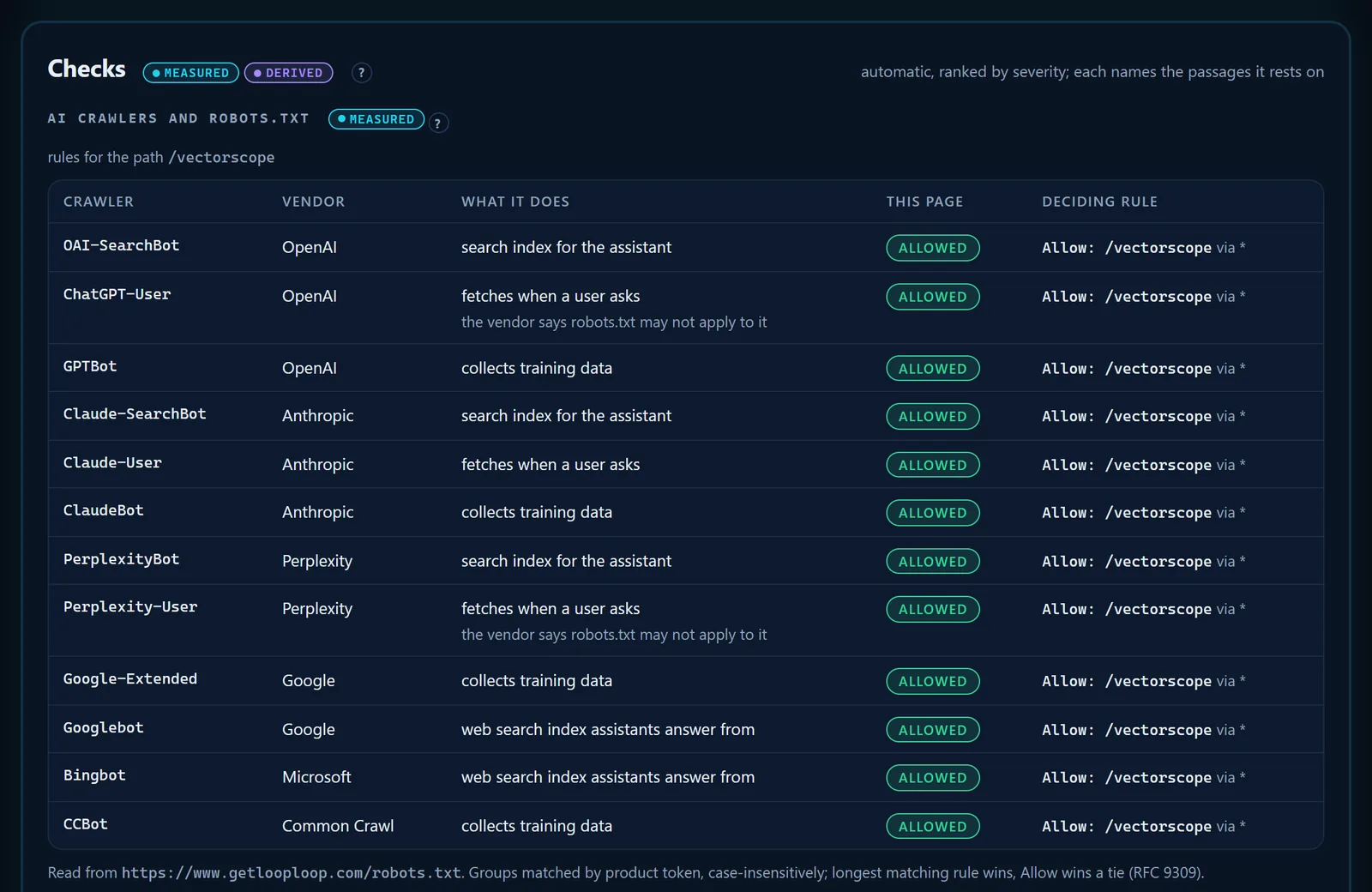
- User-fetch crawlers carry the vendor's own caveat about robots.txt.
- The verdict for this page's path.
- The rule that decided it, and the group it came from.
- Where the file was read, and the matching rules used (RFC 9309).
05 From a reading to a rewrite: query test, plan, compare, before and after
A reading says what is wrong; the rest of the Claude Code skill for AI search helps fix it and shows whether the fix worked. The query test and the plan are the agent's judgement, and the script checks both: a quote must be copied verbatim from the passage it cites, or the run is refused with the item named.
A query test
The agent writes 5 to 10 typical queries — yours if you give them, otherwise the questions a person would type into an assistant, including at least one the page probably does not answer. For each it names the single passage a retriever should return, a verdict (complete, partial or missing), whether the words make sense quoted alone, and the exact words that answer.
A rewrite plan
Fixes in priority order, each tied to a check code and to the passages it rests on, with before → after rewrites for the weakest passages. The order follows what changes retrieval most: blocked crawlers and noindex, then text past the cap, then passages whose questions or subjects were lost, then thin or fragmented sections, then markup. A rewrite may not add a claim the page does not make.
Compare mode
Read 2 to 5 pages in one run. The agent writes one shared topic dictionary first, so the groups line up across pages; the report shows a topic × page table, topic gaps (topics the others cover and a page does not), fact gaps (facts only one page states) and who wins each query. The skill compares the pages you name and is told not to volunteer a comparison against a named company's page.
Before and after
Keep the old reading. After the page changes, read it again and pass --baseline old-reading.json to the report, with --baseline-groups if you kept the old grouping: it shows which passages are unchanged, changed, added and removed, the cap status before and now, and which old groups the new ones came from. After a real change, IndexNow can tell participating search engines the URL changed [15].
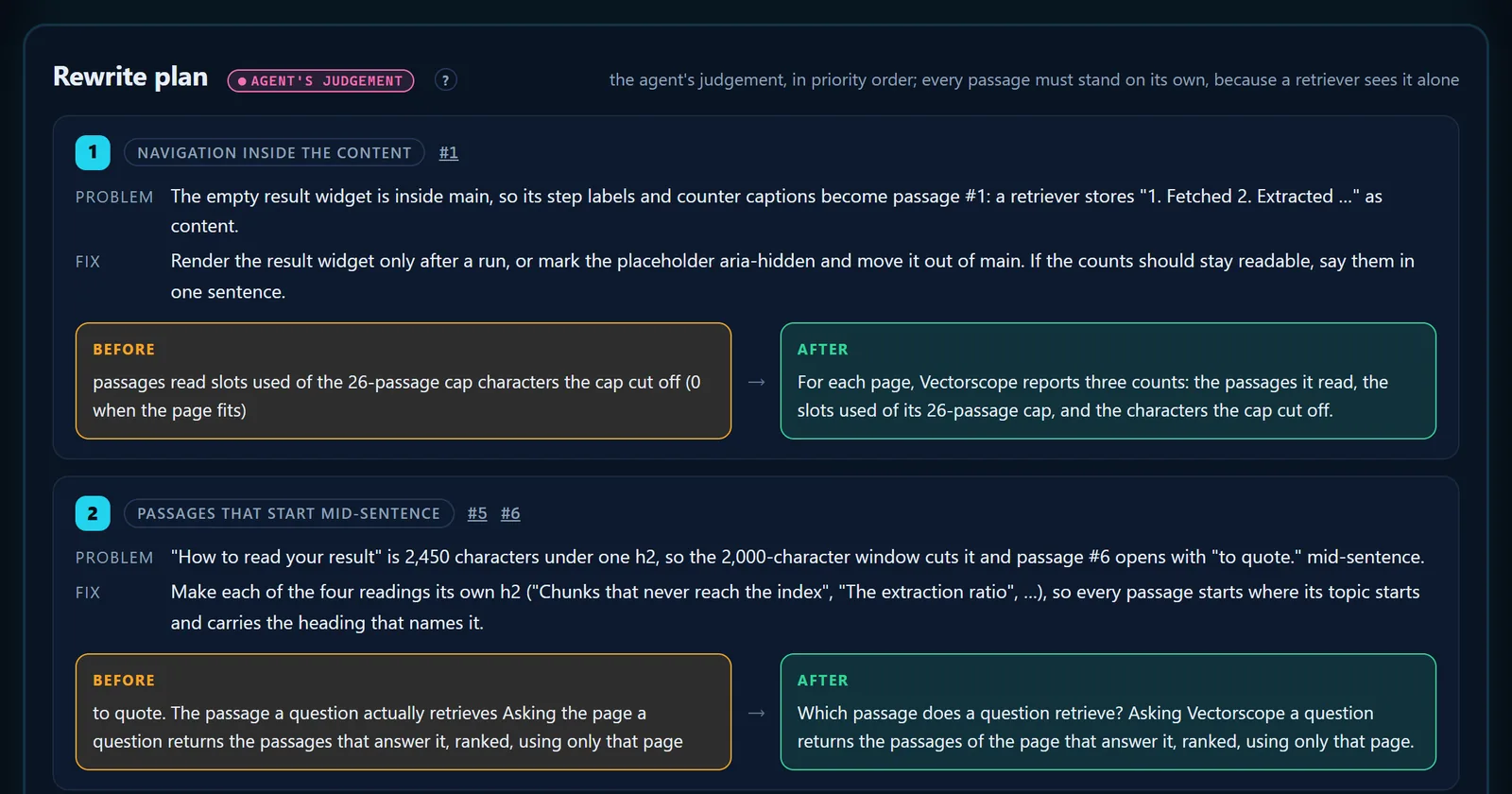
- Tagged as the agent's judgement.
- The check the item answers, and its passages.
- Before: the passage text, copied verbatim.
- After: the rewrite, which names its subject so it stands alone.
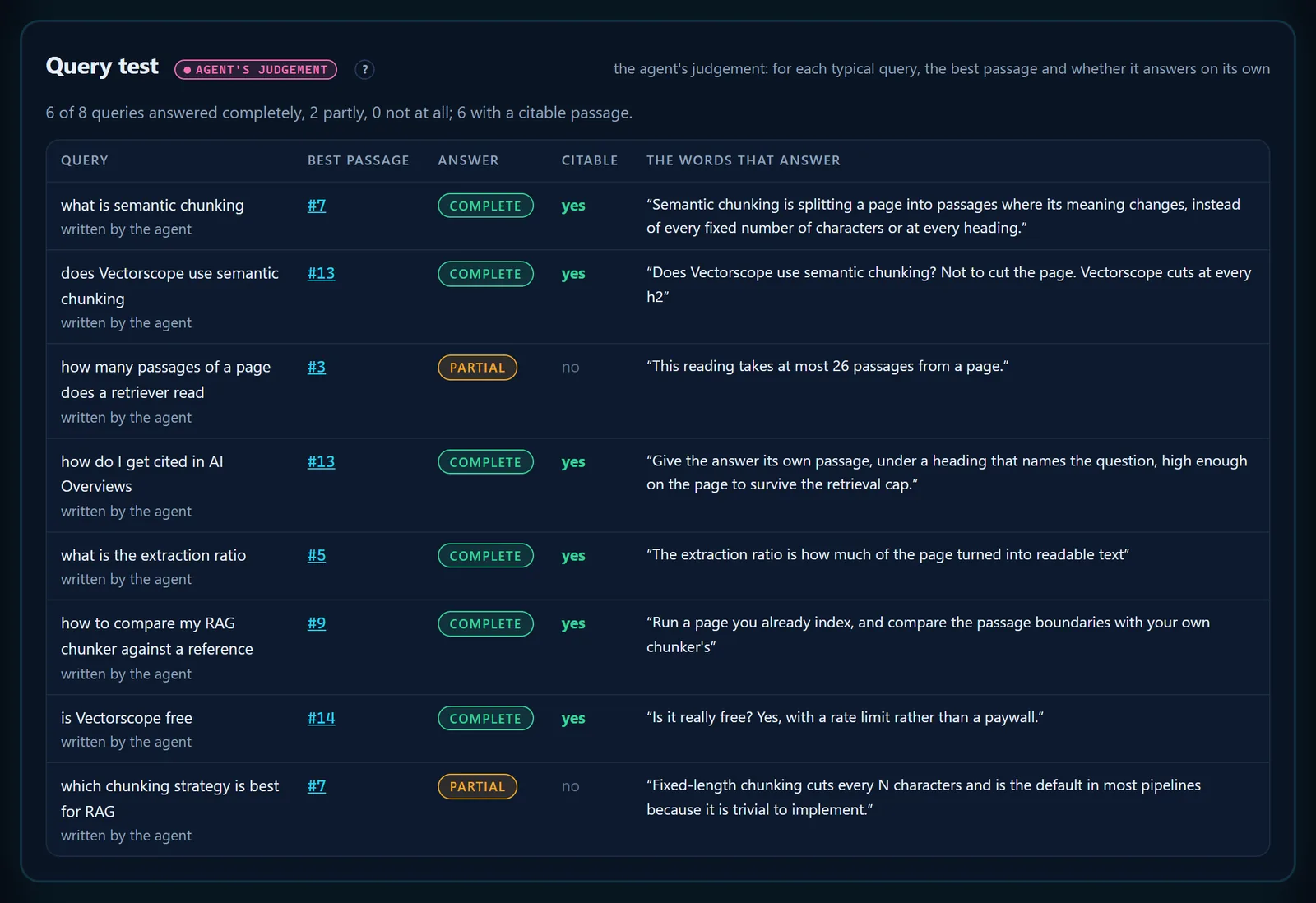
- Tagged as the agent's judgement.
- The summary: answered completely, partly, not at all, and citable.
- The verdict: complete, partial or missing.
- The exact words that answer, checked against the passage.
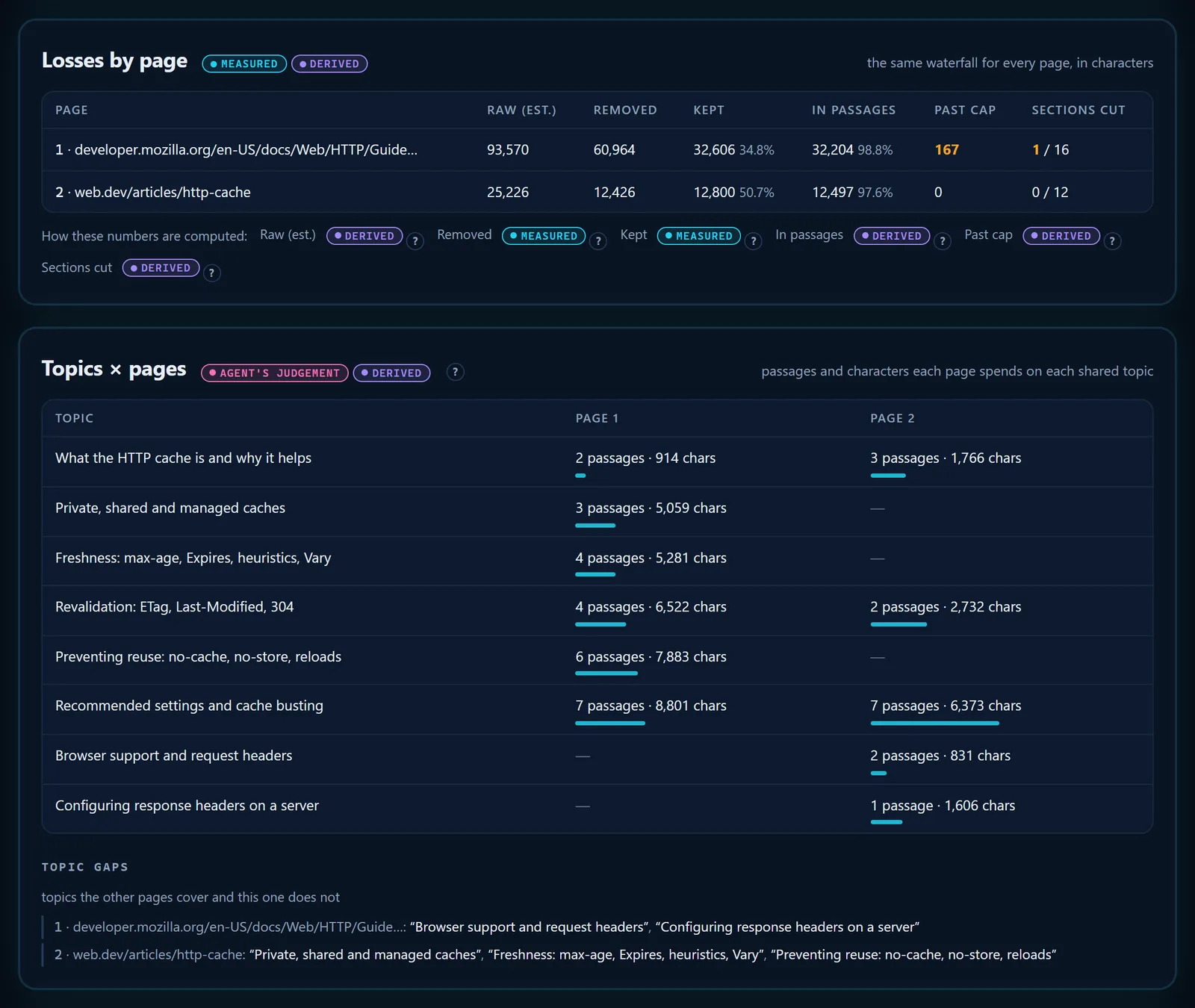
- Shown in 2.102: MDN lost 167 characters past the cap. 2.103 fixed the cut behind it (an h3 that repeated an h2 split a section), and the page now fits.
- Passages and characters each page spends on a topic.
- A topic one page covers and the other does not.
- The topic gaps, page by page.
06 Two real pages, read by the skill
Two runs ship with this Claude Code skill for AI search as examples. The Wikipedia article on large language models fills all 26 slots and leaves 55,001 characters past the cap, counted from the unique text in its passages; 2.101 subtracted the overlaps too and said 52,973. The Vectorscope page needs 17 passages and loses nothing. Every figure below is read from those two runs' JSON at skill 2.102 — nothing is estimated.
- passage
- unused slot
Twenty-six slots, one per stored passage, in reading order; a gap marks a change of group, and an outlined slot is one the page did not need. The cells count passages, not characters — the characters are in the last chart.
Long sections are cut into windows that stop near 2,000 characters; short bars are the ends of sections and the page's opening lines.
- in passages
- past the cap
Passage text is counted once, without the 200-character overlaps and the intro, so the two bars add up to the page's kept text, less the heading lines that sit in no passage.
Source: the skill's example runs examples/wikipedia-llm.json and examples/getlooploop-vectorscope.json, skill 2.102, generated 16 October 2026.
The figures as a table
| Page | Words | Passages | Characters stored, with overlaps | Of them unique | Characters past the cap |
|---|---|---|---|---|---|
| Wikipedia — Large language model | 13,718 | 26 / 26 | 41,850 | 39,111 | 55,001 |
| getlooploop.com/vectorscope | 2,463 | 17 / 26 | 14,211 | 13,547 | 0 |
07 Works with your agent: Claude Code, claude.ai, Codex, opencode, Hermes
This Claude Code skill for AI search is one folder — a SKILL.md and Node scripts — and every agent runs the same commands from it, so the agent's own model does the reading. Claude Code is the agent it was built in and the one this page is named for, but nothing in the scripts depends on it. This page describes release 2.103 (its screenshots are from 2.102); versions count in thousandths (2.101, 2.102, 2.103 …), so the first number moves only on a breaking change. Each agent finds skills in its own place:
| Agent | Where it looks for skills |
|---|---|
| claude.ai, Claude desktop | vectorscope.zip, uploaded in Customize > Skills [26] |
| Claude Code | ~/.claude/skills/ (personal) · .claude/skills/ (project) [21] |
| OpenAI Codex | ~/.agents/skills/ (user) · .agents/skills/ (repository) [22] |
| opencode | ~/.config/opencode/skills/ · .opencode/skills/, and the Claude Code and Codex folders too [23] |
| Hermes Agent | ~/.hermes/skills/, plus project folders once you trust the repository [24] |
| Any other agent | point its instructions file, such as AGENTS.md, at skills/vectorscope/SKILL.md |
GLM is a model family, not an agent: Z.ai's GLM Coding Plan runs inside coding agents, and its documentation names Claude Code, Codex and OpenCode among them [25]. Install the skill for the agent you run GLM in, and GLM does the reading.
The full install commands for every agent are in the skill's README
08 How to install it: claude.ai, the desktop app, Claude Code
This Claude Code skill for AI search needs Node 20.18 or later and no npm install anywhere: its scripts ship bundled in dist/, so plain node runs them, even where package installs are blocked.
-
claude.ai or the Claude desktop app: upload the zip
Download
vectorscope.zipfrom the release and keep it zipped. Turn on code execution, which skills need [26], then Customize > Skills > + > Create skill > Upload a skill. -
Let the sandbox reach the page
On Free, Pro and Max turn on Allow network egress; on Team and Enterprise an owner allows package managers and specific domains, with the site's domain listed [27]. If the setting cannot allow it, the run stops with
REFUSED unreachable: use Claude Code. -
A pasted link is not an install
Claude will not download and run code from a link pasted into a chat, because fetched content may carry instructions nobody vetted [28]; at most it imitates the steps, and those numbers are not the tool's.
-
Claude Code and other agents: clone
Anywhere on your machine.
shellgit clone https://github.com/Olexan-art/getlooploop-skills.git -
Copy the skill into your skills folder
~/.claude/skills/makes it yours in every project;.claude/skills/inside a repository makes it that project's.macOS, Linux, Git Bashmkdir -p ~/.claude/skills && cp -r getlooploop-skills/skills/vectorscope ~/.claude/skills/vectorscope -
The same copy in PowerShell
On Windows without Git Bash.
PowerShellNew-Item -ItemType Directory -Force "$HOME\.claude\skills" | Out-Null Copy-Item -Recurse getlooploop-skills\skills\vectorscope "$HOME\.claude\skills\vectorscope" -
Ask your agent
Type
/vectorscope https://example.com/pagein Claude Code, or ask in plain words in any agent. The run ends with the HTML report shown: a file to download in claude.ai, opened or published in Claude Code.
09 What the skill does not do
A Claude Code skill for AI search can only show what a retriever receives. Everything past that would be a claim it cannot check, so it does not make one.
- No score. A page is not given a grade, a rank or a percentage of "AI readiness".
- No AI detection. It does not say whether a person or a model wrote the page.
- No prediction of answers. It cannot say what any assistant will say about you, or whether any assistant has the page indexed today.
- No stand-in for an assistant's own pipeline. The groups, the query verdicts and the plan are the agent's reading, not an embedding clustering, and the report's info panel names the model that judged them; two models can judge a page slightly differently. The fetch, the cut, the cap and the checks are fixed rules and do not vary.
- No numbers made by hand. Where the scripts cannot run — no Node, no code execution, the network closed — the agent says so and stops rather than counting the page itself.
- One public URL per reading, up to five in compare mode, read as an anonymous visitor: no login, no cookies, no Accept-Language. JavaScript runs only with
--render, and the reading itself stays the plain fetch.

- The scripts fetched the page and its robots.txt, sent nothing anywhere and called no model.
- Links to GetLoopLoop and its author.
10 How it relates to the free web Vectorscope
The web Vectorscope and the Claude Code skill for AI search share the fetch, the extraction, the cut and the cap. They differ in who reads the passages: the web tool embeds every passage, groups them by measured similarity and draws the map; the skill hands the passages to your agent and makes no embedding calls at all, which is also what lets it judge queries and write a plan.
| The skill, in your agent | Web Vectorscope | |
|---|---|---|
| Fetch, extraction, cut, 26-passage cap | Same rules | Same rules |
| Grouping | The agent reads and groups | Embeddings, average-link clustering |
| Semantic map | No | Yes |
| AI-crawler robots.txt table and automatic checks | Yes | No |
| Query test and rewrite plan | Yes, by the agent | One question at a time, by similarity |
| Compare pages | 2 to 5 pages | One URL at a time |
| Where it runs | Your agent: your machine, or claude.ai's sandbox | Our server, in the browser |
| Limit | None of ours | A few runs per visitor |
11 Questions about the skill
Is this Claude Code skill for AI search free?
Yes. The skill is open source under the MIT licence. Its scripts make no model or embedding calls; the reading is done by the model your agent already runs, inside your own session.
Who is the Vectorscope skill for?
For people who write pages and for people who build what reads them. Content and SEO teams use it to check, before publishing, that the answer a page exists to give survives into one passage above the cap and that AI crawlers may fetch it. Engineers building RAG pipelines use it as a reference reading to hold their own chunker against.
Does the skill send my page anywhere?
No. The scripts make two GET requests — the page and its robots.txt — and send nothing anywhere; with --render, a local browser also loads the page. The report itself blocks every network request.
Is 26 passages the limit ChatGPT, Claude or Perplexity uses?
No. Twenty-six is the cap our Vectorscope and this skill apply. No assistant publishes a passage limit, and the number is a working model of a limit, not a measurement of anyone's.
Why does a page that looks long show only a few passages?
Usually because its text is drawn by JavaScript. The plain reading, like the major AI crawlers, does not run scripts; run it with --render to measure how much of the page exists only after JavaScript.
Can it tell me whether my page appears in AI answers?
No. It shows what a retriever would receive from a page. Whether an assistant cites you is a measurement over time on prompts you choose, which a reading of a page cannot answer.
Does it work outside Claude Code?
Yes. claude.ai and the Claude desktop app take it as an uploaded zip and run it in the code-execution sandbox; Codex, opencode and Hermes Agent load it from their skill folders; GLM runs it through those agents. The scripts are plain Node with nothing to install; the judgement is the agent's model.
12 Sources
How we checked these sources
This page explains a Claude Code skill for AI search, and every claim on it about how a search engine, a crawler or a retriever behaves is tied to a source, and each source was opened and read on 16 October 2026. Primary documentation comes first — the search engines and crawler operators describing their own systems — then the standard, then peer-reviewed research, then vendor writing on chunking where it states a working rule.
For each one we kept the exact sentence the claim rests on, in the source's own words, and it is printed below the link. Where a source said less than a draft of this page did, the sentence on this page was cut back to what the source says. Crawler documentation changes; if a quote below no longer matches its page, the page has moved on and this one will be updated.
Fetched and quoted on 16 October 2026.
- [1] AI features and your website Google Search Central · 2025-12-10 · Search engine
To be eligible to be shown as a supporting link in AI Overviews or AI Mode, a page must be indexed and eligible to be shown in Google Search with a snippet, fulfilling the Search technical requirements. There are no additional technical requirements. … Making sure that important content is available in textual form
- [2] Optimizing your website for generative AI features on Google Search Google Search Central · 2026-07-10 · Search engine
“Chunking” content: There's no requirement to break your content into tiny pieces for AI to better understand it. Google systems are able to understand the nuance of multiple topics on a page and show the relevant piece to users.
- [3] Introduction to robots.txt Google Search Central · 2025-12-10 · Search engine
A robots.txt file tells search engine crawlers which URLs the crawler can access on your site. This is used mainly to avoid overloading your site with requests; it is not a mechanism for keeping a web page out of Google.
- [4] Google's common crawlers Google Crawling Infrastructure · 2026-10-15 · Crawler operator
Google-Extended does not impact a site's inclusion in Google Search nor is it used as a ranking signal in Google Search.
- [5] Top ways to ensure your content performs well in Google's AI experiences on Search Google Search Central Blog · 2025-05-21 · Search engine
This includes making sure that Googlebot isn't blocked, the page works (Google receives an HTTP 200 (success) status code), and the page has indexable content.
- [6] Latest Google Search documentation updates — FAQ rich result Google Search Central · 2026-05-08 · Search engine
Deprecating the FAQ rich result feature … This feature will no longer appear in Google Search starting May 7, 2026.
- [7] Understand the JavaScript SEO basics Google Search Central · 2026-03-04 · Search engine
Google processes JavaScript web apps in three main phases: Crawling, Rendering, Indexing
- [8] The rise of the AI crawler Vercel, with MERJ · 2024-12-17 · Industry
The data indicates that while ChatGPT and Claude crawlers do fetch JavaScript files (ChatGPT: 11.50%, Claude: 23.84% of requests), they don't execute them.
- [9] Overview of OpenAI Crawlers OpenAI · Crawler operator
Sites that are opted out of OAI-SearchBot will not be shown in ChatGPT search answers, though can still appear as navigational links. … Because these actions are initiated by a user, robots.txt rules may not apply.
- [10] Does Anthropic crawl data from the web, and how can site owners block the crawler? Anthropic · 2026-04-07 · Crawler operator
Claude-SearchBot navigates the web to improve search result quality for users. … Anthropic’s Bots respect “do not crawl” signals by honoring industry standard directives in robots.txt.
- [11] Perplexity Crawlers Perplexity · Crawler operator
PerplexityBot is designed to surface and link websites in search results on Perplexity. … Since a user requested the fetch, this fetcher generally ignores robots.txt rules.
- [12] Common Crawl FAQ — CCBot Common Crawl · Crawler operator
CCBot is an automated crawler, checking first the robots.txt … Currently, JavaScript is not executed and Cookies are not used.
- [13] RFC 9309: Robots Exclusion Protocol IETF · 2022-09 · Standard
This document specifies the rules originally defined by the "Robots Exclusion Protocol" [ROBOTSTXT] that crawlers are requested to honor when accessing URIs. These rules are not a form of access authorization.
- [14] Bing Webmaster Guidelines Microsoft Bing · Search engine
Bing and Copilot search experiences rely on the same core crawling, indexing, and ranking foundation as traditional search. … URLs are more likely to be selected for grounding queries and citations when content stands on its own.
- [15] IndexNow IndexNow (Microsoft Bing, Naver, Seznam.cz, Yandex, Yep) · Standard
In its simplest form, IndexNow is a simple ping so that search engines know that a URL and its content has been added, updated, or deleted, allowing search engines to quickly reflect this change in their search results.
- [16] Retrieval-Augmented Generation for Knowledge-Intensive NLP Tasks Lewis et al., NeurIPS 2020 (arXiv:2005.11401) · 2020-05-22 · Research
the non-parametric memory is a dense vector index of Wikipedia, accessed with a pre-trained neural retriever. … Each Wikipedia article is split into disjoint 100-word chunks, to make a total of 21M documents.
- [17] Lost in the Middle: How Language Models Use Long Contexts Liu et al., TACL 2024 (arXiv:2307.03172) · 2023-07-06 · Research
performance is often highest when relevant information occurs at the beginning or end of the input context, and significantly degrades when models must access relevant information in the middle of long contexts
- [18] Introducing Contextual Retrieval Anthropic · 2024-09-19 · Industry
In traditional RAG, documents are typically split into smaller chunks for efficient retrieval. While this approach works well for many applications, it can lead to problems when individual chunks lack sufficient context.
- [19] Chunking Strategies for LLM Applications Pinecone · 2025-06-28 · Industry
As a rule of thumb, if the chunk of text makes sense without the surrounding context to a human, it will make sense to the language model as well.
- [20] Splitting recursively — text splitter guide LangChain · Tooling
It tries to split on them in order until the chunks are small enough. The default list is ["\n\n", "\n", " ", ""]. … chunk_overlap: Target overlap between chunks.
- [21] Extend Claude with skills Claude Code Docs (Anthropic) · Tooling
Skills extend what Claude can do. Create a SKILL.md file with instructions, and Claude adds it to its toolkit. Claude uses skills when relevant, or you can invoke one directly with /skill-name.
- [22] Build skills OpenAI (ChatGPT Learn — Codex) · Tooling
Codex reads skills from repository, user, admin, and system locations. … For repositories, Codex scans `.agents/skills` in every directory from your current working directory
- [23] Agent Skills OpenCode · Tooling
Create one folder per skill name and put a `SKILL.md` inside it. OpenCode searches these locations: … `~/.config/opencode/skills/<name>/SKILL.md` … `.claude/skills/<name>/SKILL.md` … `.agents/skills/<name>/SKILL.md`
- [24] Skills System Nous Research (Hermes Agent) · Tooling
All skills live in `~/.hermes/skills/` — the primary directory and source of truth.
- [25] GLM Coding Plan — Overview Z.ai · Tooling
The plan can be applied to agent tools such as ZCode, Claude Code, Codex, OpenCode, AutoClaw, and OpenClaw
- [26] Use skills in Claude Claude Help Center (Anthropic) · 2026-09-22 · Tooling
Skills require the code execution environment to function. … Upload a ZIP file containing your skill folder.
- [27] Create and edit files with Claude Claude Help Center (Anthropic) · 2026-08-06 · Tooling
To give Claude access to external data sources, toggle Allow network egress on … Allow network egress to package managers and specific domains: Claude can access package managers plus additional domains you specify.
- [28] Agent Skills Claude Platform Docs (Anthropic) · Tooling
Depending on user/admin settings, Skills may have full, partial, or no network access. … Skills that fetch data from external URLs pose particular risk, as fetched content may contain malicious instructions.