

Page Text to Prompts turns a landing page into one checked prompt per block
A free, open-source Agent Skill reads a page's copy, splits it into blocks and writes, for each one, a reusable prompt and an example measured against it. It copies the shape of the text, never the words, and a script refuses anything that does.

The short answer
- what
- Page Text to Prompts 1.008, an open-source Agent Skill that splits a web page's copy into blocks and writes, for each, its job, its structure with word ranges, its techniques, a reusable prompt and an example measured against that prompt.
- why
- Because a page that works is a set of decisions about order, length and tone that can be reused, while its sentences cannot. Copying a competitor's words is plagiarism; learning how their page is built is craft.
- who
- Copywriters and marketers who study pages that convert, founders writing their first landing page, and teams who want one house prompt per section instead of a blank page every time.
- where
- On GitHub under the MIT licence, as a zip for claude.ai or a folder for Claude Code, Codex, opencode and any agent that loads SKILL.md skills. It runs on your machine.
- when
- Version 1.008 was released on 18 October 2026. The run quoted here was made on 22 October 2026 on the repository's own test page, and the skill's 25 tests passed the same day.
- how
- Two Node scripts read the page in up to three layers, measure every element and assemble the prompts; the agent running the skill writes only its judgements in a short file. Five checks refuse copied text, brand names, missing ranges, undeclared variables and lost blocks.
In plain words
A good shop window is not good by accident: someone decided what goes first, how big the sign is and where the price sits. A web page is the same. This free tool reads a page, cuts its words into parts such as the top headline, the list of benefits, the prices and the questions, and for each part writes an instruction you can give an AI assistant to write the same kind of part for your own product. It then writes a sample, counts its words to check it follows the instruction, and refuses to finish if the sample copies the original page.
Every landing page that works is a pile of small decisions. The headline leaves the product's name out. The pains come in the same order as the features that answer them. The steps sit before the prices, so the price is read by someone already convinced that starting is easy. None of that is in the words themselves, and all of it can be reused.
Page Text to Prompts is a free, open-source Agent Skill that writes those decisions down. Give your agent a URL and it splits the page's copy into blocks (hero, problem, features, how it works, testimonials, pricing, FAQ, closing call) and, for every block, writes what the block is for, how it is built, a reusable prompt that writes the same kind of block for another product, and an example written from that prompt and measured against it. Below: how it works, one real run with every number, and what it will not do.
It copies the shape of the text, never the text: a script refuses any result that shares six words in a row with the page or names its brand.
Page Text to Prompts, README, version 1.008
Two scripts and one judgement file
The design choice that makes the skill trustworthy is a strict division of labour. The scripts call no model and no API. They read the page, count its words, derive the ranges, assemble every prompt and check the result. The agent running the skill (Claude, Codex or another) writes only what needs judgement, in one short file called analysis.md: one line per element with a code, a word range, what the element must contain and an example. SKILL.md says it plainly to the agent:
Never re-create the scripts' work by hand. Do not count words or characters. Do not write prompts.
Page Text to Prompts, SKILL.md, rule R5
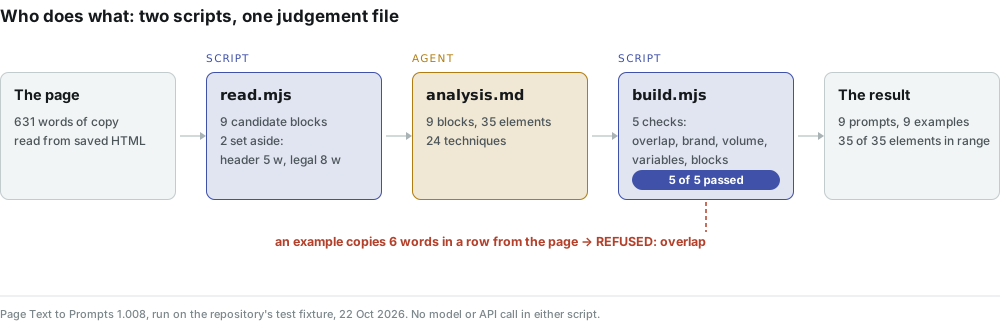
So what you get back has two kinds of content, and the report keeps them apart. The blocks, their jobs and the wording of the techniques are the agent's reading of the page. The layers, the counts, the ranges and the checks are the scripts', and they come out the same every time on the same input. When the agent gets something wrong, the build says which line and which rule, and the agent fixes only that line.
Three ways to read one page
A page is not one text. The skill reads it three ways and compares them: the raw HTML, the page rendered in the browser already on your machine (a fresh throwaway profile at 1440 × 900, scrolled, FAQ opened), and its accessibility tree. That is how the report can say which words appear only after JavaScript (js_only), which were folded behind a click (collapsed), and which a screen reader never hears (not_in_a11y). If your own page depends on scripts to show its copy, this is the same question JavaScript SEO asks, answered block by block.
The proof run: one page, every number
The repository ships a test page, studio.html, a fictional booking app for small yoga studios, and a finished judgement file for it. We ran both through version 1.008 from a saved file on 22 October 2026, so only the HTML layer was read. The reader found 631 words of copy in nine candidate blocks and set two pieces aside as not copy: the header menu (5 words) and the legal line (8 words).
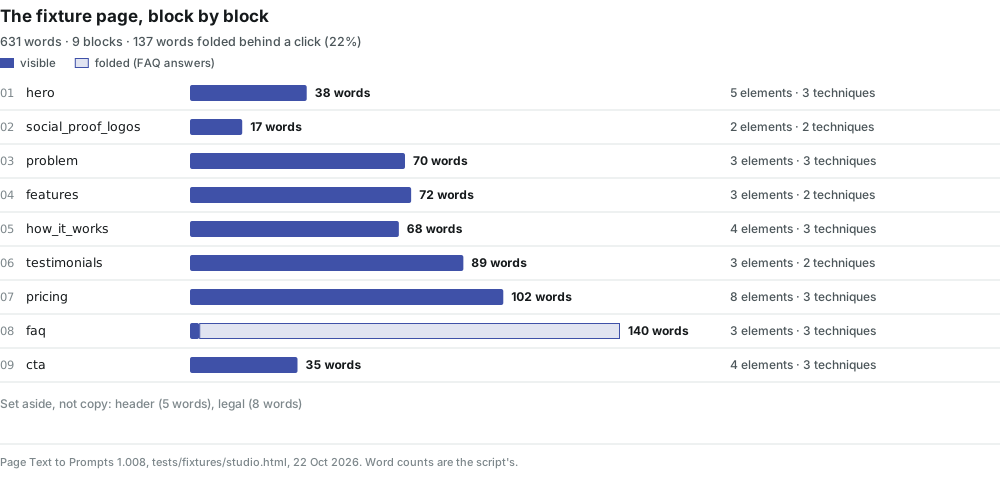
Two things in that picture are worth a second look. First, 137 of the page's 631 words (22%) sit in FAQ answers folded behind a click; the reader found them in the markup and marked them collapsed, so a writer knows that a fifth of the page's argument is hidden until somebody asks for it. Second, the element count does not follow the word count. The FAQ is the longest block and has three elements (a headline, then four question and answer pairs written as one group); the pricing block is shorter and has eight, because a plan card has a name, a price, a line on who it is for, bullets and a button. The prompt describes the structure, not the volume.
Try it on your own page
See what Voicescope finds on a page of yours
Everything above is measurable on your own work, and the check takes about a minute. Paste one address and read what comes back.
Open VoicescopeFree · no account · one at a time
One block, end to end
Here is the hero, the block every page has. On the test page it reads "Booking without phone calls", then the headline "Your students book on their own while you teach", a 15-word subheadline, a 3-word button and a 7-word line that removes the risk. The judgement file describes it in five lines, and the build turns them into this prompt, word for word from run/page-prompts.md:
Write a hero block for {product}, aimed at {audience}. Write in English.

Job of the block: say within five seconds what changes for the reader, and offer the first step.

Structure:
- Eyebrow: 3–5 words; the main change for the reader.
- Headline: 7–11 words; the result for {audience}, without the product's name.
- Subheadline: 13–19 words; how {product} delivers {main_benefit}: three parts separated by commas.
- Button: 2–4 words; verb + object, the action {cta_action}.
- Line under the button: 5–8 words; {risk_remover}.

Techniques:
- Keep {product}'s name out of the headline; it first appears in the subheadline.
- Build the headline from two short statements joined by a comma: what the reader does and what the product does.
- List three parts in the subheadline, separated by commas, and explain none of them.

Tone: businesslike, warm; address the reader as you.
Avoid: "innovative", a question as the headline, exclamation marks.
Facts: use {risk_remover} only if provided. If a value is missing, leave its element out. Never invent numbers, clients, names or guarantees.
Notice what the prompt contains: the block's job in one sentence, every element with a word range and what it must say, the techniques written as instructions rather than labels ("keep the name out of the headline", not "uses PAS"), the tone, what to avoid, and a closing rule about facts. The {product} and {audience} placeholders come from a fixed dictionary of 22 variables, 8 of which are marked as facts. It is a ready piece of prompt engineering that you fill in once and reuse for every product you write for.
The example the agent wrote from it, for a fictional pilates booking app, and how the build measured it:
| Element | Range in the prompt | Example | Words | Verdict |
|---|---|---|---|---|
| Eyebrow | 3–5 | No more booking calls | 4 | in range |
| Headline | 7–11 | Clients reserve a reformer, and you stay with the class | 10 | in range |
| Subheadline | 13–19 | Timetable, payments and reminders behind a single link that lives in your studio's bio. | 14 | in range |
| Button | 2–4 | Set up bookings | 3 | in range |
| Line under the button | 5–8 | Free to start, cancel at any time | 7 | in range |
Not one line of the example repeats the page, and none needs to: the page's headline is about students booking while the teacher teaches, the example's is about clients reserving a reformer while the owner stays with the class. Same decision, different words. That is the whole point of the skill, and the next figure shows that it held for every element on the page, not only the hero.
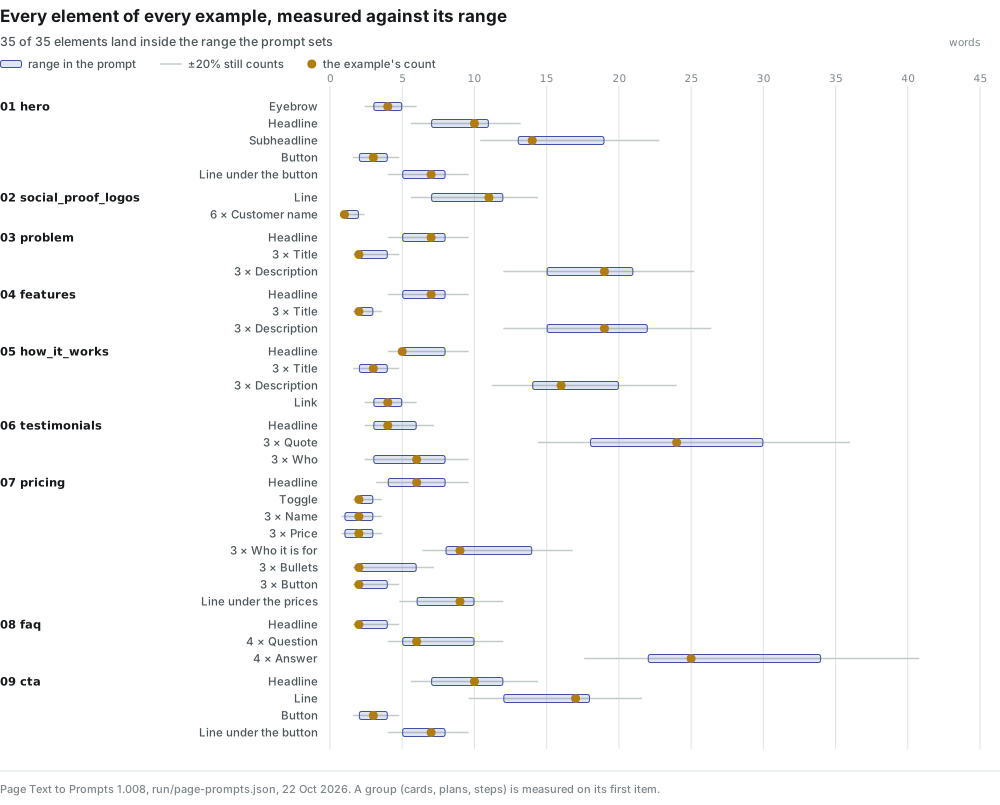
35 of 35 elements landed inside the range their prompt sets. The build allows 20% either side before it warns (the whisker in the figure), and on this run not one element needed that margin. An example that misses by more is reported as a warning, not a refusal, which is the right call: an example is there to show the prompt works, and one that runs a few words long still shows that. Prompts are what you reuse; examples are the proof.
Five checks that refuse, not suggest
The build will not write a report until five checks pass. Each one exists because a result without it would be either useless or a liability. They are defined in checks.mjs and covered by the skill's test suite, which passed 25 of 25 on 22 October 2026.
| Check | What it refuses | On this run |
|---|---|---|
| overlap | Any line that repeats 6 consecutive words of the page, case and punctuation ignored | passed |
| brand | The site's name, from its domain and og:site_name, in any field or example | passed |
| volume | An element without a word range | passed |
| variables | A {placeholder} that is not in the dictionary or declared, or a fact not marked as one | passed |
| blocks | A candidate block left out, unknown or used twice | passed |
We tried to break the first one on purpose. Swapping the example headline for the page's own sentence, "Your students book on their own while you teach", and building again gave this, and no report:
REFUSED copied.md: 1 problem(s)
  - overlap: p01.example.h1: repeats the page ("your students book on their own")
The brand check is, if anything, stricter than you would expect. When we first read the test page under the address studio.example rather than the test suite's studiora.example, the word "studio" became a brand term, and the same judgement file was refused 11 times, once for every line that said "studio". That is the check doing its job: it would rather stop and name the line than let a site's name slip into a prompt you will reuse elsewhere. Reading the page under its real address fixes it.
Facts stay blank
The most useful habit of the skill is the one you notice in the pricing block. The test page lists three plans with their monthly prices. The example card the agent wrote for the fictional product reads "Single room", then [price] / mo: the price is sample data you must replace, and the prompt ends with "Never invent numbers, clients, names or guarantees." The same goes for customer counts, logos and testimonials, each a variable marked as a fact. A prompt that makes up a customer count is a liability; this one leaves the gap and tells you so.
Install and run
Download page-text-to-prompts.zip from the latest release. In claude.ai, upload it under Customize › Skills › Upload a skill; for Claude Code, unpack it into ~/.claude/skills/. There is no npm install: the dist/ folder carries everything. You need Node 22 or later, and Chrome, Chromium or Edge if you want the rendered and accessibility layers; without a browser only the HTML is read. Then ask your agent in plain words, for example "run page-text-to-prompts on https://example.com". Under the hood it runs two commands, with its judgement file in between:
node dist/read.mjs https://example.com/ --out work/page.json
# the agent fills in work/analysis.md from work/brief.md
node dist/build.mjs work/page.json work/analysis.md \
  --html work/report.html --md work/page-prompts.md --json work/page-prompts.json

# a page that blocks automated readers: read a saved copy instead
node dist/read.mjs --file saved.html --url https://example.com/ --out work/page.json
You get three files: a self-contained HTML report (light and dark themes, an EN / UK switch for its labels), page-prompts.md with every prompt ready to paste, and page-prompts.json for anyone who wants to load the prompts into their own tools. The read takes 5 to 30 seconds; the render stops after 45 seconds and the read continues from the HTML. Prompts and examples are in English unless you ask for another language; language: uk in the judgement file gives Ukrainian prompts.
Who it is for
- Copywriters who study a page that converts and want its structure, not its sentences, as a brief they can hand to a model or a junior writer.
- Founders and marketers writing a first landing page, who need to know what a pricing block or a call to action usually holds and how long each part runs.
- Content teams who want one tested prompt per section type, so the next page starts from a house standard instead of a blank document.
- Anyone comparing pages: run it on your page and a competitor's and compare the two skeletons side by side.
What it does not do
- No design. It reads copy only. Layout, images, colour and text inside images are ignored.
- One public page at a time. Desktop view, no login, and no getting past a captcha: a bot check ends the read with a refusal code and an offer to read a saved copy.
- No verdict on whether the page converts. It describes how a page is built; it does not claim the page is good, and it has no traffic or conversion data.
- The judgement is one agent's reading. Which block is which, and how the techniques are worded, is written by the agent running the skill. The scripts validate it and the report labels it, but another model could cut the same page a little differently.
- No Russian. The skill refuses pages in Russian, sites in Russia's domain zone, sites hosted in Russia and sites with a Russian-language version, with a named refusal code for each. That is the publisher's decision, stated in SKILL.md.
Questions people ask
Is it plagiarism to turn someone else's page into prompts?
The skill is built so that it is not. It copies structure, order, length and tone, never the words: the build refuses any line that repeats six consecutive words of the page and any line that names the site's brand.
Does it send the page or my data anywhere?
The scripts call no model and no API. They fetch the one page you name and write files on your machine. The judgement is written by the agent you already run.
Which agents can run it?
Claude Code, claude.ai, Codex, opencode and any agent that loads SKILL.md skills. It needs Node 22 or later, and a local Chrome, Chromium or Edge for the rendered layer.
What if the page hides its copy behind JavaScript or tabs?
With a browser available, the skill renders the page, scrolls it and opens the FAQ, then marks words that appear only after JavaScript as js_only and folded words as collapsed, block by block.
Can the prompts be in my language?
Prompts and examples are in English by default. Asking for Ukrainian gives Ukrainian prompts, and the report's own labels switch between English and Ukrainian.
Will the examples contain real prices or customer names?
No. Prices, customer counts, logos, testimonials and guarantees are variables marked as facts. The example shows them as sample data to replace, and every prompt forbids inventing them.
The verdict
Most "analyse this landing page" prompts return an opinion. This skill returns a specification: nine blocks, each with a job, a measured structure and a prompt that reproduces the shape for a different product, with the proof attached. On its own test page every example element landed in range, every check passed, and the one attempt to copy the page was stopped before a report existed. The parts that need judgement are labelled as judgement; the parts that can be counted are counted by code that does not guess. That combination is what makes the prompts safe to reuse.
It is free, MIT-licensed and runs on your own agent: get it on GitHub. It sits beside our other open skills on Agent Skills for SEO, GEO and marketing teams, and if you want to know how an AI assistant reads the same page rather than how a person does, start with the Vectorscope and the overview of the three audit skills.
The product
Watch it on every page, every day
One reading tells you where a page stands today. The product asks the same questions of the same assistants continuously, so a change is something you are told about rather than something you go looking for.
Request an invitationInvite-only while we keep the readings honest
On this topic
Is my page ready for AI search?
Every day Crawls with the Vectorscope reading beside every page, re-checked after each fix. How the product works
Author
Olexandrauthor
15+ years in marketing and SEO. Dozens of products, mostly the US market. Research and measurement.
LinkedInPass it on
Read in your language
Opens a browser translation of this English article. The original source stays in English.