

What's new in GLLmolfar: four releases, 2–3 November 2026
GLLmolfar 0.9.25 to 0.9.28: new checks for redirects, hreflang, page size and phones, a Social previews tab, your own rating for any check, tighter crawl scope, one question to your model about many pages, and a crawl that slows down when a site stops answering.
The short answer
- what
- Four releases: 0.9.25 and 0.9.26 (local models, Summarise, Search Console from the local copy, agent skills as checklists), 0.9.27 (own check ratings, crawl scope, exports, Prompt on pages, anchor text, kept crawls, crawl pace) and 0.9.28 (new checks, Social previews, 2,000 URLs by default).
- why
- The checks cover problems that lose pages or visitors and that a crawl can see directly, and the crawl settings let a large site be read in part without a crawl of everything.
- who
- SEOs and developers who crawl sites with GLLmolfar, the GetLoopLoop desktop crawler for Windows and Apple silicon Macs.
- where
- In the GLLmolfar app. An installed copy offers the update itself; new copies come from the GLLmolfar page on getlooploop.com.
- when
- 0.9.25 and 0.9.26 were released on 2 November 2026, 0.9.27 and 0.9.28 on 3 November 2026. The update feed serves 0.9.28.
- how
- Update the app, crawl a site and open Checks. Ratings are set per site in the check's own panel; crawl scope is in Settings › Crawl scope.
In plain words
GLLmolfar is a program that visits every page of a website, like a search engine does, and lists what is wrong. In two days it got four updates. It now notices more mistakes: a link that leads to a missing page, a language label nobody can read, a page too big to read to the end, a page that will not zoom on a phone. It shows how a page looks when somebody shares it. You can tell it which problems matter more on your own site. And when a site stops answering, it waits instead of knocking harder.
GLLmolfar had four releases on 2 and 3 November 2026. This page lists what each one added, newest first, and what each change means for an audit.
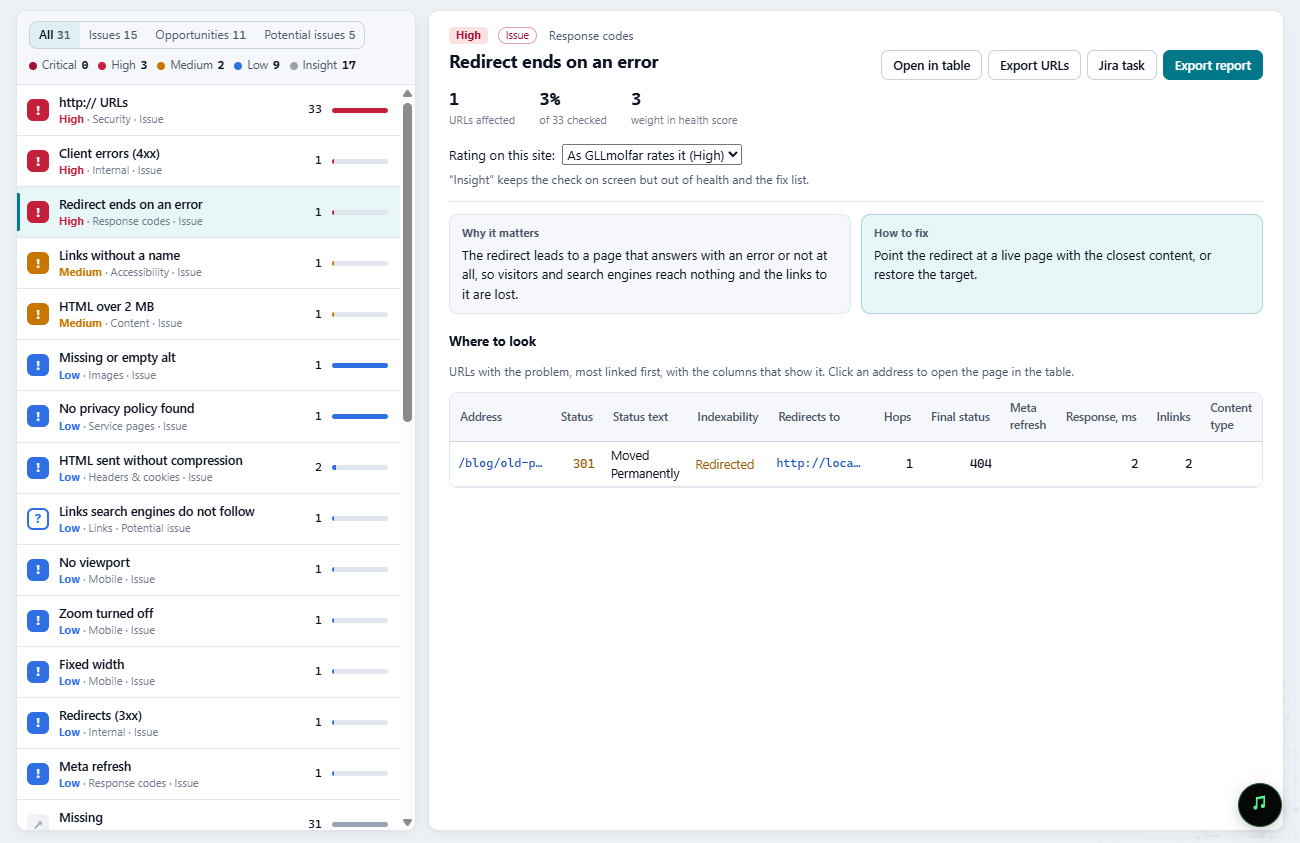
The screenshots are of GLLmolfar 0.9.28 on Windows. It crawled a small test site served on the same computer (localhost:47911, 33 URLs), built with one example of each problem. In the Prompt on pages screenshots, the answers come from a local test server that imitates a model, not from a real one.
| Version | Released | In short |
|---|---|---|
| 0.9.28 | 3 Nov 2026 | New checks for redirects, hreflang, page size, links and phones; Social previews and Mobile tabs; 2,000 URLs by default; Prompt on pages for AI agents |
| 0.9.27 | 3 Nov 2026 | Own check ratings per site, crawl scope by host and by link position, exports, Prompt on pages, anchor text by page, kept crawls, crawl pace |
| 0.9.26 | 2 Nov 2026 | Search Console reports open from the local copy; the 20 agent skills became checklists |
| 0.9.25 | 2 Nov 2026 | Local models finish long answers; Summarise in Agent › Analysis and tasks |
0.9.28 — 3 November 2026
New checks
Each new check has its own level, and the level decides how much it weighs in the site's health:
- Redirect ends on an error (high): a redirect whose target answers 4xx or 5xx, or does not answer. Visitors and search engines reach nothing, and the links to the old URL are lost. The new Final status column shows where the redirect ended.
- Code Google cannot read (high): an hreflang value that is not a valid language or language-region code, such as
uafor Ukrainian (the language code isuk). Google ignores that entry. - HTML over 2 MB (medium): Google's crawler documentation says Googlebot reads the first 2 MB of an HTML file for Search; what comes after is not indexed.
- Links search engines do not follow (low):
<a>elements with nohref, or with ajavascript:address. - Meta refresh (low): a page that sends the visitor on with
<meta http-equiv="refresh">instead of a server redirect. - Own entry differs from
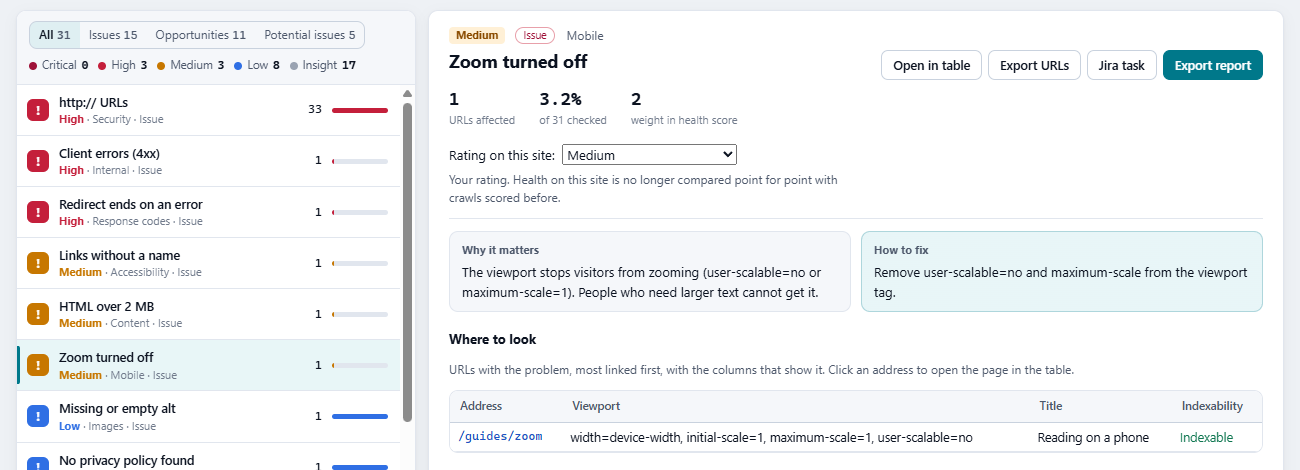
<html lang>(low): the page's own hreflang entry names another language than itslangattribute. - No viewport, Zoom turned off and Fixed width (low), in a new Mobile tab: a page laid out for a desktop screen on a phone, or one that stops visitors from zooming.
- Names only itself (insight): an hreflang set that lists only the page itself.
- Far from the site's subject (insight, needs embeddings): pages whose meaning is far from what the rest of the site is about. The cut is the median closeness minus three median absolute deviations, and a site under 20 pages gets no cut, so a site about one subject flags nothing.
Social previews
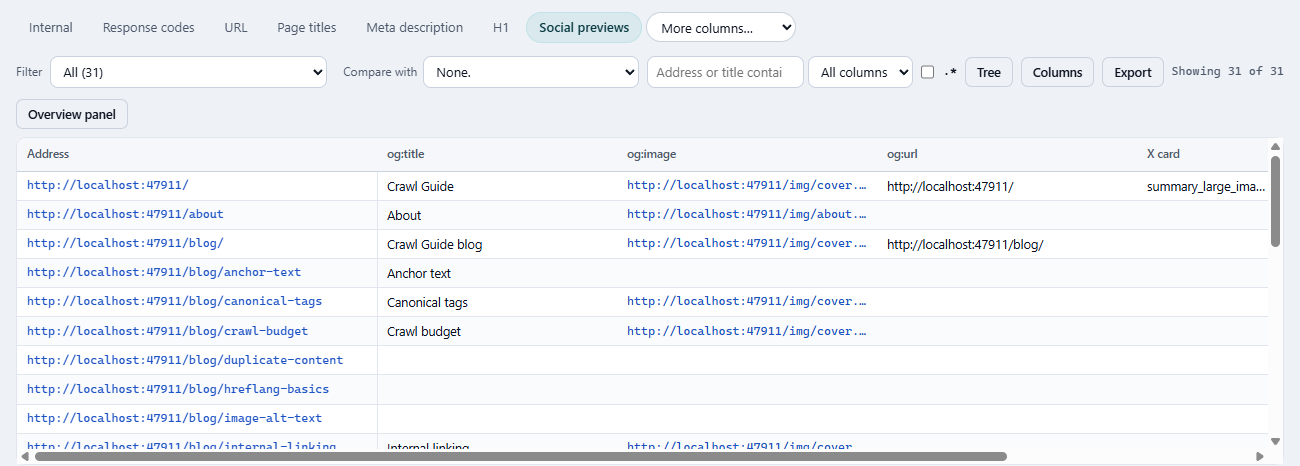
A new tab, Social previews, shows the tags that decide how a link looks when somebody shares it: og:title, og:image, og:url and the X card. Its filters list pages with no Open Graph tags, with no og:image, with an og:image that is not a full URL, with an og:url that differs from the canonical, and with no X card. These checks are at the insight level: they show on screen and stay out of health, because the tags have no documented effect on search.
2,000 URLs by default, and Prompt on pages for AI agents
A new crawl now reads up to 2,000 URLs, not 500. If your settings still hold 500, the old default, it is raised once; a number you chose yourself is kept. The same default applies when an AI agent starts a crawl or plans one.
AI agents connected to GLLmolfar can now run Prompt on pages (see 0.9.27 below) through the new run_prompt_column tool. The first call only counts the pages and the model calls and tells the agent to ask you. The run starts only when the agent calls again with confirm: true; it runs on screen in the Agent tab, and the agent gets the first 100 answers.

Try it on your own page
See what Vectorscope finds on a page of yours
Everything above is measurable on your own work, and the check takes about a minute. Paste one address and read what comes back.
Open VectorscopeFree · no account · one at a time
0.9.27 — 3 November 2026
Your own rating for any check
Every check now has a Rating on this site menu in its panel. You can raise a check, lower it, or set it to Insight, which keeps it on screen but out of health and the fix list. The rating belongs to the site, so a check that matters on a shop and not on a blog can be rated differently on each. Once a rating is yours, the panel says so: health on this site is no longer compared point for point with crawls scored before.
Crawl scope
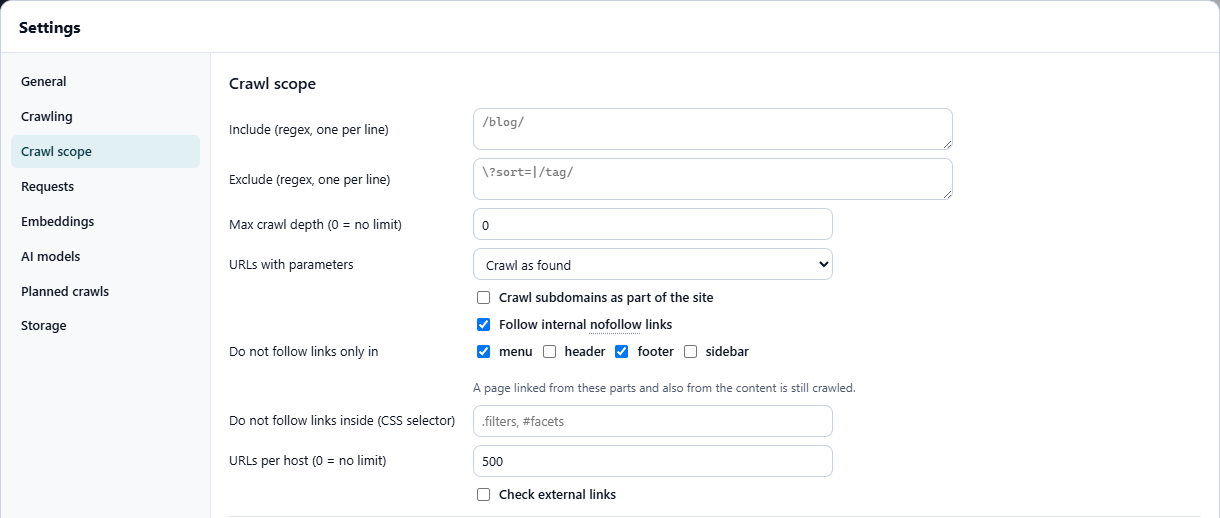
Settings › Crawl scope has three new limits for a crawl of part of a large site:
- URLs per host: a cap for each host, 0 for no limit. With subdomains crawled, one large subdomain no longer uses up the whole crawl.
- Do not follow links only in the menu, header, footer or sidebar. A page linked from those parts and also from the content is still crawled, so this skips what only the site's navigation leads to.
- Do not follow links inside a CSS selector, for faceted filters and similar blocks.
In Settings › Crawling, Read a rendered page can also wait for the network to be quiet: no request in flight for 500 ms, at most 6 seconds. That is for pages that load their content after the first paint.
Prompt on pages
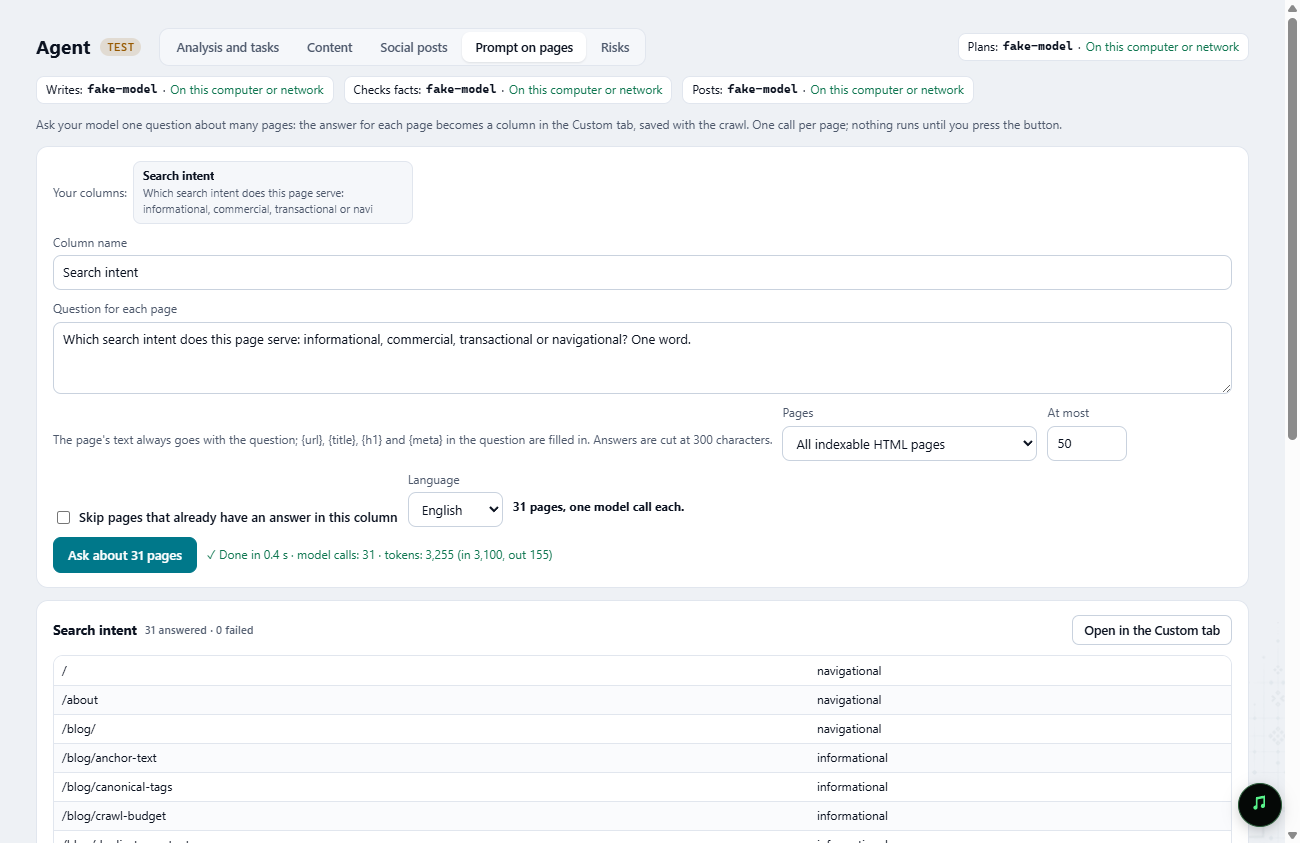
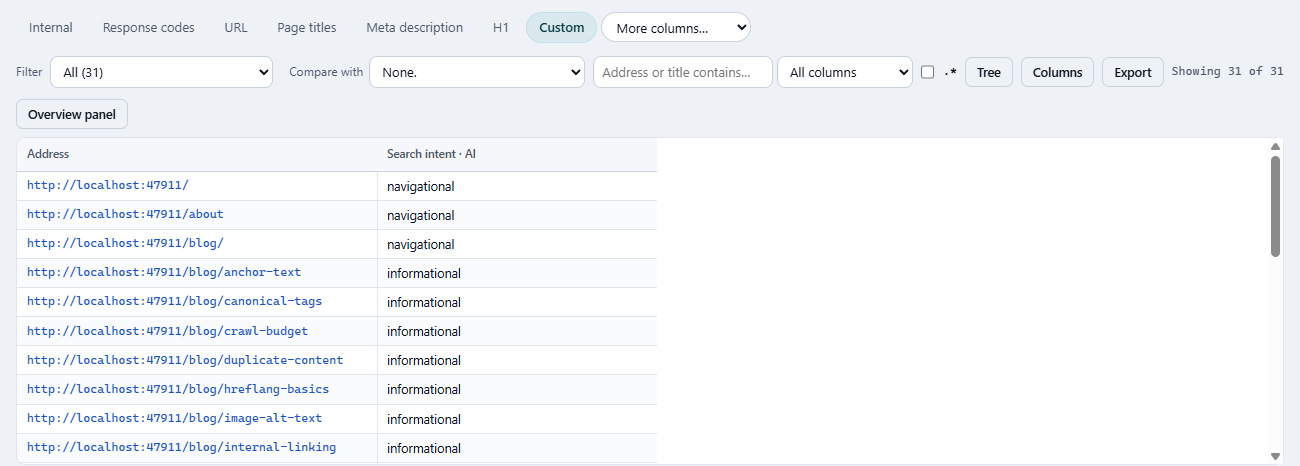
Agent › Prompt on pages asks your own model one question about many pages: all indexable HTML pages, or the pages of one check. Each answer becomes a column in the Custom tab, saved with the crawl, and the question is kept to run again. It is one model call per page, at most 500 pages a run; the button shows the count before anything runs, pages that already have an answer can be skipped, and a page that cannot be read is recorded with its reason while the rest go on. Typical questions: the search intent of each page, whether a page answers a given question, which product a page is about.
The Agent tab is marked TEST in the app, and it works only with a model you connect in Settings › AI models.
Anchor text by page
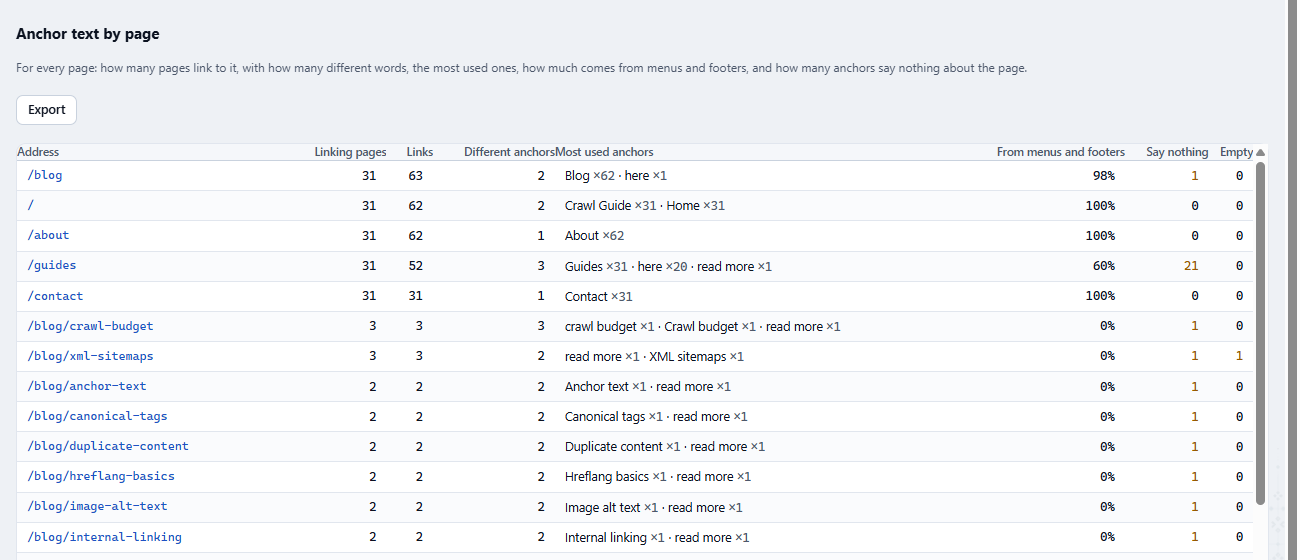
Links has a new table, Anchor text by page. For every internal URL it gives the pages that link to it, the number of links, how many different anchors they use, the five most used, the share of links from menus and footers, and the anchors that say nothing about the target ("read more", "here" and the same in five languages) or are empty. The screen shows 300 rows with the total; the export holds 2,000 and says when it is cut. More on why the words matter: anchor text.
Kept crawls and crawl pace
A crawl in History can be kept: the lock button next to it makes automatic deletion pass it by, and "Delete all except the open one" leaves it too. Keep the crawl you compare everything else with.
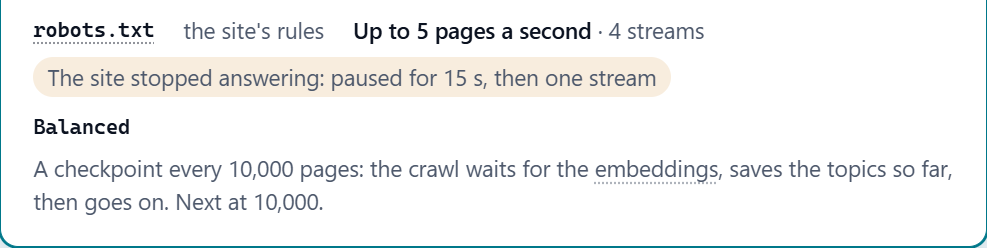
A site that stops answering is no longer hit at full speed. After five connections in a row are dropped or time out, GLLmolfar goes down to one stream and pauses: 15 seconds, doubling at each new series, two minutes at most. A 429 or 503 answer halves the streams and doubles the interval between requests. After 20 normal answers in a row, one stream comes back. The crawl screen shows the pace the site forced while it lasts, and afterwards how often it happened.

Exports and AI agents
- One workbook: every check in one Excel file, a sheet each, with a summary sheet.
- Pages as Markdown (Edit › Export pages as Markdown): each page of the crawl with saved HTML as a
.mdfile, main content only — no menu, header, footer, sidebar, forms or scripts — with the URL and title at the top. Pages without saved HTML are counted, not skipped silently. - File name template (Settings › Storage › File name):
{report},{date},{time}and{domain}. Empty keepsgllmolfar-{report}-{date}. - For AI agents:
start_crawltakes a list of URLs, include and exclude patterns, a maximum depth and rendering for that crawl only, and refuses a bad regular expression before the crawl starts. The newdiagnose_crawltells the agent why the open crawl went as it did, as codes: blocked by robots.txt, crawl delay, timeouts, 429 and 503 answers, a bot check, excluded by scope, URL limit reached.
0.9.26 — 2 November 2026
- Reports that read Search Console open at once on the data saved on this computer; fresh data from Google arrives behind them and the report is redrawn.
- With one language chosen, a report no longer loads its data again on every redraw.
- Help › Agent skills: each of the 20 recipes is now a checklist with preconditions, steps, verification, output and when to stop. The agent asks before it changes code, creates issues or crawls a site other than the one you named.
0.9.25 — 2 November 2026
- Local models in LM Studio or Ollama are no longer cut off while they write: the time limit applies to silence, not to the whole answer, so a slow model finishes.
- Agent › Analysis and tasks has Summarise: the project in brief — where it stands, what to fix and why, and what can wait. Which fix goes on which side is decided by GLLmolfar from each check's level and documented effect, not by the model.
- Settings › AI models shows each model's price beside its name, as the provider lists it, and free models first.
- Fixed an error window on a slow start.
The product
Watch it on every page, every day
One reading tells you where a page stands today. The product asks the same questions of the same assistants continuously, so a change is something you are told about rather than something you go looking for.
Request an invitationInvite-only while we keep the readings honest
On this topic
Is my page ready for AI search?
Every day Crawls with the Vectorscope reading beside every page, re-checked after each fix. How the product works
Author
Olexandrauthor
15+ years in marketing and SEO. Dozens of products, mostly the US market. Research and measurement.
LinkedInPass it on
Read in your language
Opens a browser translation of this English article. The original source stays in English.