

GLLmolfar and WordPress: we tested the Connector end to end
A fresh WordPress, the free GLLmolfar Connector plugin and every step the app can take on a site: titles, descriptions, an article, the home page and the colours. What worked, what did not, and what 0.9.47 changed.
The short answer
- what
- A live test of the GLLmolfar Connector plugin and the app's WordPress features: pairing, installing the plugin, meta descriptions and titles written by a model, an article and a home page sent as drafts, the site's colours, and the fixes that went into GLLmolfar 0.9.47.
- why
- A crawler that only lists problems leaves the person to fix each one by hand in the WordPress editor. We wanted to see, step by step, whether the fixing part holds up on a real installation.
- who
- People who crawl a WordPress site with GLLmolfar and want to fix what the crawl found without copying it field by field.
- where
- A fresh WordPress 7.1 with Twenty Twenty-Five and Yoast SEO 28.9, on the test machine, never on the internet.
- when
- 21 November 2026; GLLmolfar 0.9.47 came out the same day.
- how
- One script drove the app and a browser signed in to WordPress, took a screenshot at every step and read the pages' <title> and meta description before and after. Models: a small local one on the processor, then Claude Opus 5.5 and GPT-6.1 Terra through OpenRouter.
In plain words
GLLmolfar is an app that checks websites. It can now also fix some of what it finds on a WordPress site, through a small free plugin. We built a pretend coffee shop website and let the app work on it: it wrote short page descriptions, fixed two pages with the same title, wrote an article and a home page as drafts, and changed the site's colours. Most of it worked. A few things did not, so we fixed them in the next version.
GLLmolfar finds what is wrong with a site. On WordPress it can now also put some of it right: meta descriptions, titles and canonicals go into the site's SEO plugin through the free GLLmolfar Connector, and studio articles and home pages arrive as drafts. We wanted to see all of it on a real installation, so we built one: a fresh WordPress 7.1 with Yoast SEO, a made-up coffee roastery called Northside Roasters, four pages, four posts, two of them with the same title and not one meta description. Then we let the app work on it and took a screenshot of every step.
Connecting the site
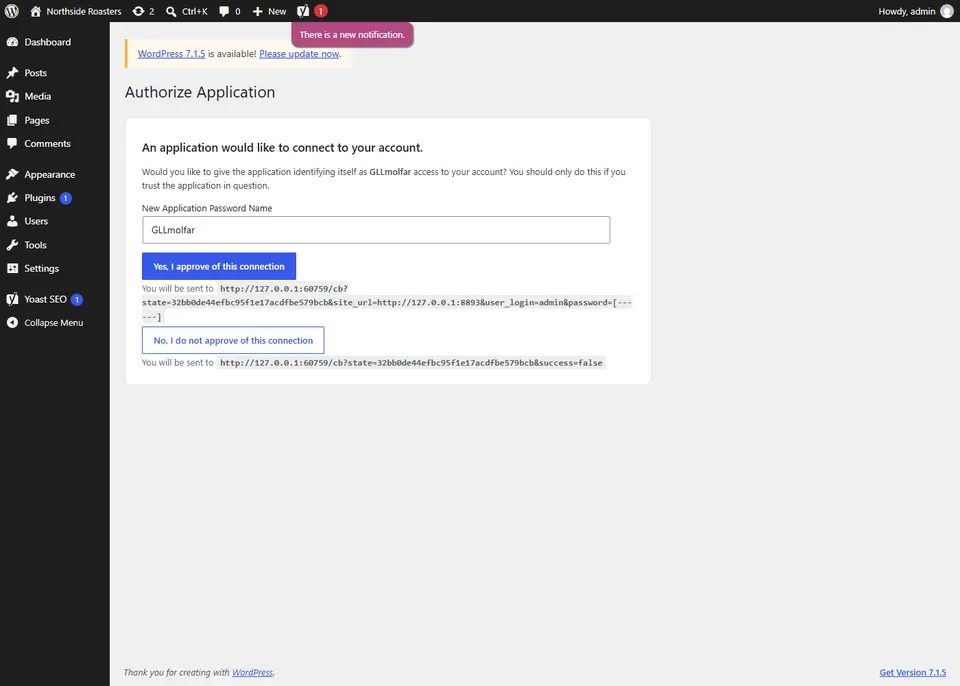
The app does not ask for your WordPress password. You type the site's address in Studio › WordPress, the app opens WordPress's own Authorize Application page, and you approve it in your browser. WordPress hands the app an application password; the app replaces it straight away with a fresh one it creates itself, so the one that passed through a browser address is never kept. You can revoke it in your WordPress profile at any time.
Installing the Connector
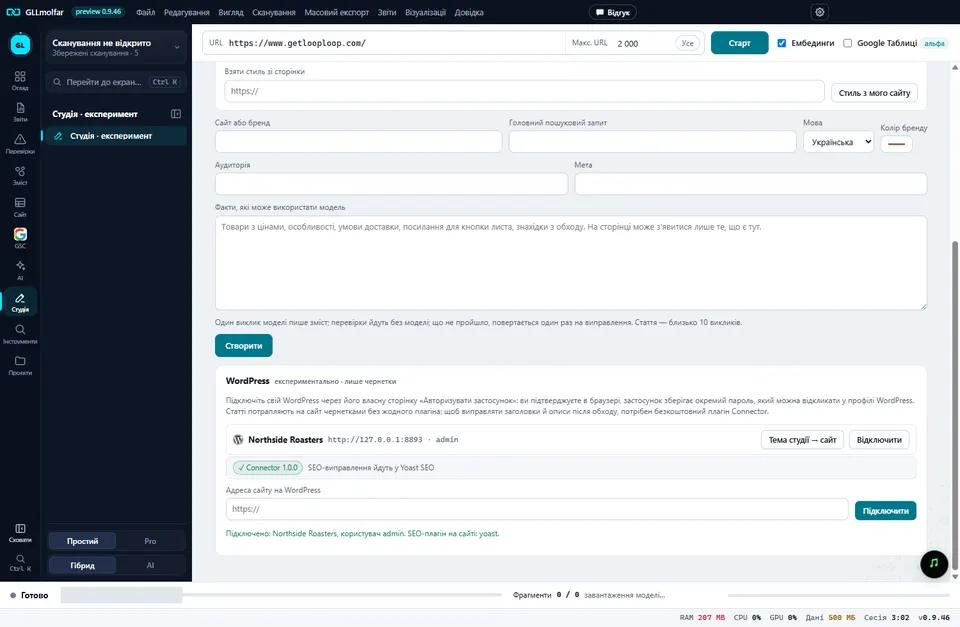
Articles go in as drafts without any plugin, through WordPress's own REST API. Fixing titles and descriptions needs the Connector, because each SEO plugin keeps those fields its own way. The app carries the plugin: one button saves its zip, and WordPress installs it through Plugins › Add New › Upload Plugin like any other. Back in the app, Check again shows the Connector's version and the SEO plugin it will write through. Here: Yoast SEO. It also works with Rank Math, All in One SEO and SEOPress, and writes its own tags when there is none.
Text written by a model, checked before it goes in
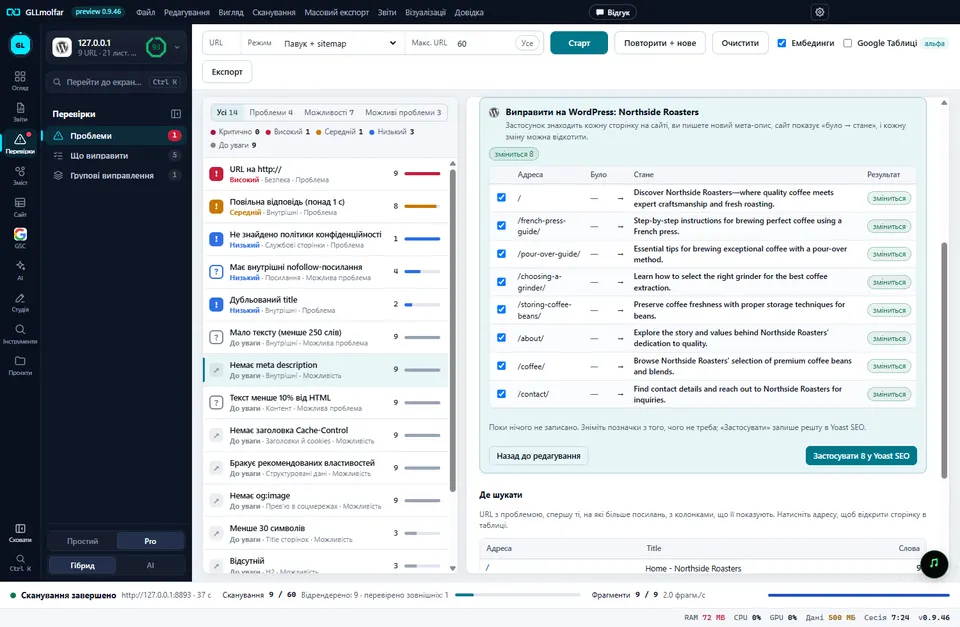
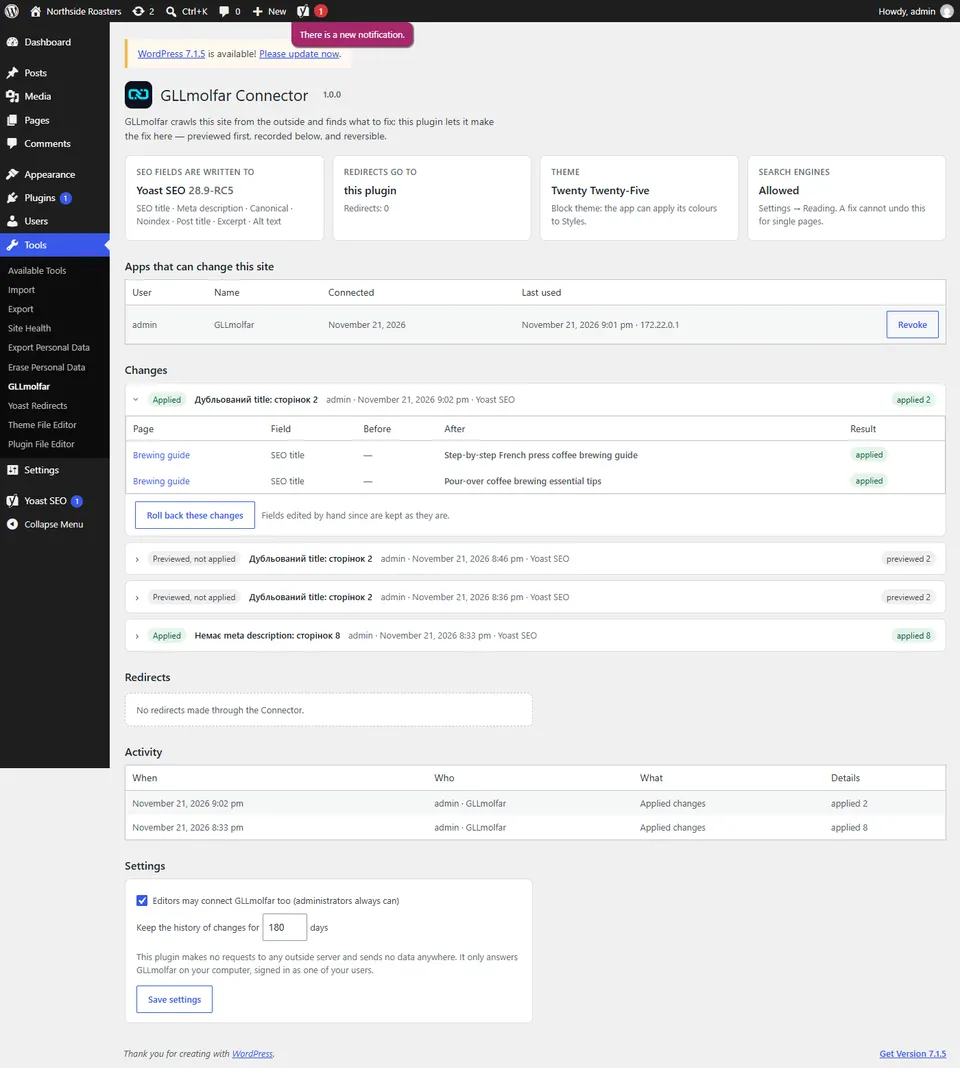
After a crawl, the check Missing meta description listed nine pages; the app found eight of them on the site (the ninth was not a post or a page). Suggest with my model sends them to the model you connected and fills every field. Nothing is written yet: Preview on the site asks WordPress what would change, page by page, before → after, and only Apply writes it. Every batch is kept on the site under Tools › GLLmolfar and can be rolled back from there or from the app.
Try it on your own page
See what Voicescope finds on a page of yours
Everything above is measurable on your own work, and the check takes about a minute. Paste one address and read what comes back.
Open VoicescopeFree · no account · one at a time
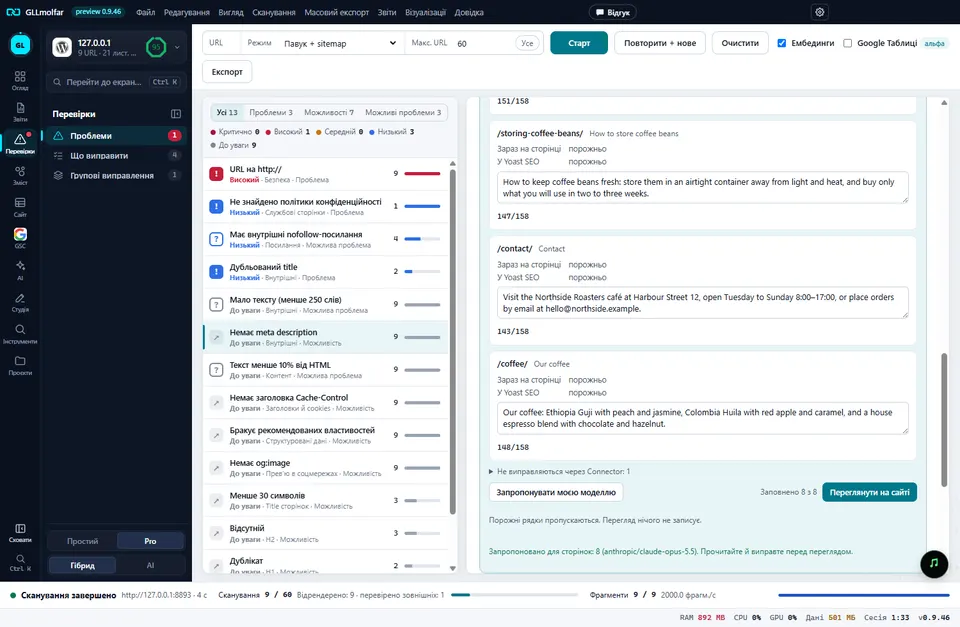
The first run used a small local model on the processor. It wrote all eight in 134 seconds, and the descriptions were correct but thin. When we repeated the run with Claude Opus 5.5 and GPT-6.1 Terra, the big models were just as thin: "The home page of Northside Roasters, providing a starting point for exploring". The fault was ours. The app gave the model only each page's title and heading, so there was nothing else to write from. Since 0.9.47 it also sends the first 900 characters of the page's own text, taken from the saved crawl, and asks for what the page offers rather than what it is. The same models then wrote this:
| Page | Before 0.9.47 (GPT-6.1 Terra) | 0.9.47 (Claude Opus 5.5) |
|---|---|---|
| /pour-over-guide/ | A brewing guide from Northside Roasters, offering guidance on brewing for readers interested in the brewing process. | Pour-over brewing guide: 15 g of coffee to 250 g of water at 94 °C, a 30-second bloom and three pours for a clear cup in about three minutes. |
| /contact/ | The contact page for Northside Roasters, providing a place to find information about contacting Northside Roasters. | Visit the Northside Roasters café at Harbour Street 12, open Tuesday to Sunday 8:00–17:00, or place orders by email at hello@northside.example. |
| /coffee/ | Explore the coffee from Northside Roasters, with information about the coffee featured on the Our Coffee page of its website. | Our coffee: Ethiopia Guji with peach and jasmine, Colombia Huila with red apple and caramel, and a house espresso blend with chocolate and hazelnut. |
Titles, and the brand at the end of them
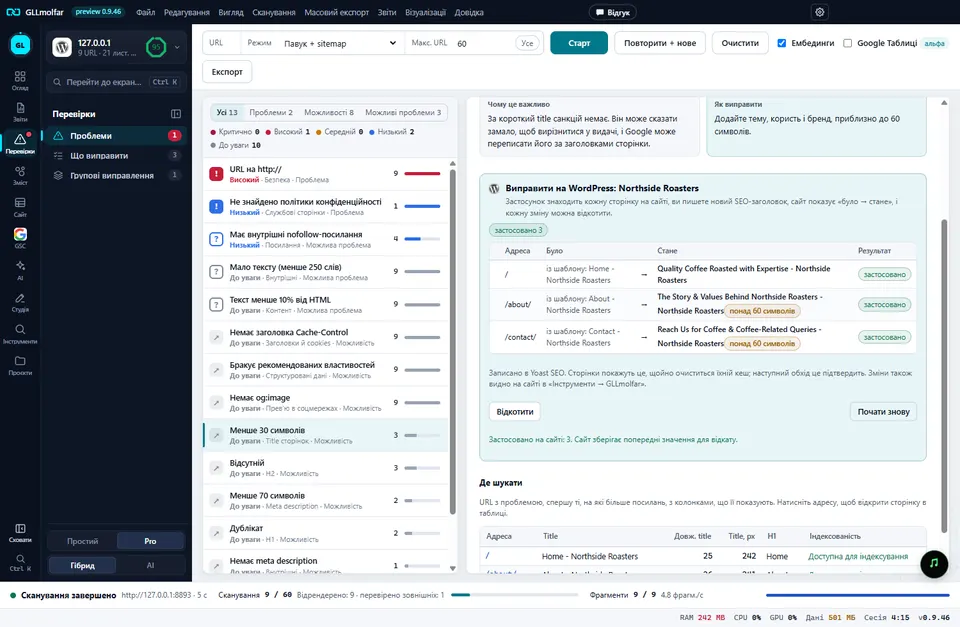
Two posts shared the title "Brewing guide - Northside Roasters". The model wrote two different titles, the preview showed them, and they went in. They also showed a problem: a title written into Yoast replaces its template whole, so the " - Northside Roasters" every other page ends with was gone. Since 0.9.47 the app finds the ending most of the site's titles share, asks the model to leave it out and stay within what is left of the length, and adds it back. It never adds it twice, and a box beside the fields turns it off.
The home page had a second problem. Its title, "Home - Northside Roasters", is not duplicated, not too long and not missing, so no check offered a fix for it. It was in the list all along, under titles shorter than 30 characters, which had no WordPress button. In 0.9.47 short titles and short descriptions have one, so the home page got "Quality Coffee Roasted with Expertise - Northside Roasters".
An article, as a draft
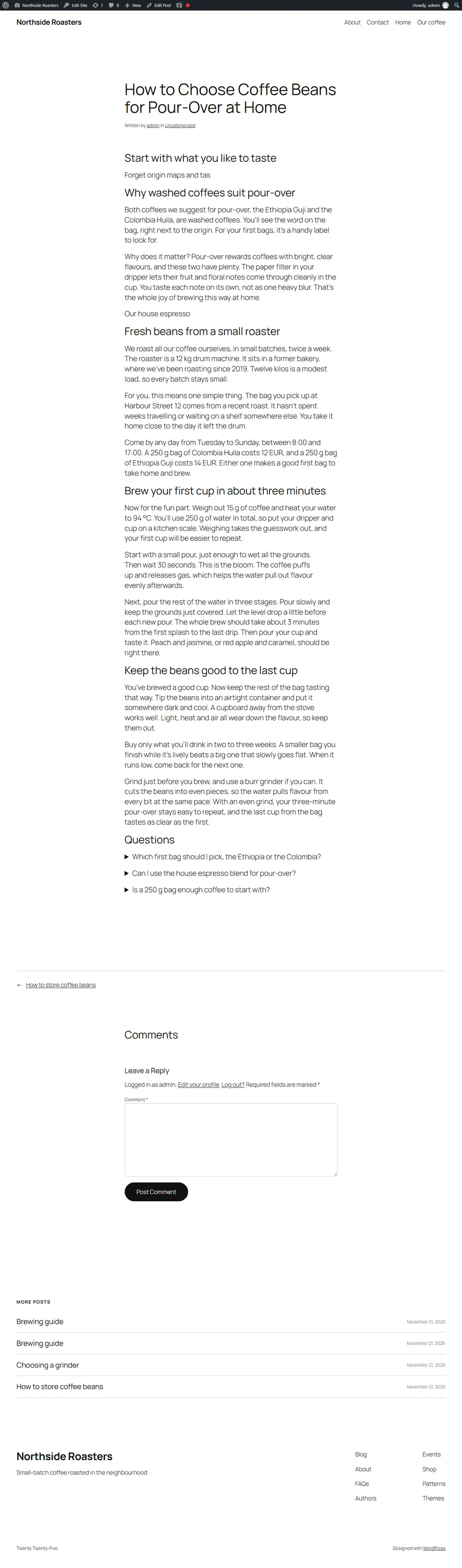
The studio writes an article from a topic and the facts you give it, section by section, and checks it without a model: numbers and contacts that are not in the facts, repeated sentences, Russian letters in Ukrainian. To WordPress as a draft creates a post with headings, paragraphs and the questions as Details blocks, and the Connector puts its description into Yoast. The app never publishes; that stays your step, in your editor.
The test found three things here, all fixed in 0.9.47:
- Reasoning models stopped with nothing. Claude Opus 5.5 and GPT-6.1 Terra both failed the article on the first try: each section has a small limit, and the thinking used all of it. The app now asks OpenRouter for low reasoning effort, and an answer emptied or cut by thinking is asked once more with room. Afterwards Opus wrote the article in 48 seconds and Terra in 30.
- A cut section passed as finished. One section came back as "Forget origin maps and tas". A section that stops mid-sentence is now written again, and reported if it is cut a second time.
- Invented days. The small local model wrote "every Tuesday and Friday" from facts that said "twice a week". The check saw numbers but not weekdays. Days and months the facts never name are now flagged, in all five languages the studio writes.
The home page
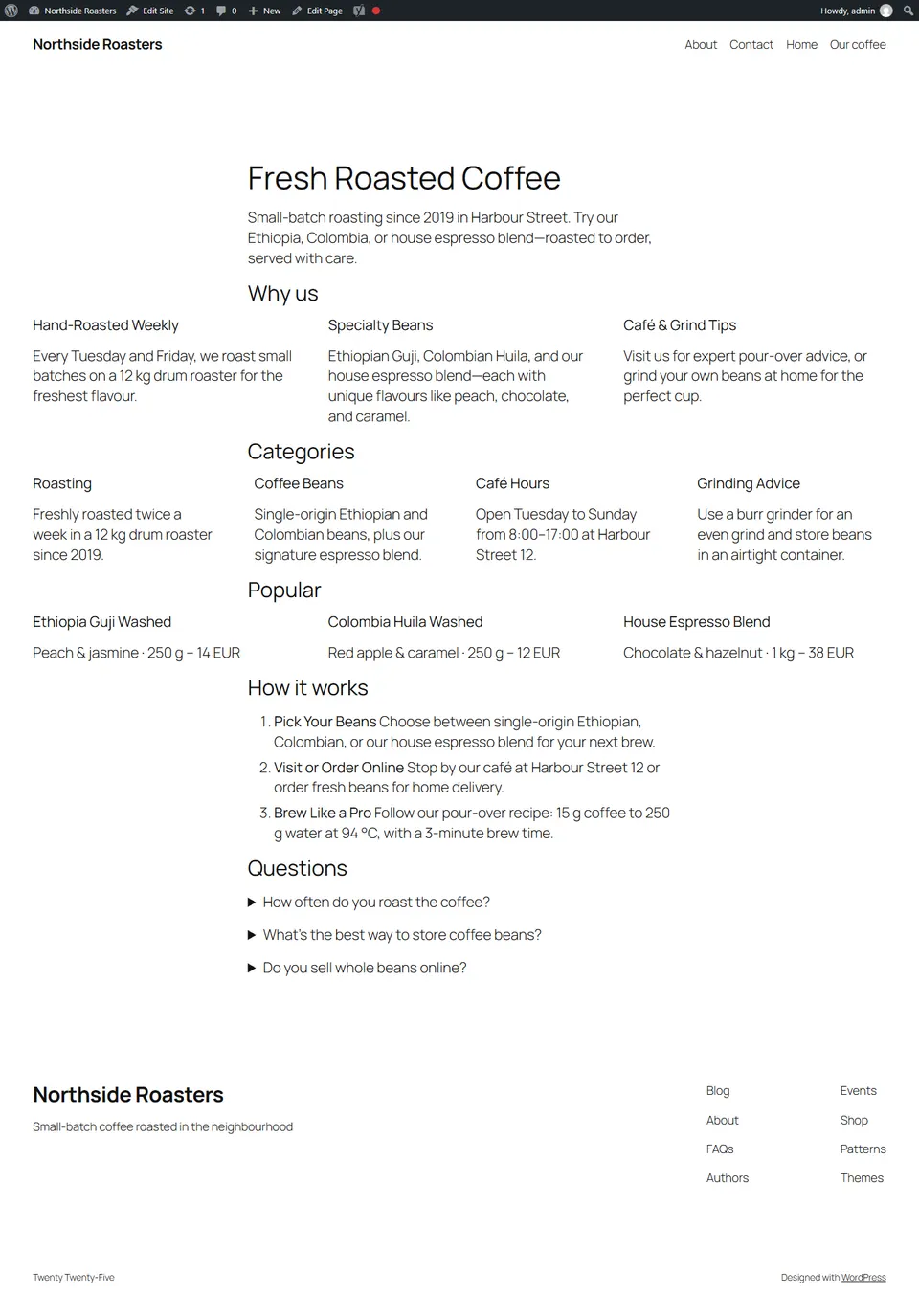
Before 0.9.47 the studio's home page could only be saved as a separate HTML file. Now it goes to WordPress as a draft page made of the site's own blocks: the headline as the title, the lead, columns for the reasons, categories and popular coffees with their prices, the steps as a list and the questions as Details. It takes the theme you already have. The app does not touch the live home page; you read the draft and set it as the home page yourself in Settings › Reading.
The colours
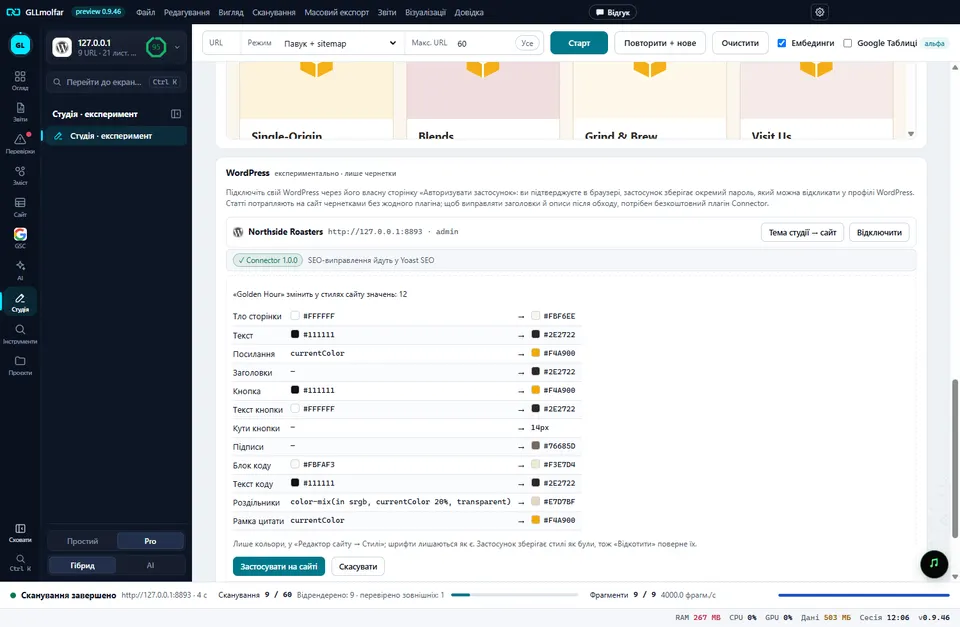
On a block theme the app can also give the site one of the studio's palettes. It shows every value that would change (12 here: background, text, links, the button, its corners, quotes, code), writes them into the theme's global styles and keeps the old ones. Roll back put the site back exactly as it was. It changes colours only, not fonts or layout, so the button is now called Studio colours → site.
Questions people ask
Does GLLmolfar need my WordPress password?
No. It uses WordPress's own Authorize Application page: you approve it in your browser, and the app keeps a separate application password that you can revoke in your WordPress profile.
Which SEO plugins does the Connector work with?
Yoast SEO, Rank Math, All in One SEO and SEOPress. With none of them, it writes its own title and description tags.
Can GLLmolfar publish posts or change my live home page?
No. Articles and home pages arrive as drafts, and you publish them in your own editor. Title, description and canonical fixes are previewed before they are written and can be rolled back.
Which model writes the text?
The one you connect: a local model through Ollama, LM Studio or the app's built-in models, or a model through OpenRouter with your own key. In this test both a small local model and two large models worked, with clear differences in speed and detail.
The product
Watch it on every page, every day
One reading tells you where a page stands today. The product asks the same questions of the same assistants continuously, so a change is something you are told about rather than something you go looking for.
Request an invitationInvite-only while we keep the readings honest
On this topic
Is my page ready for AI search?
Every day Crawls with the Vectorscope reading beside every page, re-checked after each fix. How the product works
Author
Olexandrauthor
15+ years in marketing and SEO. Dozens of products, mostly the US market. Research and measurement.
LinkedInPass it on
Read in your language
Opens a browser translation of this English article. The original source stays in English.