

GLLmolfar 0.9.36: a content studio and built-in models that run on your laptop
Two experiments in one release: Gemma 4 models that download into the app and run without keys or a connection, and a studio that writes pages, articles and emails from your facts. Measured on one laptop, with screenshots, timings and every invented sentence we caught.
The short answer
- what
- Two experimental features in 0.9.36: built-in Gemma 4 models (download, check, delete, use for every task) and a content studio for six kinds of page with eleven designs, model-free checks and one targeted fix.
- why
- A crawl ends with a list of pages to write or rewrite. Until now that needed a model account; small open models have become good enough to draft, if the app does the parts they are bad at.
- who
- People who crawl sites with GLLmolfar and want drafts written from what the crawl found, on their own computer.
- where
- On the person's own computer. Measured on a laptop with an AMD Ryzen 9 8945HS, integrated Radeon 780M graphics and 28.8 GB of memory.
- when
- GLLmolfar 0.9.36 for Windows and Mac, released 11 November 2026; every measurement here is from the same day.
- how
- Six local models benchmarked on the app's own tasks; the app's built-in check run on Gemma 4 12B; six page types generated the old way and through the studio, timed, and read line by line.
In plain words
GLLmolfar can now download a small AI model and run it on your own computer, so it can write without an account anywhere else. It is slower and makes more mistakes than the big paid assistants, and the app says so in a red box. It also has a new studio: you give it facts about your shop or your site, and it makes a web page, an article or an email. The model only writes the words; the app draws the page and checks that nothing was made up.
GLLmolfar 0.9.36 has two new parts, both marked experimental and both open to signed-in apps only. The first runs an AI model inside the app: you download it once, and from then on it answers on your own computer, with no key, no account elsewhere and no connection. The second is a content studio: it turns the facts you give it — a catalogue, the findings of a crawl — into a page, an article or an HTML email.
This article shows both, and measures both. Everything was run on 11 November 2026 on one ordinary laptop: an AMD Ryzen 9 8945HS with integrated Radeon 780M graphics and 28.8 GB of memory, no separate graphics card. GLLmolfar is ours, so read the claims knowing whose tool it is; the numbers are the ones we got, including the ones that do not flatter it.
Built-in models
Settings › AI models now opens with a section called Built-in models on this computer. It names the memory, the graphics card and the free disk it found, and offers three models, each on its own card. The first press downloads the engine as well — llama.cpp, about 40 MB — which runs on Vulkan on Windows (AMD, Intel and NVIDIA graphics, integrated ones included) and on Metal on Apple silicon. If the graphics card cannot take the model, the app falls back to the processor and remembers that it had to.
A download can be stopped and resumed from where it stopped, and the finished file is checked against its published size and SHA-256 before the app will use it. Delete removes the model's file; deleting the last model removes the engine too, so nothing is left behind in the folder.
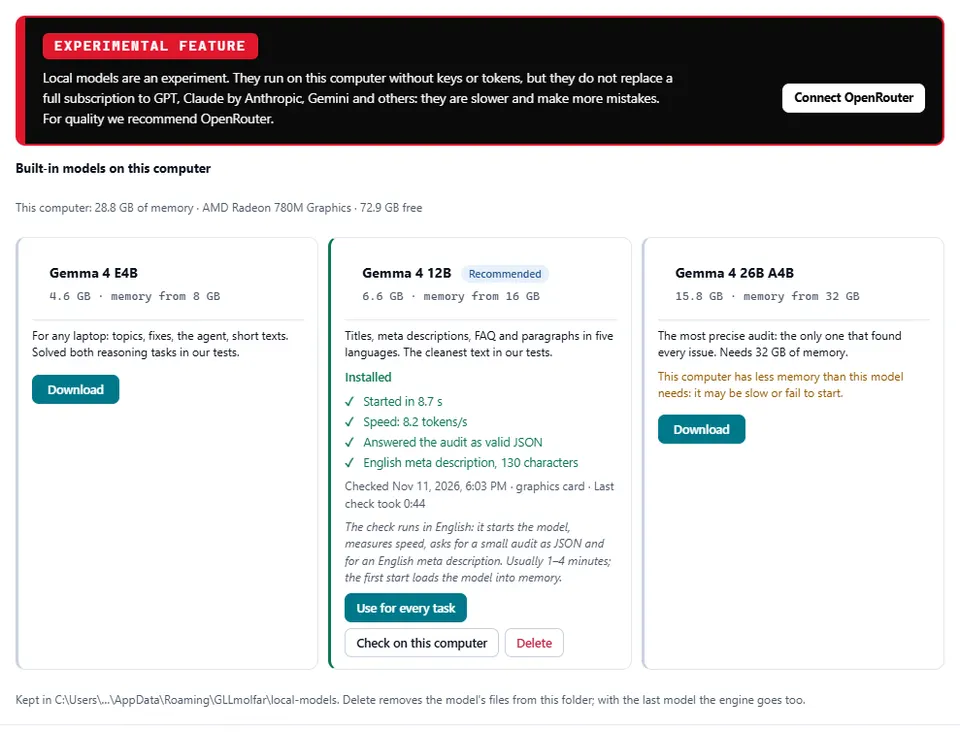
The red-and-black box at the top is there on purpose and does not go away. Local models are slower than the large hosted ones and make more mistakes; they do not replace a subscription to GPT, Claude or Gemini, and for work that has to be right we recommend connecting a model through OpenRouter, which is one press away in the same box. The built-in models are for drafts, for work that must not leave the computer, and for trying the app's AI features before deciding on anything else.
Use for every task puts the installed model on all eight of the app's AI roles — topics, fixes, audit, prompts on pages, the agent, content, checks and social posts — in one press, instead of choosing it in each list. A model that passes Check on this computer is also put on every role that has no model yet, without touching the roles you already pointed somewhere else.
| Model | Download | Memory it asks for | What it is for |
|---|---|---|---|
| Gemma 4 E4B | 4.6 GB | 8 GB | Any laptop: topics, fixes, the agent, short texts |
| Gemma 4 12B | 6.6 GB | 16 GB | Titles, descriptions, FAQ and paragraphs in five languages; recommended from 16 GB |
| Gemma 4 26B A4B | 15.8 GB | 32 GB | The most precise audit; needs 32 GB |
Why Gemma 4: six models on the app's own tasks
Before choosing what to ship we ran six current open models through the same script, on the same laptop, once on the processor and once on the integrated graphics. The tasks were the ones the app actually gives a model: an audit of eight pages with seven planted issues, returned as JSON; a title and meta description in English, Ukrainian, Spanish, French and Polish within length limits; two small reasoning tasks; and a two-step tool call. This run used Ollama, not the app's engine, so its speeds are for comparing models with each other.
| Model | Tokens/s, graphics (processor) | Audit, issues of 7 | Invented issues | Reasoning, of 2 | Texts in limits, of 5 languages |
|---|---|---|---|---|---|
| Gemma 4 E4B | 17.3 (10.1) | 4 · 8 s | 0 | 2 | 5 |
| Qwen3.5 4B | 19.1 (10.6) | 3 · 6 s | 0 | 2 | 2 |
| Qwen3.5 9B | 11.3 (6.3) | 2 · 9 s | 0 | 2 | 2 |
| Gemma 4 12B | 10.6 (9.6) | 6 · 16 s | 0 | 1 | 4 |
| Ministral 3 8B | 14.1 (6.6) | 5 · 20 s | 1 | 0 | 1 |
| Gemma 4 26B A4B | did not start (9) | 7 · 39 s | 0 | 2 | 2 |
Writing speed on integrated graphics, tokens per second
Audit without reasoning: planted issues found, of 7
Try it on your own page
See what Voicescope finds on a page of yours
Everything above is measurable on your own work, and the check takes about a minute. Paste one address and read what comes back.
Open VoicescopeFree · no account · one at a time
What decided it:
- Gemma 4 had the best audits. Gemma 4 12B found 6 of 7 issues in 16 seconds without reasoning; the 26B found all 7. Ministral 3 8B found 5 and invented one. Qwen3.5 9B found 2 without reasoning; with reasoning it found 6, but took 5.2 minutes.
- Reasoning is too slow to be the default. With it switched on, Gemma 4 E4B, 12B and 26B also reached 6 of 7, in 1.5, 2.3 and 3 minutes. The app asks for answers without it.
- Speed is not the bottleneck it looks like. Qwen3.5 4B was the fastest writer at 19.1 tokens/s, but kept only 2 of 5 texts within limits and confused what the page was about.
- Texts: Gemma 4 E4B kept all five languages within limits, Gemma 4 12B four; read by hand, the 12B's texts were grammatically clean in all five, with a slightly promotional tone. The Qwen models and Ministral missed the limits in most languages, and Qwen3.5 9B advised deleting orphan pages when the task was to link them.
Two results were the same for all six. Every model completed the two-step tool call correctly. And no Ukrainian answer from any model contained a Russian letter — something we check mechanically in everything the app writes, because a model asked for Ukrainian can drift into Russian spellings.
The check on this computer
A benchmark on our laptop says little about yours, so every card has Check on this computer. It starts the model, measures how fast it writes, asks for a small audit as JSON and for a meta description, and shows each step as it happens, with a clock and the engine's own log — how many layers went to the graphics card, what it is loading — so a long first start does not look like a hang. The check always runs in English, whatever the interface language, so its results compare across machines; the card says so under the button.
On the test laptop Gemma 4 12B passed all four steps on the graphics card: started in 8.7 s, wrote 8.2 tokens per second, returned valid JSON and a 130-character English meta description; the whole check took 44 seconds. The very first start, with the model not yet in memory, took 33 s. This is the app's own engine, llama.cpp on Vulkan, so its speed is not directly comparable with the Ollama run above.
Gemma 4 12B in the app: seconds to start
The content studio
The studio is a new section in the left rail, also experimental. It makes six things: an article, a home page, a product list, a product page, an alternatives page and an HTML email. You give it the site or brand, the search query the page is for, the audience, the goal, the language and — the part that matters — the facts the model may use. It writes with whichever model the content role uses: a built-in one, Ollama or LM Studio on the same computer, or a hosted model through OpenRouter.
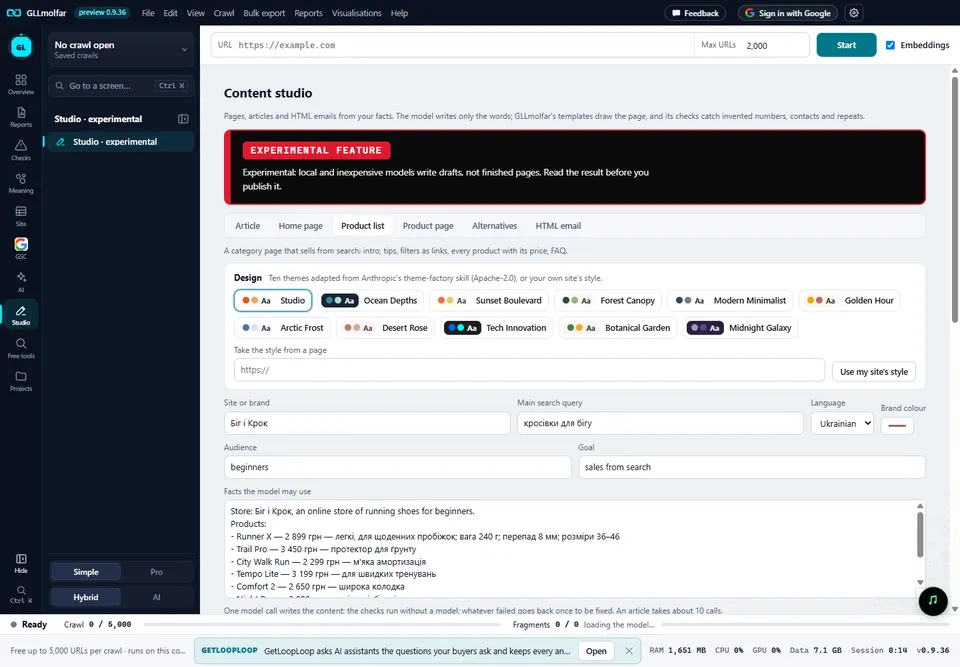
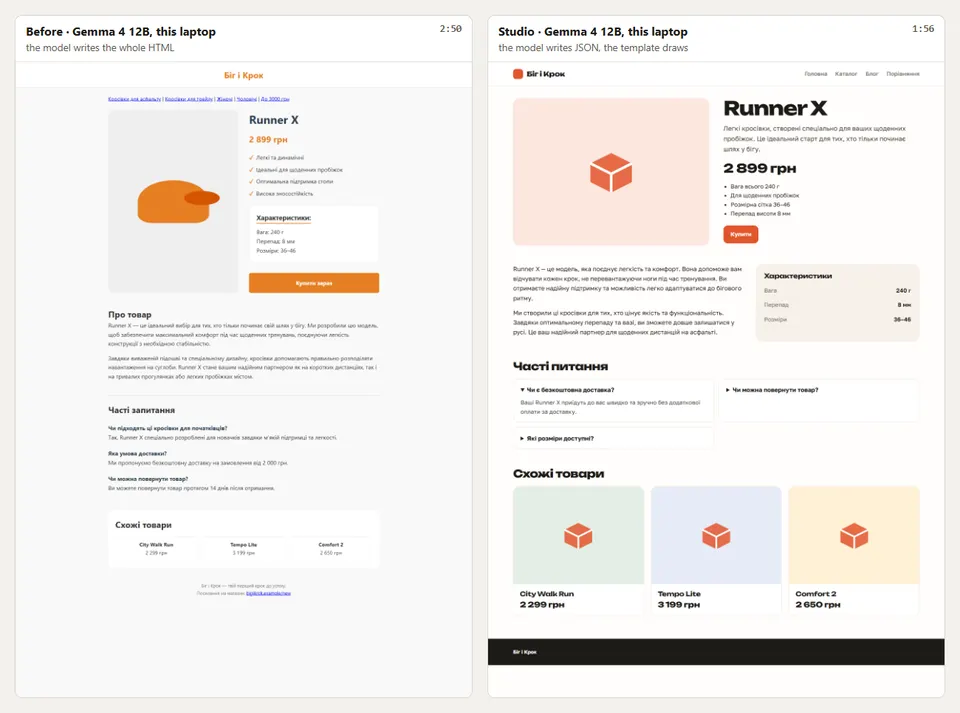
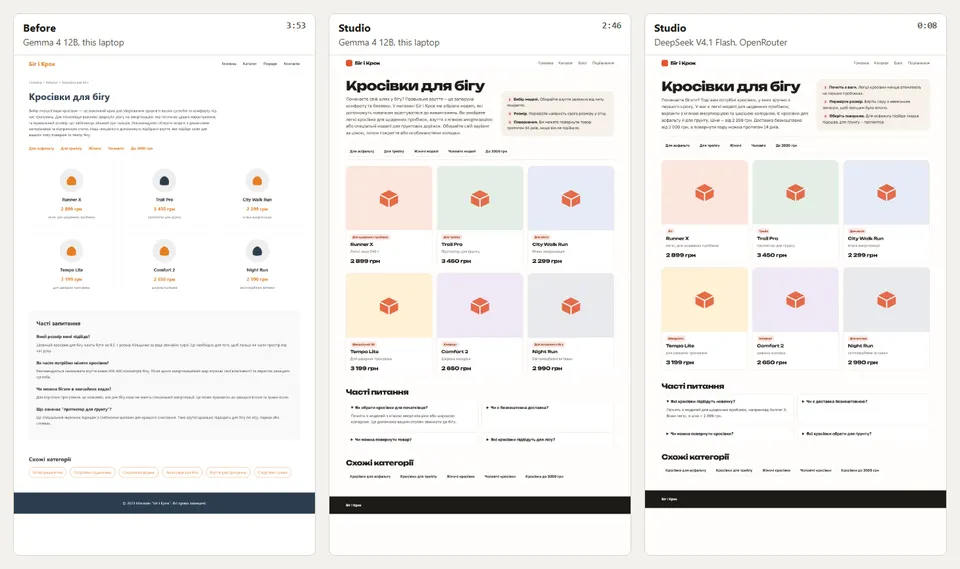
The way it works is the release's real change. The first version of this feature asked the model for a whole HTML page, and small models are poor at that: the design varied from page to page, and they filled the footer and the copy with things nobody gave them. Now the model returns only the content, as JSON — a heading, an introduction, the products with their notes, the FAQ — and GLLmolfar's templates draw the page. Then come checks that need no model at all:
- every number in the text must appear in the facts ("2 480" and "2,480" count as the same number);
- every phone, email address and year must appear in the facts;
- claims about the business that the facts do not make — "we developed", "our specialists" — are flagged;
- repeated passages are found by overlapping three-word sequences;
- lengths of titles and descriptions are measured, and Russian letters are flagged in Ukrainian.
Whatever the checks find goes back to the model once, as a targeted fix of those fields only, not as "rewrite it". Anything still wrong is listed above the result, so the draft arrives with its own review.
Articles get one more step. A long piece written in one call by a small model loses its line; written section by section, each section repeats the last. The studio writes an outline, then each section seeing what has already been said, what comes later and the text so far, then the FAQ.
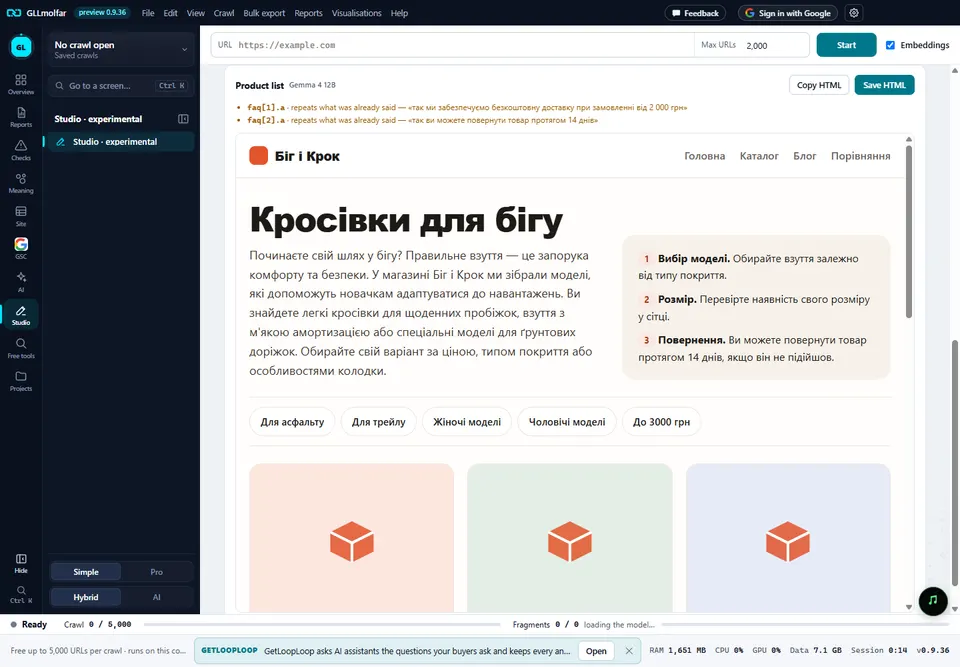
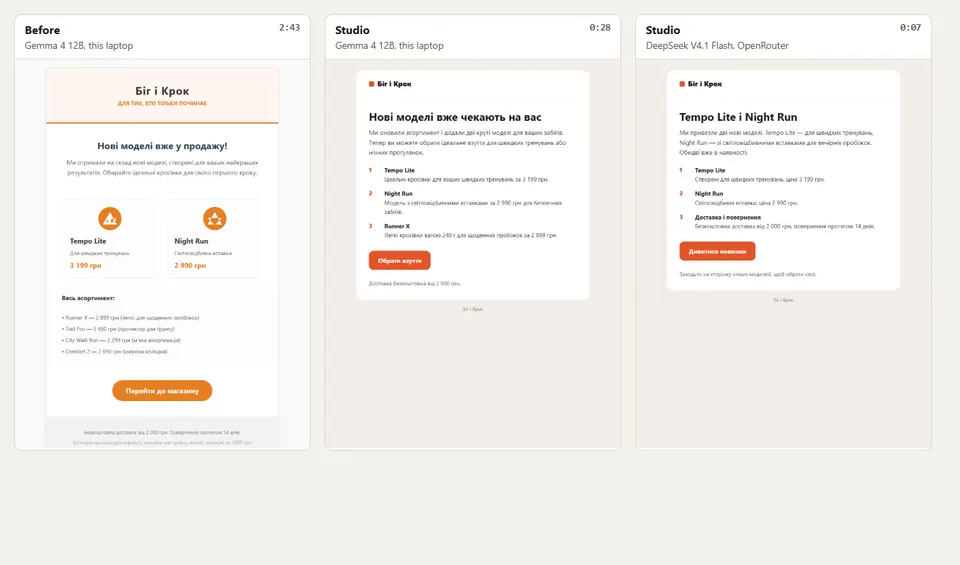
The design is a choice of eleven themes. One is the studio's own; ten are adapted from the theme-factory skill that Anthropic publishes under Apache-2.0, with fonts that carry Cyrillic. Or press Use my site's style: the app opens the page you name in a hidden window, reads its background, text and button colours, its fonts and the rounding of its buttons, darkens or lightens any text or accent colour that would fail contrast, and offers the result as one more theme. The HTML email has its own template — tables, 600 pixels wide, styles inline — because email programs do not render the layouts a browser does.
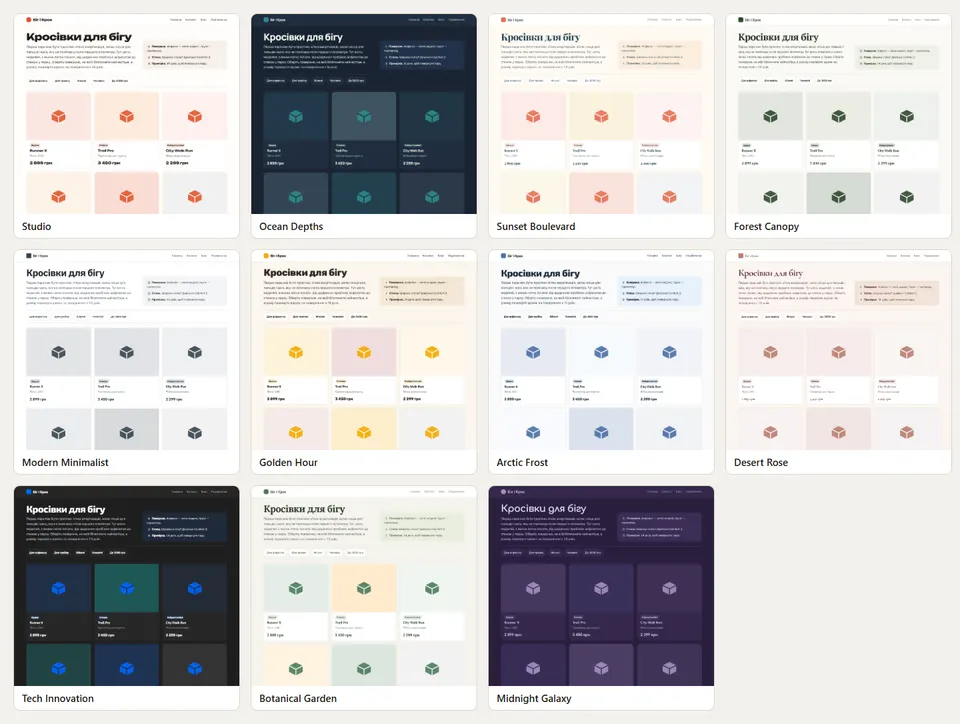
Before and after, on the same model
To see what the pipeline is worth we generated all six types twice with the same local model, Gemma 4 12B, on the same brief: once the old way, with the model writing the whole HTML page, and once through the studio. Then we ran the studio once more on a small hosted model, DeepSeek V4.1 Flash through OpenRouter, to show where a fast connection takes it. Times are per page, from the first call to the finished page, including the fix.
| Page | Before: Gemma 4 12B writes HTML | Studio: Gemma 4 12B | Faster | Studio: DeepSeek V4.1 Flash |
|---|---|---|---|---|
| Article | 4:36 | 3:39 | 1.3× | 0:45 |
| Home page | 3:33 | 2:21 | 1.5× | 0:16 |
| Product list | 3:53 | 2:46 | 1.4× | 0:08 |
| Product page | 2:50 | 1:56 | 1.5× | 0:22 |
| Alternatives | 4:18 | 1:28 | 2.9× | 0:14 |
| HTML email | 2:43 | 0:28 | 5.8× | 0:07 |
How much faster the studio wrote each page on Gemma 4 12B, times
Speed is the smaller half. The larger one is what the old pages contained that nobody had given the model:
- a copyright line with © 2023 on the home page, the product list and the alternatives page;
- "our specialists will help" on the product list — the shop has no specialists in its facts;
- "We developed this model" and "high wear resistance" on the product page — the shop sells the shoes, it did not make them, and the facts say nothing about wear;
- three words that do not exist in Ukrainian in the article.
Through the studio none of those remained. One slipped through on the product page — "Ми створили", "we created" — and the claims check now catches that phrasing too. On the home page the fix call mixed up an FAQ question and its answer, which the result list did not catch; that is the weakest point we know of, and the next check to add is that each answer belongs to its question. DeepSeek through the studio invented nothing on any of the six pages.
What a local model is good for here
On this laptop Gemma 4 12B through the studio needs one to four minutes a page and produces a draft that has to be read: the checks and the one fix catch most of what goes wrong, not all of it, and the style leans formal. That is useful when the facts must not leave the computer, when you want twenty drafts overnight, or when there is no account to connect. DeepSeek V4.1 Flash through OpenRouter wrote the same six pages ten to twenty times faster and invented nothing, which makes a small hosted model the better everyday choice. We also had Claude Opus write the same six contents once for the same templates, outside the app and untimed: it was the densest and the most candid — it said "no weight data" where the facts had none — and is worth it where a text goes to a client unedited.
The studio does not decide that for you. It shows which model wrote the page beside the result, and the same brief can be run again on a different one.
Trying it
Update GLLmolfar to 0.9.36 on Windows or Mac and sign in; both features are open to signed-in apps while they are experiments. The models are in Settings › AI models; the studio is in the left rail. A model is a few gigabytes, so download it on a connection you do not mind using for that. After the download, the built-in model works without one. We measured on Windows only; on Apple silicon the engine is the same build on Metal, and we have no numbers from a Mac yet.
One change to what the app sends: the anonymous usage statistics now include which built-in models are installed, as catalogue names only (for example gemma4-12b), so we can see which sizes people actually keep. The settings screen and the GLLmolfar page list it with everything else the app sends; it never includes a site address, a prompt or anything a model wrote.
Questions people ask
Do the built-in models replace ChatGPT, Claude or Gemini?
No, and the app says so in the red box above the models. They are slower and make more mistakes. For work that has to be right, connect a model through OpenRouter; the built-in ones are for drafts and for data that must stay on the computer.
Which model should I download?
Gemma 4 12B if the computer has 16 GB of memory or more — it wrote the cleanest text in five languages in our tests, and the app marks it as recommended. Gemma 4 E4B on 8 GB. Gemma 4 26B A4B was the most precise auditor, but asks for 32 GB.
Does anything leave my computer when I use a built-in model?
The model and the engine are downloaded once. After that the model answers locally and the studio's checks run locally. The usage statistics say which built-in models are installed, by catalogue name, and nothing about what they wrote.
Why does the check run in English?
So that its results mean the same thing on every computer and in every interface language. Writing in your language is what the studio and the other features then use the model for.
Can I publish what the studio writes without reading it?
We would not. The checks catch invented numbers, contacts, years and claims, and repeats, but not every mistake: on one page in our tests the fix call swapped an FAQ question and answer. Treat the result as a draft.
How this was measured
One laptop: AMD Ryzen 9 8945HS, Radeon 780M integrated graphics through Vulkan, 28.8 GB of memory, Windows, 11 November 2026. Model choice: Ollama, one script, six models, processor and graphics runs saved as JSON per model. In-app check: GLLmolfar 0.9.36, llama.cpp build b12284, the values stored by the check and shown on the card. Studio: one brief for a running-shoe shop with six products, Gemma 4 12B Q4_K_M in Ollama on the graphics card, and deepseek/deepseek-v4.1-flash through OpenRouter, wall time per page. Invented content was found by reading every page against the facts and confirmed by searching the saved HTML. The screenshots are of GLLmolfar 0.9.36 with an isolated profile holding the real model file and check result, and of the pages the runs produced.
Related: GLLmolfar, What's new in GLLmolfar: four releases, 2–3 November 2026.
The product
Watch it on every page, every day
One reading tells you where a page stands today. The product asks the same questions of the same assistants continuously, so a change is something you are told about rather than something you go looking for.
Request an invitationInvite-only while we keep the readings honest
On this topic
Is my page ready for AI search?
Every day Crawls with the Vectorscope reading beside every page, re-checked after each fix. How the product works
Author
Olexandrauthor
15+ years in marketing and SEO. Dozens of products, mostly the US market. Research and measurement.
LinkedInPass it on
Read in your language
Opens a browser translation of this English article. The original source stays in English.