

All scenarios/ Developer
A crawl stopped after a few pages: why, and what to do
A crawl of your own site ended after a few dozen pages, or drags on for hours. There can be several reasons: robots.txt closes sections, the server answers 429, the CDN shows a bot check, or the scope rules cut more than intended. Until you know which, changing settings is guesswork.
- Who
- Developer, DevOps, technical SEO
- Site
- A site behind a CDN or bot protection, with rate limits
- What hurts
- The crawl is incomplete or very slow, and it is unclear why
- What you need
- The exact cause with example addresses, and what to change — on the site or in the settings
Steps in Molfar
Read the robots.txt line
Above the live crawl, Molfar says whose rules apply — the site's, your own from the settings, or none; what pace the site allows, such as Crawl-delay; how many streams; how many paths are closed, and to which AI bots the site is closed. The cause often shows here already.
Crawl — docs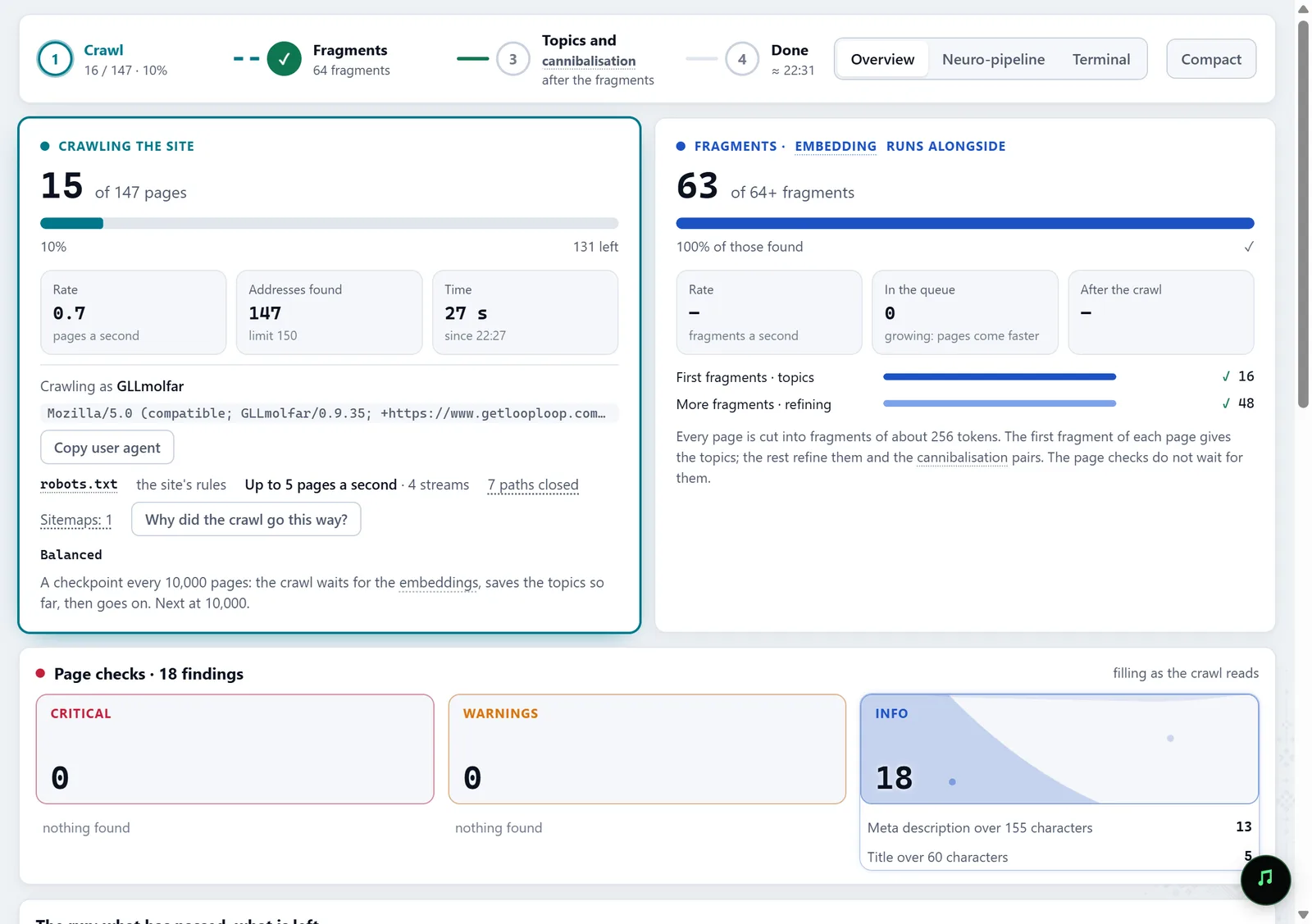
In the screenshot: robots.txt and crawl pace See how the site holds the crawl back
When the site answers 429 or 503, Molfar slows down on its own: fewer streams, a longer pause, honouring Retry-After, and after a run of normal answers it speeds back up step by step. The same line says what happened: "the site answered 429: slowed", "the site stopped answering: paused", "speeding back up".
Crawl — docsIn the screenshot: robots.txt and crawl pace Open the diagnosis
The button "Why did the crawl go this way?" in the same line, or Crawl › Diagnosis…, opens a panel with the causes in one list: addresses closed by robots.txt, 429 and 503 answers, bot-check pages with the vendor's name, pages that did not answer, addresses outside the scope, language versions left out, the limit reached. Each item comes with its count and example addresses. An agent gets the same items over MCP with the diagnose_crawl tool.
Diagnosis — docsIn the screenshot: robots.txt and crawl pace Check your own scope
The "skipped by scope" counter during the crawl shows how many addresses your own rules dropped: Include, Exclude, depth, parameters, the start folder. If it is large, the crawl is incomplete because of the settings, not the site.
Settings · Crawl scope — docsIn the screenshot: robots.txt and crawl pace Change the rules for your own site
For your own site or staging, the crawl settings let you set your own robots.txt and test it against an address, or not respect the site's robots.txt. Bot protection is better not bypassed: ask the CDN's admin to let your crawler through.
Settings · Crawling — docsIn the screenshot: robots.txt and crawl pace Crawl again and compare
After the changes, crawl again and compare with the previous run in History: how many new addresses appeared, and whether the pages with response errors are gone.
History — docs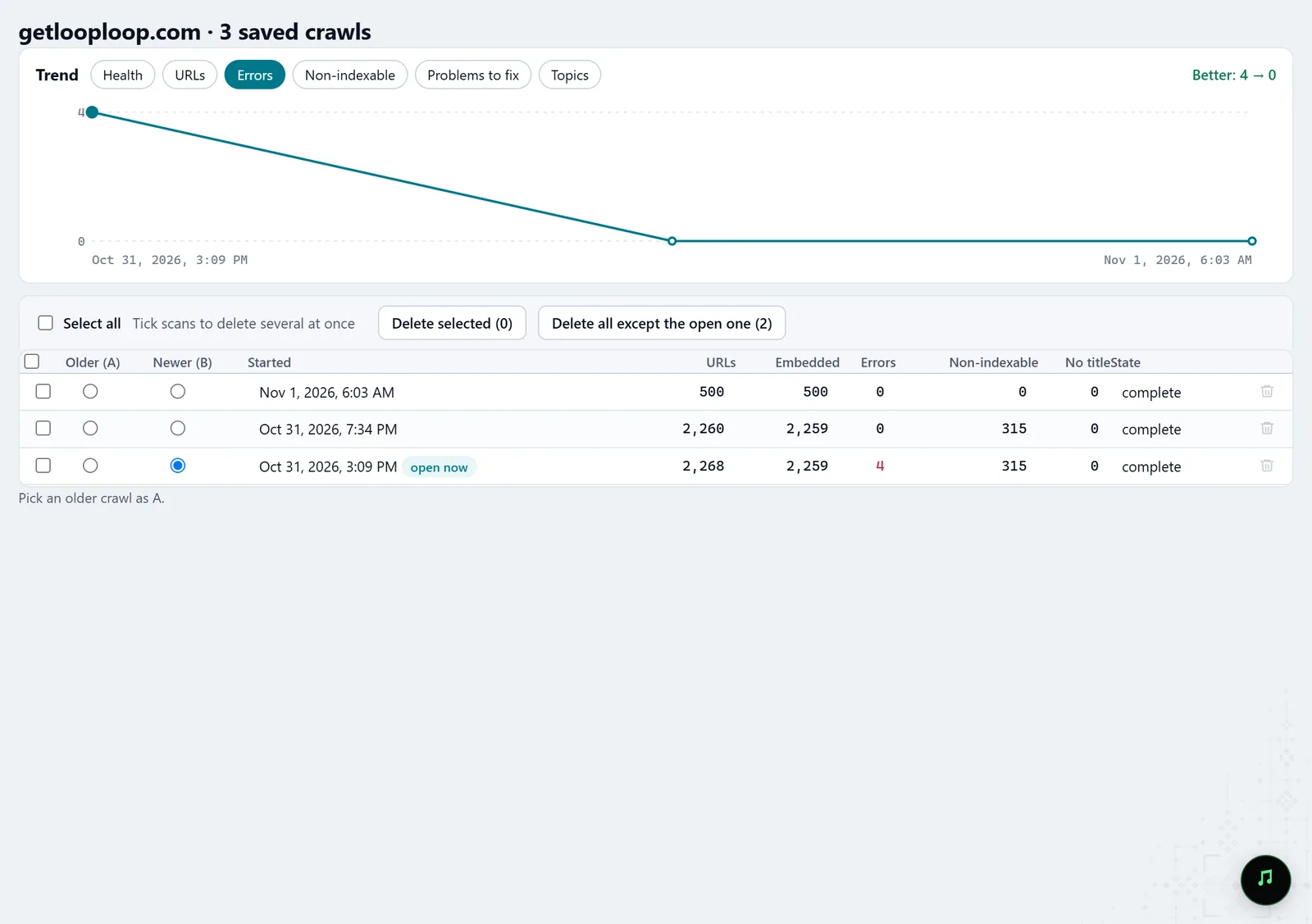
In the screenshot: Crawl history
What you get
The cause with examples
What exactly stopped the crawl, with the addresses where it happened.
What to change, and where
On the site: robots.txt, the rate limit, a CDN rule; in Molfar: the scope and the pace.
A full crawl
A second run, compared with the first.
Good to know
- The diagnosis explains the open crawl from what it recorded and asks the site nothing again: to see whether a change helped, crawl again.
- Molfar does not get around bot checks: at a CAPTCHA the crawl can pause and open the page for you to pass it yourself.
- Ignore robots.txt only on sites that are yours or that you have permission to crawl.
- Some settings may be locked on your account; the lock says what opens them.
Questions
- Why does Molfar slow down by itself?
- Because 429 and 503 mean the server asks for fewer requests. Pushing on gets you blocked or takes the site down; a slow full crawl is worth more than a fast partial one.
- Can I set the pace by hand?
- Yes, Requests per second is in the crawl settings; the site's Crawl-delay still applies when you respect robots.txt.
- Does the diagnosis see language versions?
- Yes: if the scope cut the site's language versions, the diagnosis names that as its own item.