

Settings › Crawling
Describes GLLmolfar 0.9.22current release 0.9.23 · checked 1 Nov 2026
How the crawler asks a site for its pages: how fast, as which user agent, how long it waits, which robots.txt it obeys, what it does at a CAPTCHA, and when it renders JavaScript.
- Where
- Settings › Crawling
- Opens
- The gear at the top right
- Stored
- In the settings file on this computer
- Applies
- To the next crawl
On the screen
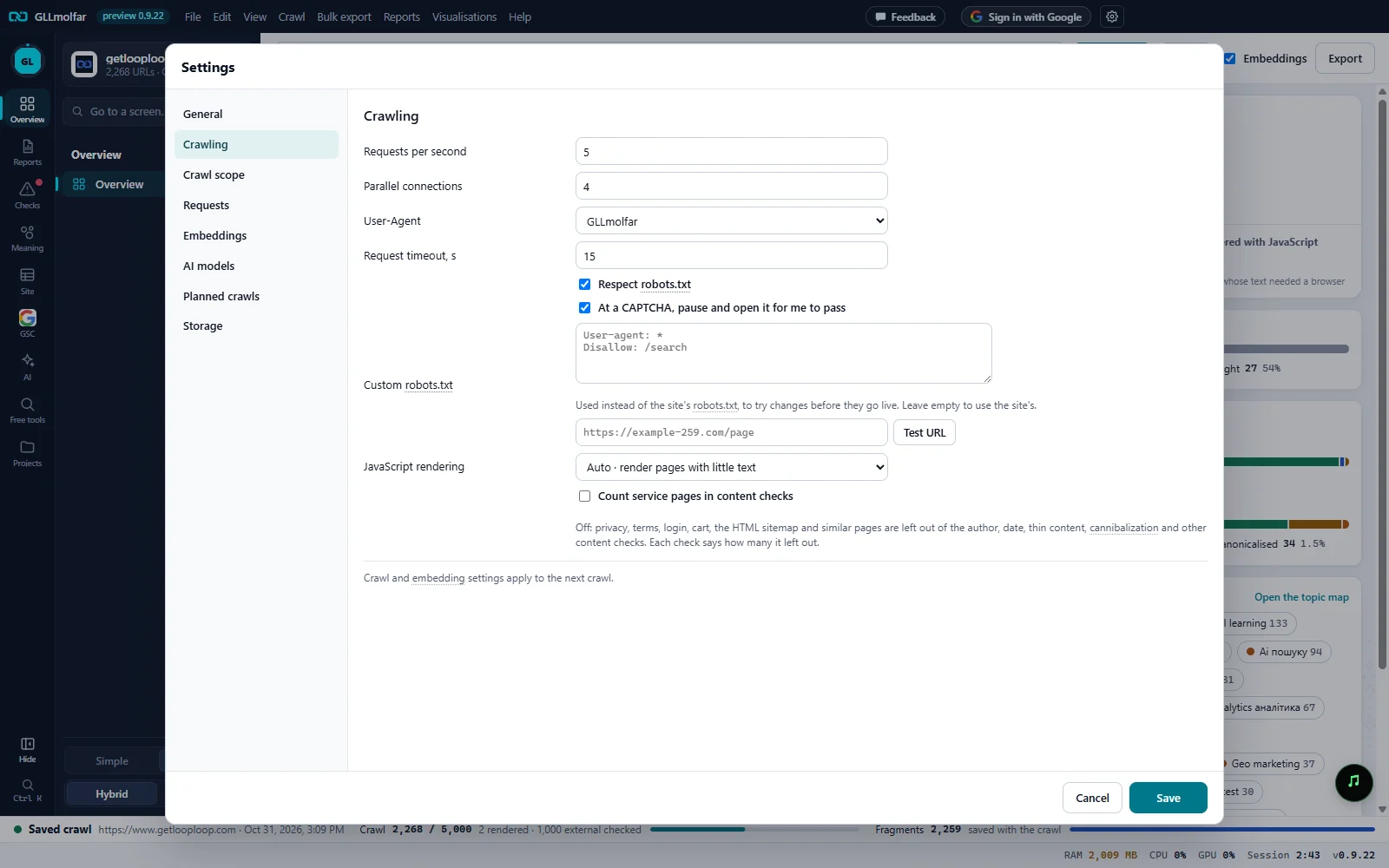
Speed. Requests per second and Parallel connections.
User-Agent. Who the crawler says it is: GLLmolfar, a search engine bot, Chrome, an AI crawler or your own.
Respect robots.txt. Obey the site's robots.txt.
At a CAPTCHA. At a CAPTCHA, pause and open it for me to pass: the crawl waits while you pass the site's check, then goes on.
Custom robots.txt. A robots.txt to use instead of the site's, and Test URL to try an address against it.
JavaScript rendering. Off, pages with little text, or all pages.
Service pages. Count service pages in content checks.
Fields
| Field | What it does | Options | Default |
|---|---|---|---|
| Requests per second | The most requests the crawler sends each second. | 0.2 to 20 | 5 |
| Parallel connections | How many requests run at once. | 1 to 16 | 4 |
| User-Agent | The name the crawler gives the site. A bot preset obeys that bot's own group in robots.txt. | GLLmolfar; Googlebot Smartphone; Bingbot; Chrome (Windows); under AI: GPTBot (OpenAI), OAI-SearchBot (OpenAI), ChatGPT-User (OpenAI), ClaudeBot (Anthropic), PerplexityBot (Perplexity); Custom… | GLLmolfar |
| Custom… (text box) | Shown for Custom…: your own user agent. It cannot name another company: Save is refused, the box gets the focus, and the section says A custom user agent cannot name another company, with the word it found. | Text | Empty |
| Request timeout, s | Seconds to wait for one answer before giving up. | 3 to 120 | 15 |
| Respect robots.txt | Skips addresses the site's robots.txt closes. With a bot preset as the user agent, robots.txt is obeyed even when this is off. | On or off | On |
| At a CAPTCHA, pause and open it for me to pass | When a page answers with a CAPTCHA or a bot check, in place or by sending every page to a check page, the crawl pauses and the page opens in a window of its own, with the crawl's user agent. Once the site lets you through, the crawl resumes and asks for the page again with the cookies the check left. Off, and in planned crawls: such pages are recorded as bot checks and the crawl goes on. | On or off | On |
| Custom robots.txt | Used instead of the site's robots.txt, to try changes before they go live. Leave empty to use the site's. | Text | Empty |
| Test URL | Checks one address against the custom robots.txt, or against the site's when the box is empty. Without an address it tests the one in the toolbar. | Button | — |
| JavaScript rendering | Whether pages are opened in a browser so that text written by JavaScript is seen. | Off · raw HTML only; Auto · render pages with little text; All pages (slower) | Auto · render pages with little text |
| Count service pages in content checks | Off: privacy, terms, login, cart, the HTML sitemap and similar pages are left out of the author, date, thin content, cannibalization and other content checks. Each check says how many it left out. | On or off | Off |
States and messages
Allowed · custom robots.txt
Test URL: the address may be crawled. The second part says which robots.txt answered: custom robots.txt, the site's robots.txt or the site has no robots.txt.
Blocked · the site's robots.txt
Test URL: the robots.txt closes this address.
Crawl and embedding settings apply to the next crawl.
A crawl that is running keeps the settings it started with.
When a site asks for a CAPTCHA
With the switch on, the first check a crawl meets pauses it and opens a window titled Pass the site's check — GLLmolfar. A bar in the main window says what happened and offers three buttons.
The crawl is paused: the site asks for a CAPTCHA.
Under it: Pass it in the window that opened; the crawl goes on by itself once the site lets you through. When the app recognises the check, its maker's name comes first.
| Button | What it does |
|---|---|
| Show the window | Brings the check's window to the front. |
| I passed it, continue | Resumes the crawl when the window has not noticed on its own. |
| Skip checks in this crawl | Closes the window; this and later checks are recorded as bot checks until the crawl ends. Closing the check's window does the same. |