

Search Console: Performance
Describes GLLmolfar 0.9.22current release 0.9.23 · checked 1 Nov 2026
Google Search Console for the open site, read-only: clicks, impressions, CTR and position by day, this week's query moves, and the queries, pages, countries and devices behind them. Performance is the first of the nine reports in the GSC section, and the place where you connect.
- Where
- GSC › Performance
- Mode
- Simple and Pro
- Built from
- Your Search Console property, read from Google and kept on this computer
- Changes
- On Refresh, or when you pick another property or period
On the screen
GSC in the rail opens a panel of nine reports: Performance, Pages, Positions, Indexing, Sitemaps, Lost clicks, Cannibalization, Query clusters and Visualisation. Every report shares the same head: what the section reads, the property, and the period. The picture shows a saved report while signed out.
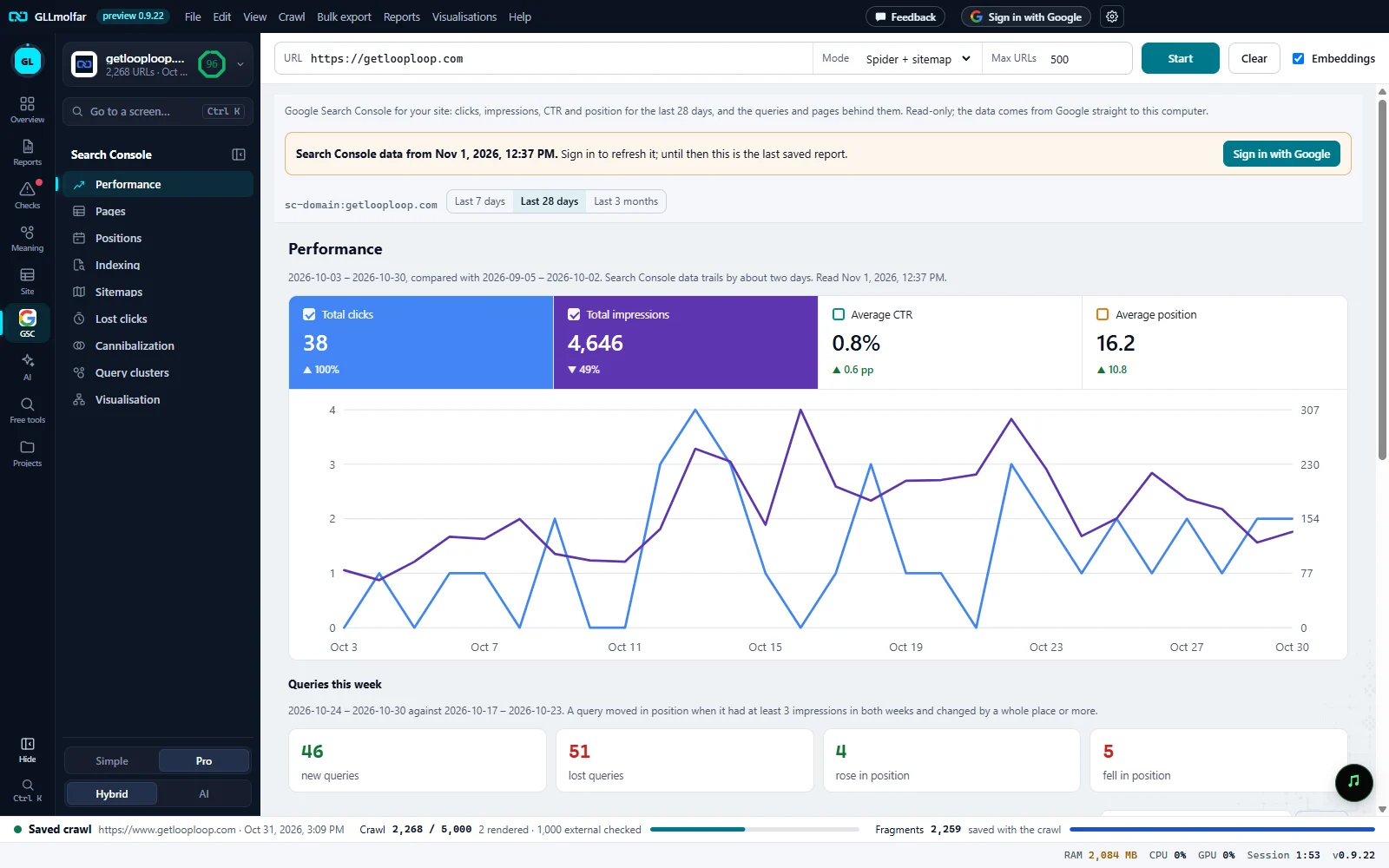
The GSC section. Nine reports, one page each. Lost clicks and Cannibalization carry a count in the panel when they have rows.
What it reads. Clicks, impressions, CTR and position for the last 28 days, and the queries and pages behind them. Read-only; the data comes from Google straight to this computer.
Saved report. Search Console data from {date}. and why it is not fresh, with the one button that refreshes it: here Sign in with Google.
Property and period. The property the report comes from, and Last 7 days, Last 28 days or Last 3 months.
Totals. Total clicks, Total impressions, Average CTR, Average position, each against the period before. A ticked card draws its line on the chart.
By day. The ticked metrics by day, each on its own scale; the first two have an axis, left and right.
Queries this week. This week against last week: new queries, lost queries, rose in position, fell in position.
Connecting
- Signed out, with no saved report, the section says “Search Console connects to the Google account you sign in to GLLmolfar with.” beside Sign in with Google.
- Signed in, Connect Search Console opens Google in your browser. The section reads “Waiting for Google in your browser…” with Open the page again, Copy link and Cancel.
- Use the same Google account you are signed in to GLLmolfar with. Another account is refused with a message.
- Once connected, the head shows Search Console property, the period, Refresh, Connected as {email}. and Disconnect.
- The property that covers the open crawl's site is picked for you. When none covers it, the section says so and you pick one from the list.
Kept on this computer
A report, once read, is saved on this computer with its date. Offline, signed out or disconnected, the last saved report is shown in full under a line that says how old it is, and every report in the section uses it. Only refreshing needs the account.
| Line over the report | What refreshes it |
|---|---|
| Search Console data from {date}. Sign in to refresh it; until then this is the last saved report. | Sign in with Google |
| Search Console data from {date}. Connect Search Console to refresh it; until then this is the last saved report. | Connect Search Console |
| Search Console data from {date}. No connection to Google right now; this is the last saved report. | Try again |
| Search Console data from {date}. Google did not answer the refresh; this is the last saved report. | Try again |
Performance
A line under the title gives the dates against the period before, says Search Console data trails by about two days, and when the report was read.
| Block | What it shows |
|---|---|
| Totals | Total clicks, Total impressions, Average CTR, Average position, each with the change against the period before: percent for clicks and impressions, points (pp) for CTR, places for position. A card switches its line on the chart on and off. |
| Chart | The chosen metrics by day, each on its own scale; position runs upside down, 1 at the top. Hovering shows every value of that day. |
| Queries this week | The last seven days against the seven before. A query moved in position when it had at least 3 impressions in both weeks and changed by a whole place or more. A card opens its list: query, Position before, Position now, impressions, clicks. |
| Tables | Queries, Pages, Countries, Devices, each with clicks, impressions, CTR and average position. Filter… narrows the rows; Export saves them. 100 rows are shown, with Showing N of M. |
The other reports
- Pages: each page with its top query and its state in the crawl, and the crawled pages Google never showed.
- Positions: queries by position band, and those close to the top.
- Indexing: Google's URL Inspection answer, page by page.
- Sitemaps: the sitemaps submitted to Search Console and how Google read them.
- Lost clicks: pages that lost clicks, and the reason the numbers point at.
- Cannibalization: queries for which Google showed two or more of your pages.
- Query clusters: queries grouped by meaning on this computer.
- Visualisation: the period's queries drawn instead of listed.
Where else it shows
States and messages
Search Console connects to the Google account you sign in to GLLmolfar with.
With Sign in with Google, when no report has been saved yet.
Reading Search Console: {step} — step {n} of {total}
The wait bar moves through the steps: totals, clicks by day, queries, pages, countries, devices, pages by query.
This Google account has no Search Console properties.
Nothing to read.
That was a different Google account. Connect Search Console with the account you are signed in to GLLmolfar with.
Connect again with the right account.
Google was not given access to Search Console. Connect again and tick the Search Console box.
The connection was made without Search Console access.
Search Console is not connected any more (access was removed in the Google account). Connect it again.
Access was taken back on Google's side.
Google asks to slow down: the allowance for this site is used up for now.
Google's own limit; try again later.
No search data for this period.
The chart is empty for the period picked.