

URL audit
Describes GLLmolfar 0.9.22current release 0.9.23 · checked 1 Nov 2026
One page, no crawl. GLLmolfar fetches the address, renders it with JavaScript, photographs it on desktop and mobile, and runs the page's own checks. Checks that need the rest of the site are left out.
- Where
- Site › URL audit
- Mode
- Simple and Pro
- Built from
- One fetch of the address, from this computer
- Changes
- Each time you press Audit
On the screen
At the top, the address field. After an audit: the address with four actions, a row of tiles, the page map, and two columns — the checks and findings on the left, the screenshots and headers on the right.
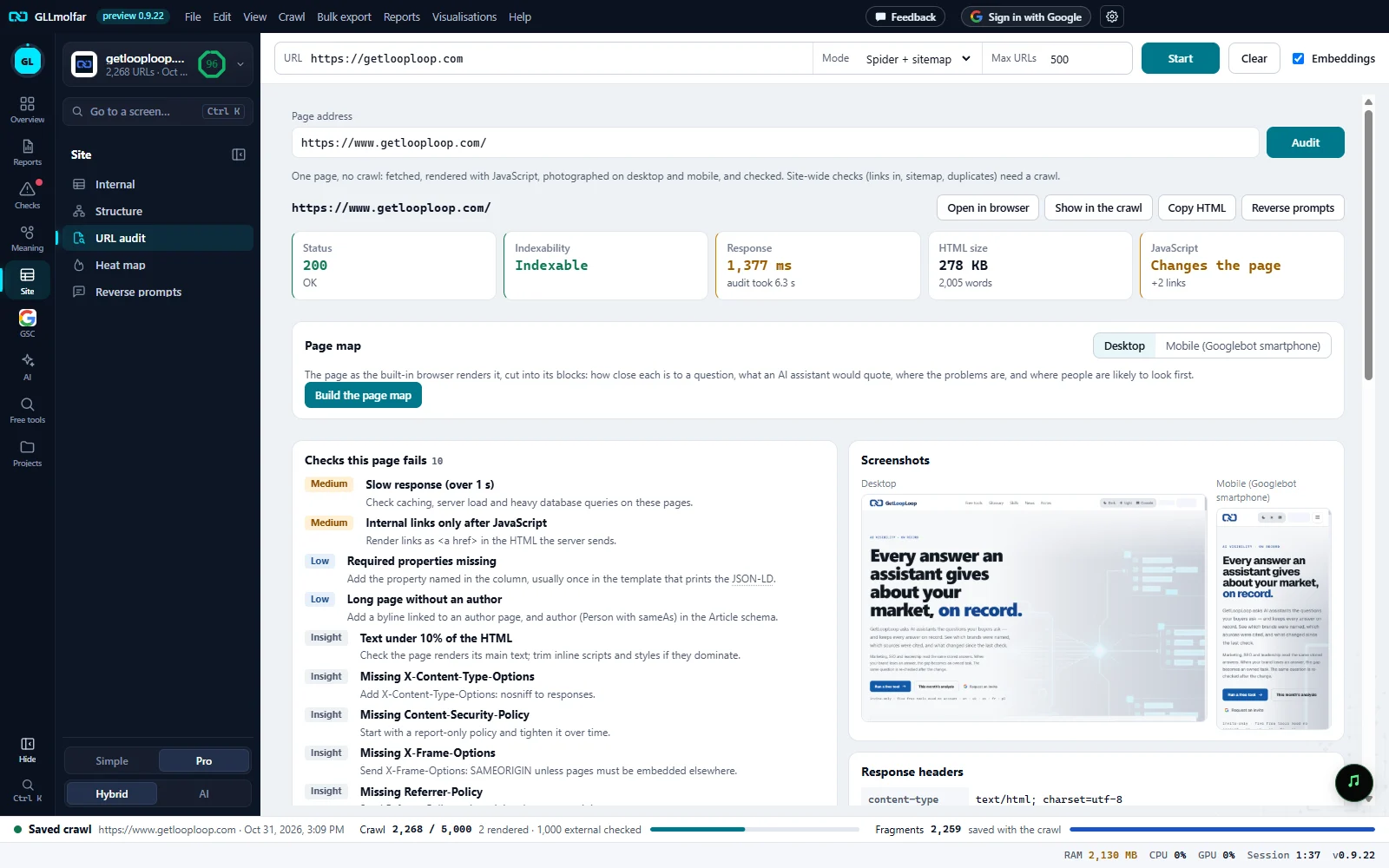
Page address. Type an address and press Audit. The line under it says what the audit does and what it leaves to a crawl.
Actions. Open in browser, Show in the crawl (only when the open crawl has the page), Copy HTML and Reverse prompts.
Tiles. Status, indexability, response time, HTML size and what JavaScript changes. A Bot check tile joins them when the page answered with one.
Page map. The rendered page cut into its blocks and coloured four ways. Built on a button, for desktop or mobile.
Checks this page fails. The page-level checks it fails, most important first, each with how to fix it.
Screenshots. The page on desktop and as Mobile (Googlebot smartphone).
Response headers. The headers that matter, security headers as ticks and crosses, cookies, and all headers in a fold.
Tiles
| Tile | What it shows |
|---|---|
| Status | The HTTP status and its text. Red from 400 or with no answer, amber for a redirect. |
| Indexability | Indexable or Non-indexable, with the reason when it is not. |
| Response | The server's response time in ms, amber over 1,000 ms. Under it: audit took N s. |
| HTML size | The HTML in KB and the number of words. |
| JavaScript | Changes the page with what changed (canonical, meta robots, title, H1, description, added links), or No key changes with words in the HTML against words after JavaScript. Red when JavaScript changes the canonical or meta robots. |
| Bot check | Shown only when the page answered with a CAPTCHA or bot check, with its name. |
Page map
The page as the built-in browser renders it, cut into its blocks. Build the page map draws it; Desktop and Mobile (Googlebot smartphone) switch the device. Once built, four buttons pick what the colours show, and a list beside the picture names the blocks. A block in the list scrolls the picture to it.
| Colours | What they show |
|---|---|
| Meaning to a question | Each block coloured by how close its text is to a question, from this page's lowest to its highest. The first question is the page's H1, or its title; type another and press Colour. Beside it: Closest blocks. Needs embeddings switched on. |
| What AI quotes | What an AI retriever takes from the page, in reading order, the first 26 passages kept. Blocks read quoted, weak passage, past the 26 passages, only after JavaScript or menu / footer, with a count of each and What to do for the ones that miss. |
| Problems | Accessibility findings counted inside each block: fields without a label, buttons and links without a name, images without alt. |
| Attention forecast | Heat from the layout: position against the first screen, size, headings, calls to action and large images. A line marks the end of the first screen. Lists Most likely seen first and Content that gets little attention. |
The two columns
| Block | What it shows |
|---|---|
| Checks this page fails | The crawl's page checks that this page fails, rated like the Issues tab, most important first, each with how to fix it. Checks that need the rest of the site — links in, sitemap, duplicates, topics — are left out. |
| Accessibility (axe) | axe-core run in the rendered page: rules broken by impact (Critical, Serious, Moderate, Minor), the elements affected, the WCAG references, and How to fix for each rule. The note under it gives the axe-core version, the rules passed and the ones that need a person to look. |
| In search results | The title and description drawn as a desktop search result, with their widths in pixels against the limit. |
| Redirects | Each hop with its status, ending at the final address. Shown only when the address redirected. |
| What JavaScript changes | Title, canonical, meta robots, H1 and description in the HTML against after JavaScript, links added, and the HTML size before and after rendering. |
| robots.txt | Whether Googlebot, GPTBot, OAI-SearchBot, ClaudeBot, PerplexityBot and Google-Extended may fetch this address, with the matching rule and its line. |
| Screenshots | Desktop, and Mobile (Googlebot smartphone). |
| Response headers | content-type, cache-control, content-encoding, x-robots-tag, last-modified, etag, vary, server and link, when sent. Then HSTS, CSP, X-Content-Type-Options, X-Frame-Options and Referrer-Policy as ✓ or ✕, and No compression when there is none. Cookies set by this page: N lists each cookie as Secure or not Secure, HttpOnly or readable by scripts, and its SameSite. All headers (N) opens the rest. |
States and messages
Fetching, rendering and taking screenshots. Usually 5–20 seconds.
Under the field, a bar with the seconds so far and, once an audit has run on this computer, how long one usually takes. The button reads Checking… until the audit ends.
The page did not load in time for a picture.
Shown in place of a screenshot.
The page could not be rendered.
What JavaScript changes cannot be compared.
The accessibility check did not run: the page did not load in a browser window.
The Accessibility block stays empty.
No robots.txt on this site: everything is allowed.
The robots.txt block has no table.
The page map could not be built.
The rest of the audit stays on screen.
The audit could not run.
Or The audit stopped: with the reason.