

Fix list
Describes GLLmolfar 0.9.22current release 0.9.23 · checked 1 Nov 2026
The checks that need work, written as tasks and numbered in the order to do them. Each task says how many URLs it touches, why it matters, how to fix it and where to look.
- Where
- Checks › Fix list
- Mode
- Simple and Pro
- Built from
- The open crawl
- Changes
- When you open another crawl
On the screen
On the left, the numbered tasks. On the right, the one you picked, laid out as in Issues: figures, why and how, and the URLs.
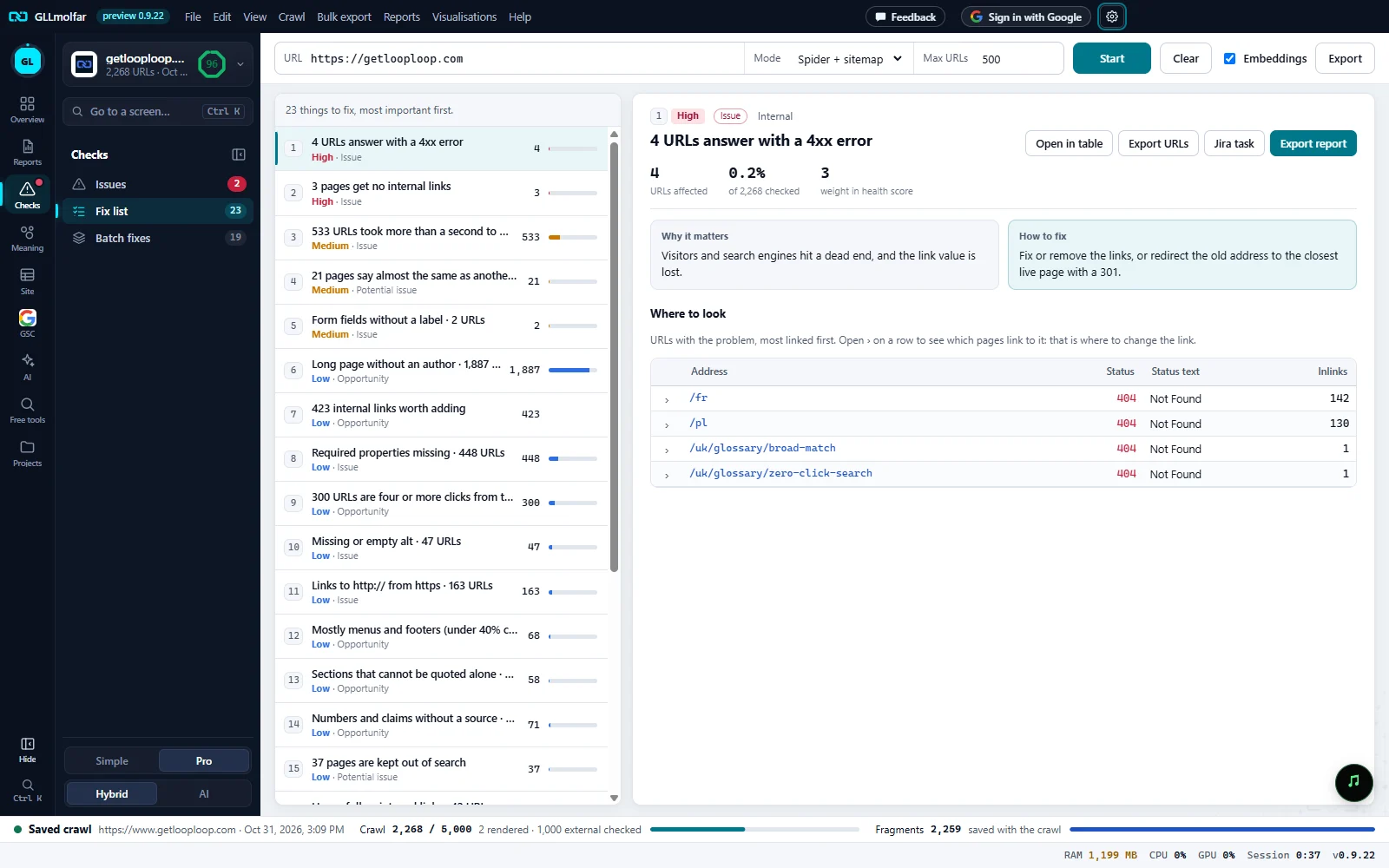
How many. N things to fix, most important first.
Tasks. One numbered row per task: the task as a sentence, its importance and type, the number of URLs and a bar for the share of pages.
The task. Its number, importance, type and column set, the sentence, and URLs affected, of N checked and weight in health score.
Actions. Open in table, Export URLs, Jira task and Export report.
Why and how. Why it matters and How to fix.
Where to look. The URLs with the problem, most linked first.
What is listed, and in what order
- Every check with findings, except those rated Insight: they weigh nothing and are not tasks.
- Ordered by importance first, then by the share of pages the check touches.
- Internal links worth adding join the list as one low-importance opportunity once the topics are ready: N internal links worth adding.
- An orphan in the sitemap that is already among the pages with no internal links is one problem, not two rows: that row is dropped when it names no other page.
| Row part | What it shows |
|---|---|
| Number | The task's place in the order. The same number heads its detail. |
| Sentence | The task with its count, such as 4 URLs answer with a 4xx error or 3 pages get no internal links. A check without its own sentence shows its name and N URLs. |
| Second line | Importance and type: Issue, Opportunity or Potential issue. |
| Number on the right | URLs affected. |
| Bar | The share of the pages the check applies to. |
The detail of a task
The same as a check's detail in Issues: the three figures, Why it matters, How to fix, a line about service pages left out when there are any, and Where to look — a table of URLs, groups of duplicates with Keep on the strongest page, or groups of pages that compete.
N internal links worth adding has its own detail: From, To, Suggested anchor and Similarity for each link, and Open Link opportunities instead of the other buttons.
| Button | What it does |
|---|---|
| Open in table | Opens the check's filter in All pages. |
| Export URLs | Saves the affected URLs with the columns of the detail. |
| Jira task | Opens the task as a Jira ticket, its fields and files on the left. |
| Export report | Saves a PDF about this task: why, how, where the pages are, and every affected URL. |
| Export (toolbar) | The whole list, one row per affected URL: Order, Task, Importance, URLs affected, How to fix, Address. |
States and messages
Enter a site address above and press Start.
The tab is empty until a crawl is open.
Nothing to fix in this crawl.
No check outside Insight has findings.
N things to fix, most important first.
While a crawl runs the list follows it a few seconds behind; it is exact once the crawl ends.