

Topics
Describes GLLmolfar 0.9.22current release 0.9.23 · checked 1 Nov 2026
The site's pages grouped by what they say. One row per topic: how many pages it has, the words that mark it, how tight and how well linked it is, and the page that acts as its hub. Another crawled site can be compared topic by topic.
- Where
- Meaning › Topics
- Mode
- Simple and Pro
- Built from
- The open crawl's embeddings, made on this computer
- Changes
- Live during the crawl; final when it ends
On the screen
At the top, one line with the counts. Under it, the comparison with another site. Then a strip of every topic's share of pages, and the table of topics.
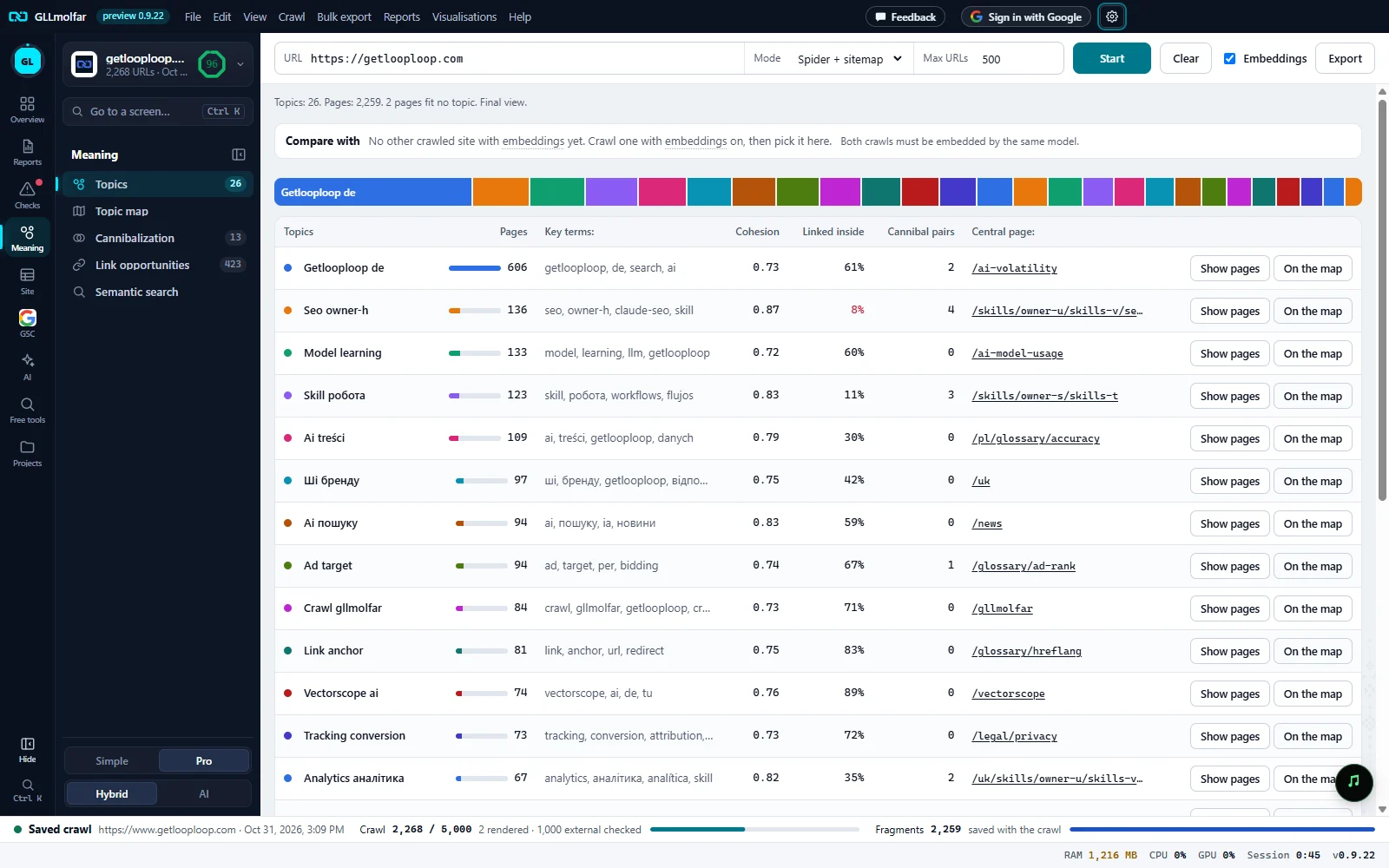
Counts. How many topics and pages, how many pages fit no topic, and whether this is the live or the final view.
Compare with. Pick another crawled site to compare its topics with these. Shown once the final view is ready.
Share of pages. One band per topic, as wide as its share of pages. A band opens the topic's pages in the table.
Topics, Pages, Key terms. The topic's name, its number of pages with a bar, and the words that mark it.
Cohesion, Linked inside, Cannibal pairs. How tight the topic is, how well its close pages link to each other, and how many of its pages compete.
Central page. The most linked page of the topic. It opens that page's details.
Show pages, On the map. Show pages opens the table of pages filtered to this topic. On the map opens the topic map with this topic in focus.
The table
| Column | What it shows |
|---|---|
| Topics | The topic's name, made from its key terms, with its colour. The same colour marks the topic on the map and in every other tab. |
| Pages | How many pages belong to the topic, with a bar against the largest topic. |
| Key terms: | The words that set the topic apart, taken from its pages' titles and H1s. |
| Cohesion | How close the topic's pages are to its centre in meaning, from 0 to 1. Higher is a tighter topic. |
| Linked inside | Of the topic's pairs of pages that are close in meaning (similarity 0.80 or more), the share where one page links to the other. Red below 10%. after crawl until links are known. |
| Cannibal pairs | Pairs of pages in this topic that say almost the same thing. Amber at 100 and above. See Cannibalization. |
| Central page: | The page of the topic with the most internal links pointing to it: the topic's hub. |
| Show pages / On the map | Open the topic's pages in the table of all pages, or on the topic map. |
The toolbar's Export saves the table: topic, key terms, pages, cohesion, linked inside, cannibal pairs and central page.
Compare with another site
The Compare with list holds the other sites crawled with embeddings. Both crawls must be embedded by the same model. Nothing is worked out until a site is picked.
| Part | What it shows |
|---|---|
| The two sites in numbers | Health score, URLs crawled, indexable pages, errors, not indexable, problems to fix, topics and cannibal pairs, side by side. The better figure is green, the worse red. From each site's latest crawl with embeddings. |
| Topics both sites cover · N | Topics matched by meaning, with their similarity and a bar of Pages, yours : theirs. Closest pages lists the page pairs nearest to each other, with their similarity. |
| Only on {site} · N | Topics one site has and the other does not, with their pages and key terms. For the other site: subjects they cover and you do not, candidates for new pages. |
States and messages
Topics appear once pages are embedded. Turn on Embeddings if they are off.
No page has been embedded yet. The Embeddings box in the toolbar turns the model on.
Not enough embedded pages for topics yet.
Some pages are embedded, but not enough to group.
topics wait for the model: {n} first fragments left
Printed in the status bar while the model catches up with the crawl.
No other crawled site with embeddings yet. Crawl one with embeddings on, then pick it here.
The comparison needs a second site crawled with embeddings.
Comparing topics…
The comparison runs once per pick and is kept until the topics change.
A tab with a lock is not open on this account; pressing it says what opens it.
The tab keeps its place in the Meaning panel with a lock.