

Structure
Describes GLLmolfar 0.9.22current release 0.9.23 · checked 1 Nov 2026
The site as a diagram. Each page is a dot on the path a visitor clicks to reach it, or on the folders in its address. Colour the dots by topic, status, indexability, depth, response time or one check, and click a page to see its numbers and its checks.
- Where
- Site › Structure
- Mode
- Simple and Pro
- Built from
- The pages and internal links of the open crawl
- Changes
- When a crawl ends or another opens
On the screen
A row of controls on top, the diagram in the middle, and on the right the legend and the card of the page you clicked.
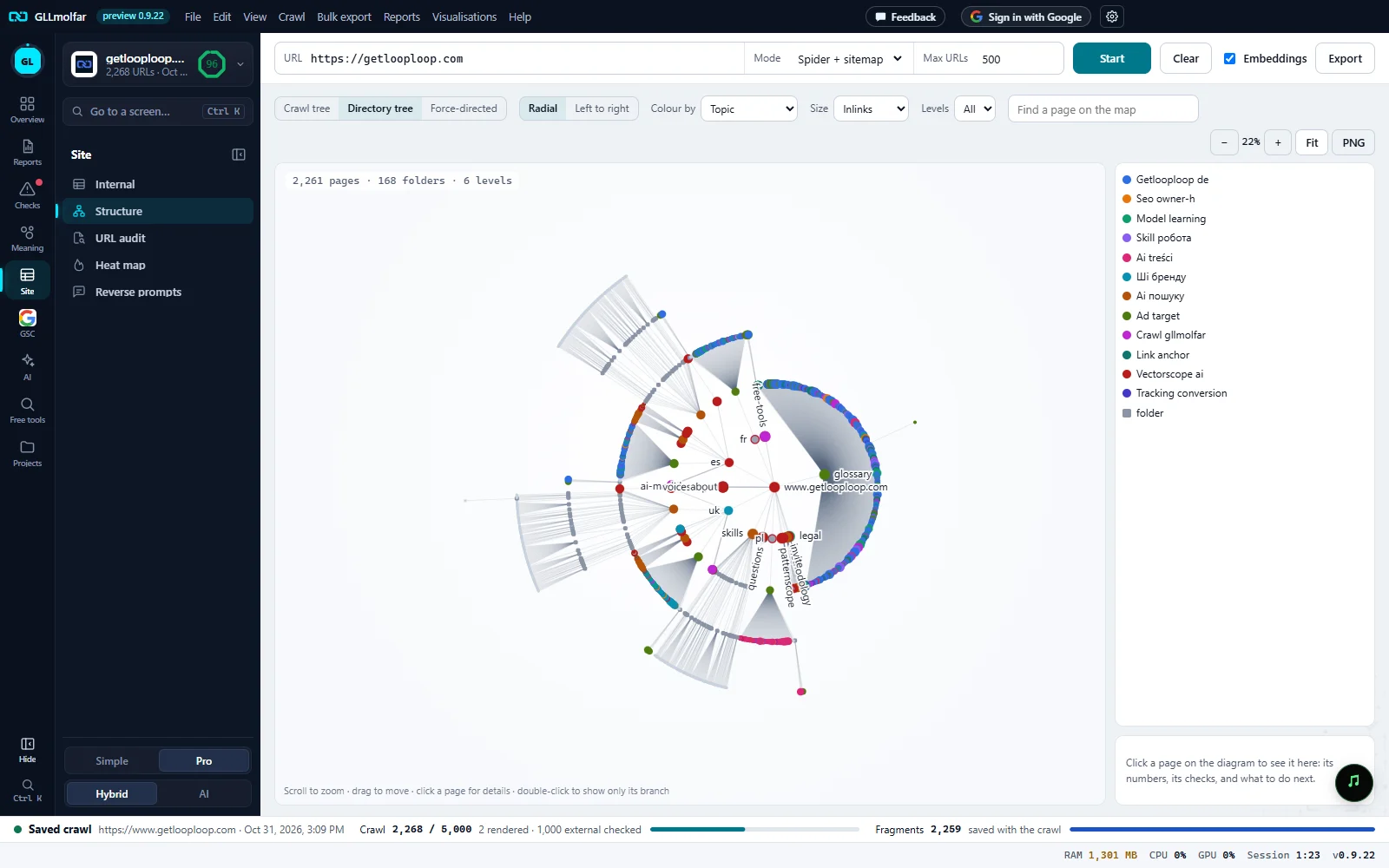
Diagram and layout. Crawl tree, Directory tree or Force-directed; Radial or Left to right for the two trees. Here: the directory tree, radial.
Colour, size, levels. Colour by, Size and Levels. All internal links joins them in the crawl tree; the directory tree does not have it.
Find. Find a page on the map: matching pages get a ring, the rest fade; N found beside it.
Zoom and PNG. − and + with the zoom level, Fit to show the whole diagram, PNG to save it as an image.
Counts and the tree. Pages, folders and levels of the directory tree on screen. Below them, the folders in the address around the site: a folder without a page of its own is a grey square; an address with a query string hangs from its folder.
Legend. What each colour means. In topic colours, the first twelve topics; a grey square for groups or folders.
Page card. The clicked page: its numbers, the checks it fails, and what to do next. Empty until a page is clicked.
Three diagrams
| Diagram | What a branch is | Layout |
|---|---|---|
| Crawl tree | The shortest click path from the start page. Pages reached without a link from a crawled page hang from the group Not linked (sitemap or list only). | Radial or Left to right |
| Directory tree | The folders in the address. A folder without a page of its own is a grey square; an address with a query string hangs from its folder. | Radial or Left to right |
| Force-directed | The crawl tree, let loose: each page pulls toward the page above it, and all dots push each other apart. A dot can be dragged. | — |
A red ring marks a page that answered 4xx, 5xx or nothing. A number beside a dot, +N, counts the pages folded under it by Levels.
Controls
| Control | Choices | What it changes |
|---|---|---|
| Colour by | Topic, Status, Indexability, Crawl depth, Response time, A check | The colour of each dot. A check adds a list to pick one, each with its count: affected pages turn red. |
| Size | Inlinks, Link score, Same | The size of each dot. |
| Levels | All, 1 to 6 | How deep the diagram goes. Deeper pages fold into a count on their ancestor. |
| All internal links | On or off | Draws every internal link, faintly, under the tree. Not in the directory tree. |
| Find a page on the map | Text | Rings the pages whose address or title contains it. Enter zooms to them. |
| Colour by | Legend |
|---|---|
| Topic | The topics, the first twelve. |
| Status | 2xx, 3xx, 4xx / 5xx |
| Indexability | Indexable, Non-indexable, Bot check |
| Crawl depth | One colour per level from 0, the last for that level and deeper. |
| Response time | < 400 ms, 400–800, 800–1500, > 1500 |
| A check | The check's name, and not affected. |
The mouse: scroll to zoom, drag to move, hover for a page's title, address, status, depth and inlinks. A click on a page opens its card; a double-click shows only its branch. The toolbar's Export saves the pages by topic.
Page card
| Part | What it shows |
|---|---|
| Title and address | The page's title, or its address; a click on the address opens it in the table. |
| Figures | Status, Depth, Inlinks, Words, Topic, Indexability. |
| Below it | N directly below, and N folded when levels are cut. |
| Checks | Up to eight checks the page fails, most important first. A check opens in Issues. With none: No checks flag this page. |
| Buttons | In table, About the page, Only this branch, Whole site (after a branch was picked) and Open in browser. |
States and messages
Enter a site address above and press Start.
Nothing to draw yet.
The structure is drawn when the crawl ends.
The click paths are known only once every page is in.
Click a page on the diagram to see it here: its numbers, its checks, and what to do next.
The card before a page is picked.
Image saved to {path}
After PNG: the diagram as it is on screen, on a white background.