

Topic map
Describes GLLmolfar 0.9.22current release 0.9.23 · checked 1 Nov 2026
Every embedded page as a dot. Pages that say similar things sit close together, and each topic covers its own area. A dot opens a card with the page and the pages closest to it in meaning.
- Where
- Meaning › Topic map
- Mode
- Simple and Pro
- Built from
- The open crawl's embeddings and topics
- Changes
- Live during the crawl; redrawn more precisely when it ends
On the screen
A row of tools across the top, the map in the middle, and on the right the legend with a card for the page picked on the map.
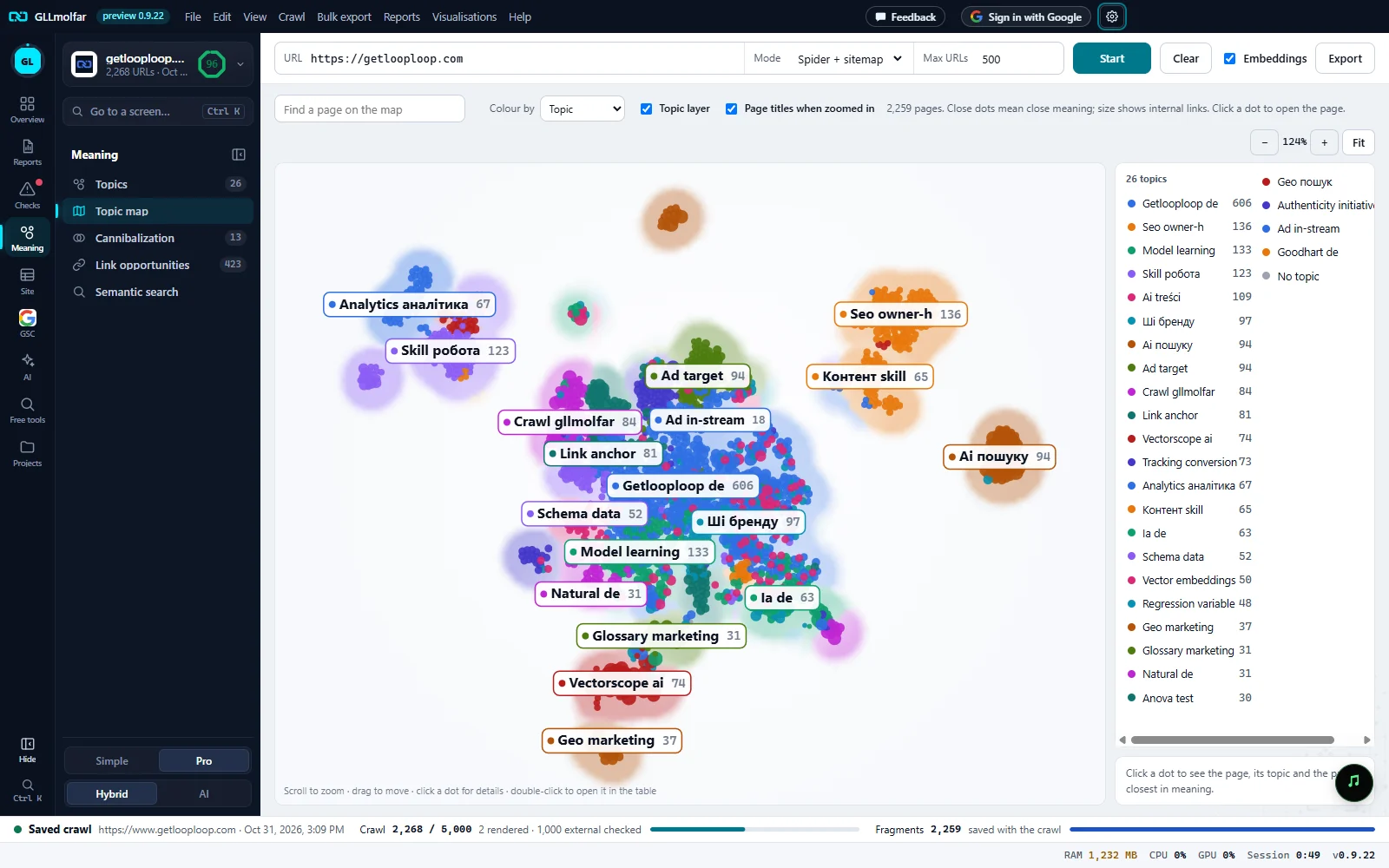
Find a page on the map. Type part of an address or a title. Pages that do not match fade; Enter zooms to the matches.
Colour by. Topic, Status, Indexability or Crawl depth.
Topic layer, page titles. Topic layer shades the area of each topic. Page titles when zoomed in labels the dots once you zoom in.
Zoom and Fit. − and + zoom, the figure is the zoom, Fit shows every page again.
The map. One dot per page. Close dots mean close meaning; a bigger dot has more internal links. Each topic carries a label with its number of pages.
Legend. The topics, largest first, with their pages. A topic puts the map's focus on it; No topic collects the pages that fit none.
Page card. Empty until a dot is clicked. Then: the page, its topic and the pages closest to it in meaning.
Tools
| Tool | What it does |
|---|---|
| Find a page on the map | Matches the address or the title. The count shows as N matches · Enter to zoom; Enter fits the view to them. |
| Colour by | Topic: each topic's colour. Status: 200 OK, Redirect, Error or no response. Indexability: Indexable or Non-indexable. Crawl depth: clicks from start, 0 to 6+, and Not linked (sitemap only). The legend changes to match. |
| Topic layer | Soft coloured areas, one per topic. Drawn only when colouring by topic. |
| Page titles when zoomed in | Labels the best linked pages with their titles once the zoom is high enough. |
| −, +, Fit | Zoom out, zoom in, and show every page. Fit also clears a topic in focus. |
Under the map: Scroll to zoom · drag to move · click a dot for details · double-click to open it in the table. With the map focused, + and − zoom, 0 fits, the arrow keys move and Esc clears the picked page and the focus.
Dots, legend and card
| Element | What it shows |
|---|---|
| A dot | One embedded page. Its size grows with the internal links pointing to it. Grey and smaller: the page fits no topic. |
| Hover | The page's address, title, topic and inlinks. |
| Topic label | The topic's name and its number of pages, placed in the middle of its pages. |
| Legend, N topics | Every topic with its pages. Pressing one fades the others and fits the view to it; pressing it again clears the focus. |
| Card | The full address, the title, the topic with the page's fit, then Status · depth · inlinks · words. Open in table opens the page's details; Open in browser opens the page itself. |
| Similar pages | In the card: the six pages closest in meaning, each with its similarity from 0 to 1. A row moves the map to that page. |
The toolbar's Export saves the pages by topic: topic, address, title, fit, whether the page is the topic's central page, words and inlinks.
States and messages
The map appears once pages are embedded.
No page has been embedded yet. Turn on Embeddings in the toolbar if they are off.
N pages. Quick live layout; a more precise one is drawn when the crawl ends.
The crawl is still running, or the final layout is not ready.
N pages. Close dots mean close meaning; size shows internal links. Click a dot to open the page.
The layout worked out over every page once the crawl ended.
Looking for pages with similar meaning…
The card is finding the closest pages.
A tab with a lock is not open on this account; pressing it says what opens it.
The tab keeps its place in the Meaning panel with a lock.