

Settings › Storage
Describes GLLmolfar 0.9.22current release 0.9.23 · checked 1 Nov 2026
How much space GLLmolfar takes on this disk, and per project. Each project can drop its older crawls or their saved HTML, and the database can be compacted to give freed space back to the disk.
- Where
- Settings › Storage
- Space on this disk
- Since 0.9.16
- Built from
- The crawl database on this computer
- Changes
- Each time Settings opens
On the screen
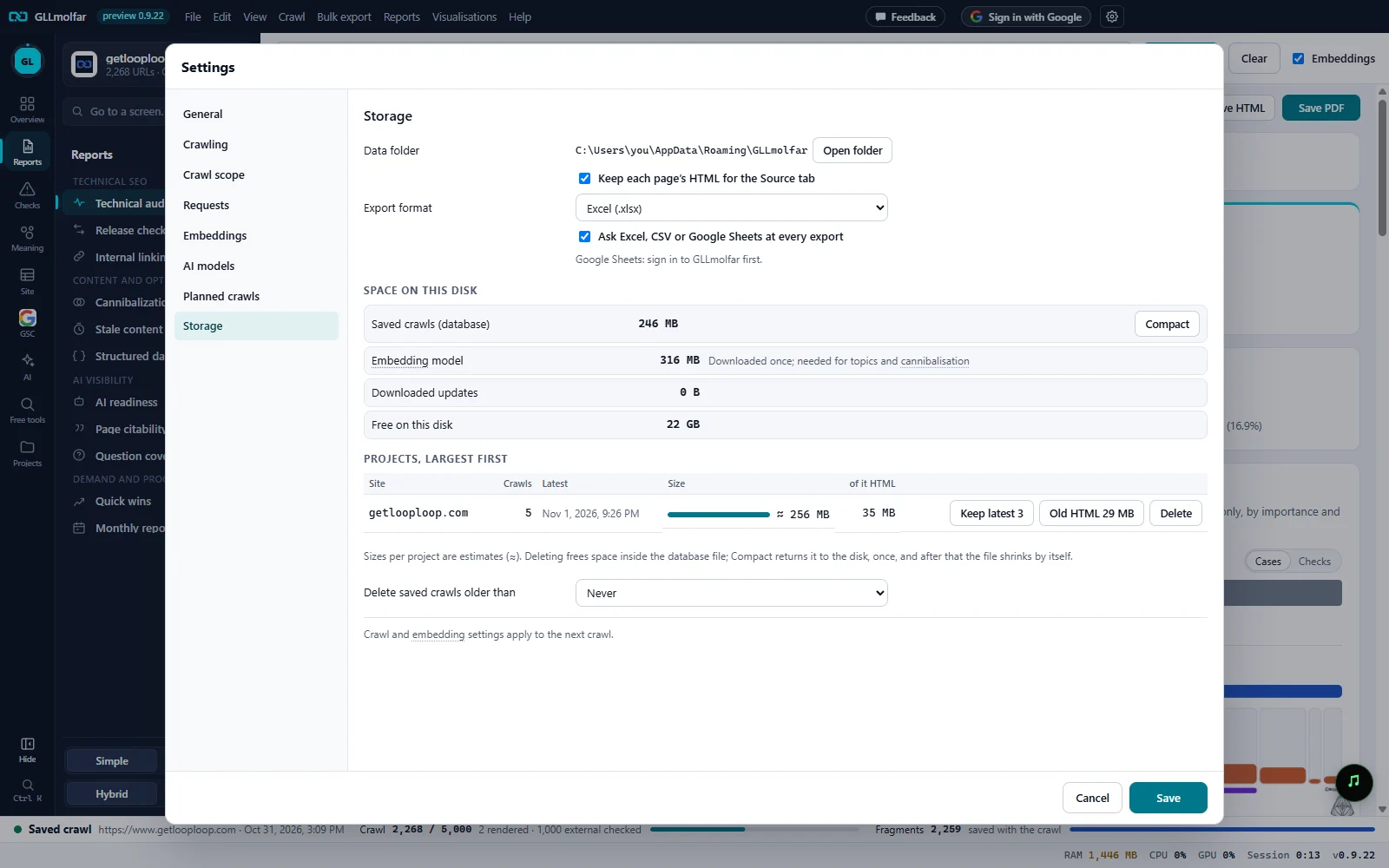
Data folder. Where the crawls and settings live, and Open folder.
HTML and export. Keep each page's HTML for the Source tab, the export format (Excel, CSV or Google Sheets) and whether to ask at every export.
Saved crawls. The size of the crawl database and Compact, with the space freed inside it when there is any.
Model, updates, free space. The embedding model, downloaded installers with Remove when there are any, and what the disk has left.
Projects. Every saved site, largest first: crawls, the latest, the size and how much of it is HTML, with the actions for that project.
Delete saved crawls older than. Never, 30 days, 90 days or 1 year.
What is counted
| Row | What it shows |
|---|---|
| Data folder | The folder that holds the crawl database, the model and the settings. Open folder shows it in the file manager. |
| Keep each page's HTML for the Source tab | On: every crawl saves each page's source, so the Source tab can show it. It is the largest part of a crawl. |
| Export format | Excel (.xlsx), CSV or Google Sheets, with Ask Excel, CSV or Google Sheets at every export. Google Sheets makes a new spreadsheet in your Drive; signed out, the section says Google Sheets: sign in to GLLmolfar first. |
| Delete saved crawls older than | Never, 30 days, 90 days or 1 year. |
| Saved crawls (database) | The size of the crawl database file. N freed inside the file; Compact gives it back to the disk when deletions left free space. After the first compaction: Deleted data shrinks the file on its own. |
| Embedding model | Downloaded once; needed for topics and cannibalisation. |
| Downloaded updates | Installers of versions already installed; safe to remove. The app also removes them itself after an update. |
| Free on this disk | Free space on the disk that holds the data folder. |
Projects and their actions
| Column or button | What it shows or does |
|---|---|
| Site | The project's site. |
| Crawls | How many crawls of it are saved. |
| Latest | When the newest one ran. |
| Size | What the project takes, ≈. |
| of it HTML | How much of that is saved page HTML. |
| Keep latest 3 | Deletes every crawl but the three newest. Asks first, with the number of crawls and the space. |
| Old HTML | Deletes the saved HTML of every crawl but the newest. The crawls stay with their pages, links, findings and history. |
| Delete | Deletes the project and all its crawls. |
States and messages
Counting links · 12 s
A bar fills step by step (pages, links, page vectors, fragments, external links, link checks, saved HTML), with the step and the seconds. Under it: On a large database this takes up to a minute. Nothing is changed; you can close Settings meanwhile.
A deletion or compaction is running; the buttons come back when it ends.
Progress shows in a card at the bottom of the window. Crawls cannot start during a compaction.
Could not read the sizes. Close the settings and open them again.
The sizes could not be read this time. Nothing was changed.
Google refused access to Sheets. Connect again in Settings › Storage.
An export to Google Sheets that Google turned down for want of permission.
Google Sheets is switched off for GLLmolfar on Google's side. Connecting again will not help; export to Excel or CSV for now.
Since 0.9.18 the two refusals are told apart.