

Settings › Embeddings
Describes GLLmolfar 0.9.22current release 0.9.23 · checked 1 Nov 2026
Embeddings are what topics, cannibalization, semantic search and the topic map are built from. This section sets whether a new crawl makes them, how much of each page the model reads, and where the model runs.
- Where
- Settings › Embeddings
- Model
- One model on this computer, the same in every mode
- Built from
- The text of each crawled page
- Changes
- From the next crawl
On the screen
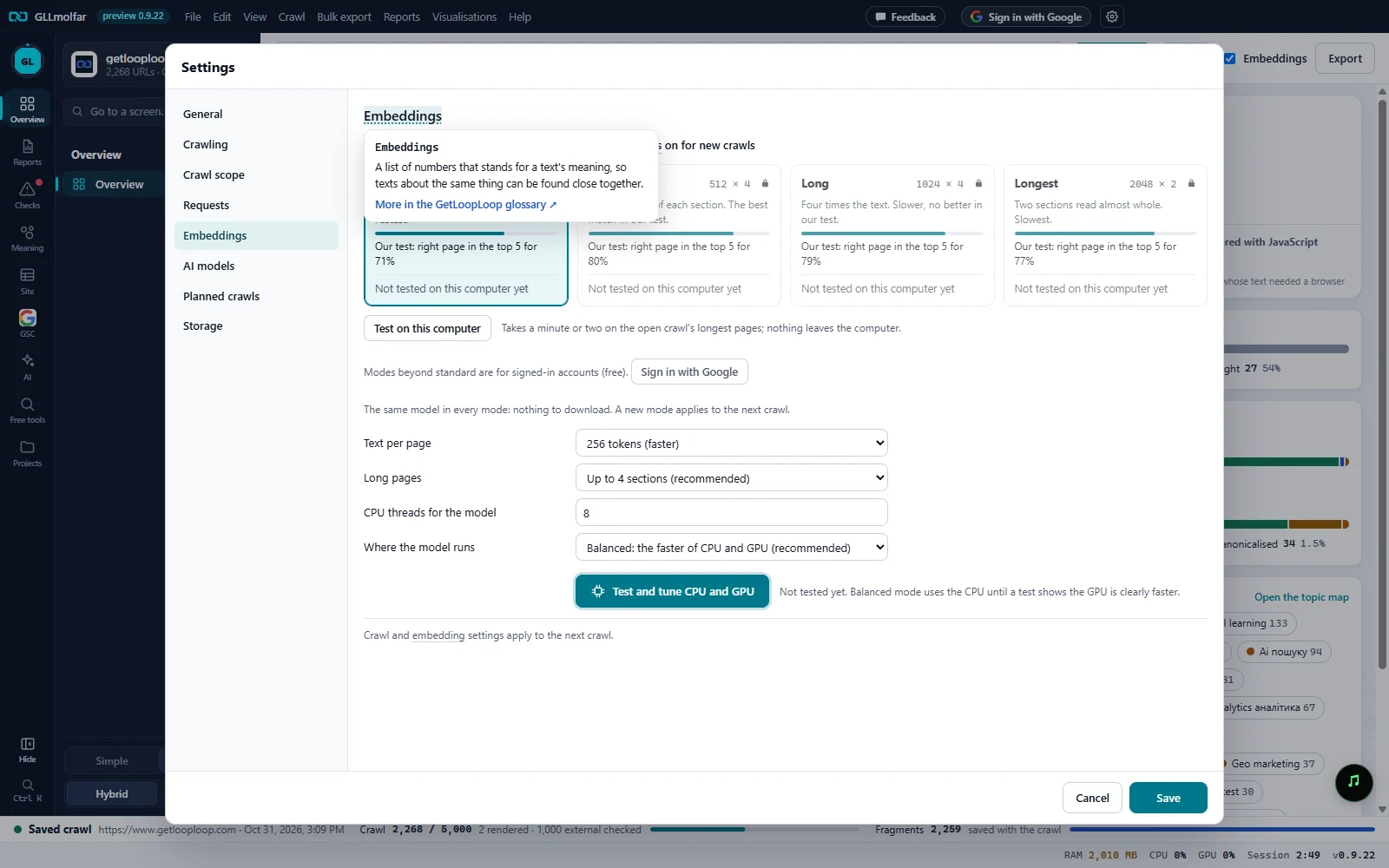
A term explained. Hovering the dotted Embeddings heading: one sentence and More in the GetLoopLoop glossary. Under it, Embeddings on for new crawls.
Modes. Standard, Extended, Long and Longest: how much text per section and how many sections. Each card shows its result in our test and, once tested, its result on this computer.
Test on this computer. Measures every mode on the open crawl's longest pages. Nothing leaves the computer.
Locked modes. Modes beyond standard are for signed-in accounts (free). Sign in with Google stands beside it, and the cards carry a lock.
The model's settings. Text per page and Long pages, the same choice as the cards; then CPU threads for the model and Where the model runs.
Test and tune CPU and GPU. Measures the CPU and the GPU and sets threads and batch sizes for this computer.
The four modes
Every mode runs the same model, so changing mode downloads nothing. A mode is a size of text per section and a number of sections per page, printed on the card as tokens × sections. Our test is a fixed set of pages: a sentence from the second half of each page had to find its own page, and the figure is how often that page was in the first five.
| Card | Size | What the card says | Our test: right page in the top 5 |
|---|---|---|---|
| Standard | 256 × 4 | The start of each of four sections. Fastest. | 71% |
| Extended | 512 × 4 | Twice the text of each section. The best match in our test. | 80% |
| Long | 1024 × 4 | Four times the text. Slower, no better in our test. | 79% |
| Longest | 2048 × 2 | Two sections read almost whole. Slowest. | 77% |
After Test on this computer, each card shows how many pages per second it embedded here, how many times slower than Standard it was, and how often it found its page among the open crawl's pages. Three marks can appear: Most accurate here, Fastest here and Found fewer here. The result is kept until the next test, with the site, the number of pages and the date.
Fields
| Field | Options | What it does |
|---|---|---|
| Embeddings on for new crawls | On or off. On by default. | Whether the toolbar's Embeddings box starts ticked. Without embeddings a crawl has no topics, cannibalization or semantic search. |
| Text per page | 256 tokens (faster), 512 tokens (more precise), 1024 tokens, 2048 tokens (slowest) | How much text of each section the model reads. |
| Long pages | Start of the page only (fastest), Up to 2 sections, Up to 4 sections (recommended), Up to 8 sections (slowest) | How many sections of a long page are read. |
| CPU threads for the model | From 1 to the number of cores. Half the cores by default. | How many processor threads the model uses. |
| Where the model runs | Balanced: the faster of CPU and GPU (recommended), CPU only, GPU (DirectML) | Balanced uses the CPU until a test shows the GPU is clearly faster. The GPU choice and the test exist on Windows only; elsewhere the model runs on the CPU. |
| Test and tune CPU and GPU | A button | Tries thread counts and batch sizes on the CPU, then the GPU, in about two minutes, and keeps the best for this computer. |
States and messages
Not tested on this computer yet
A card before the first test. Only our test's figure is shown.
Mode 2 of 4: 512 × 4…
The mode test is running, one mode after another.
Wait until the crawl and its embeddings finish, then test.
A test cannot run beside a crawl.
Open a crawl with saved pages first: the test uses its longest pages.
The mode test needs an open crawl.
The test stopped: …
The reason follows the colon. Settings are unchanged.
Not tested yet. Balanced mode uses the CPU until a test shows the GPU is clearly faster.
Before Test and tune CPU and GPU has run.
Testing thread counts and batch sizes on the CPU, then the GPU: about two minutes…
The device test is running.
Balanced mode stays on the CPU: the GPU is not 1.5× faster, and a built-in GPU takes its memory from the same RAM.
The test's verdict, with the measured rates before it.
Balanced mode uses the GPU: it is worth its memory here.
The test's verdict, with the measured rates before it.
The GPU could not run the model here; CPU … texts/s. Balanced mode uses the CPU.
The model runs on the CPU.