

Batch fixes
Describes GLLmolfar 0.9.22current release 0.9.23 · checked 1 Nov 2026
The problems of the crawl, grouped by where one change fixes many pages: a server setting, the shared layout, a page template, or the texts of one topic. Each batch says where to change it, what to fix once, and which pages it covers.
- Where
- Checks › Batch fixes
- Mode
- Simple and Pro
- Built from
- The checks of the open crawl and its topics
- Changes
- When you open another crawl
On the screen
On the left, the batches, the one that fixes the most first. On the right, the batch you picked: where to change it, what to fix, and the pages.
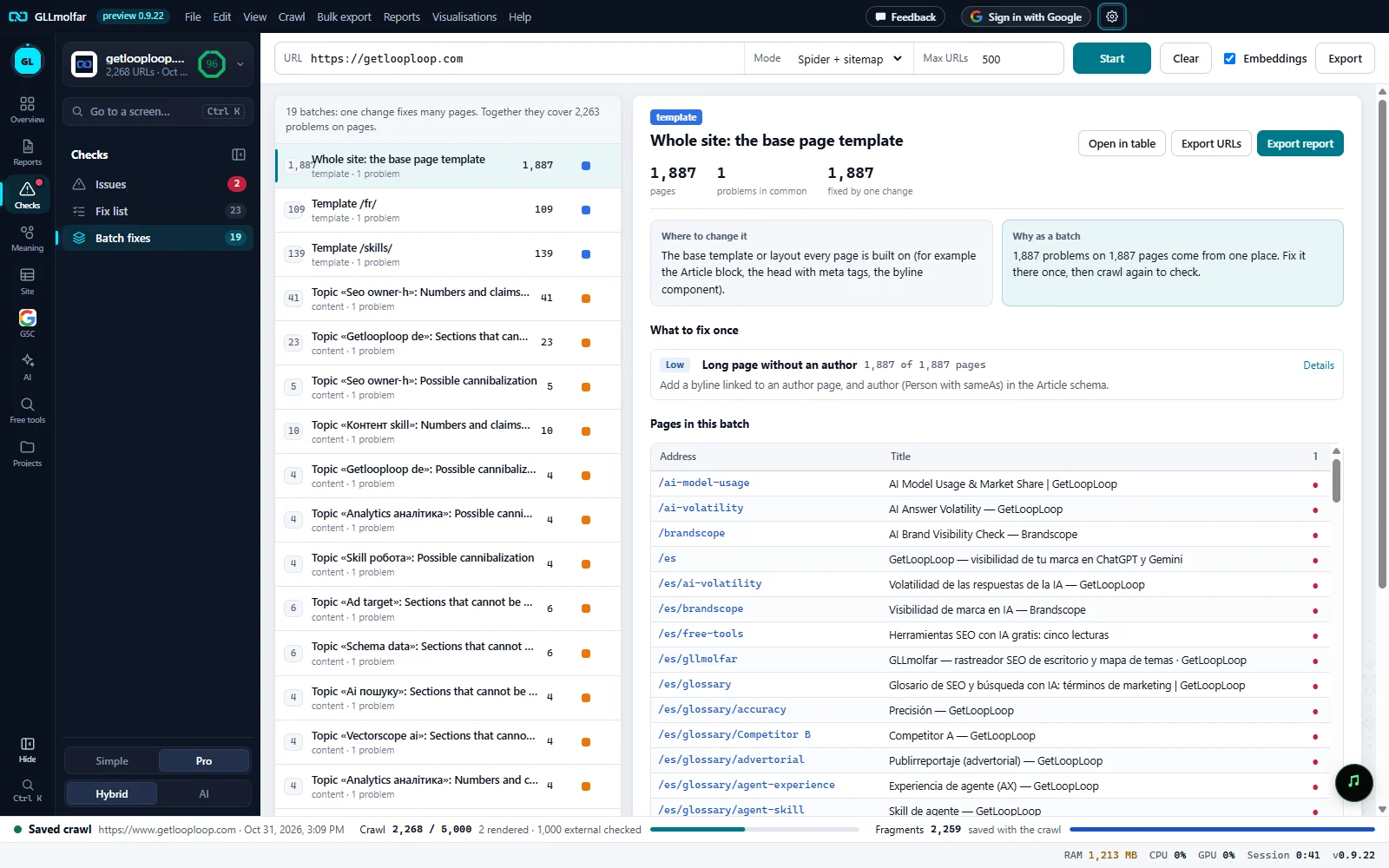
How many. N batches: one change fixes many pages. Together they cover M problems on pages.
Batches. Pages in the batch, its name, its cause and number of problems, the problems on pages it fixes, and a square coloured by cause.
The batch. Its cause, its topic when it has one, its name, and the figures: pages, problems in common, fixed by one change.
Actions. Open in table, Export URLs and Export report.
Where and why. Where to change it and Why as a batch.
What to fix once. Each problem of the batch with its importance, how many of the pages have it, how to fix it, and Details.
Pages in this batch. Each page with its title and a mark per problem.
Kinds of batches
| Name on screen | Cause | When it appears | Where to change it |
|---|---|---|---|
| Whole site: server and CDN settings | server | A server problem on most pages, in more than one folder. | Server, CDN or hosting settings (headers, redirects, caching, bot protection). Usually one config file or one dashboard. |
| Whole site: shared layout (menu, footer) | shared layout | A layout problem on most pages, in more than one folder. | The shared layout every page uses: header, menu, footer, sidebars. |
| Whole site: the base page template | template | A template problem on most pages, in more than one folder. | The base template or layout every page is built on (for example the Article block, the head with meta tags, the byline component). |
| Whole site: linking and sitemap | linking | A linking or sitemap problem on most pages, in more than one folder. | Navigation, hub pages and the sitemap generator. |
| Template {folder} | template | A folder of at least three pages where most of them share a problem. | The page template that renders that folder: one file in the CMS or the codebase sets these fields for every page in it. |
| Top-level pages (/page) | template | The same, for pages at the root of the site. | The page template that renders them. |
| Topic «{topic}»: {check} | content | One content problem on three or more pages of one topic. | The texts themselves: one brief for the editors covers every page in the batch. |
| {folder}: {check} | content | The same, grouped by folder when the pages have no topic. | The texts themselves. |
- Only checks on pages count, and not those rated Insight.
- Batches are ordered by what they fix: the importance of each problem times the pages that have it, added up.
- The number beside Batch fixes in the Checks panel is the number of batches. It appears once the crawl has ended.
The detail of a batch
| Block | What it shows |
|---|---|
| pages | Pages in the batch. |
| problems in common | How many checks the batch groups. |
| fixed by one change | Problems on pages the batch fixes: each check counted once per page that has it. |
| pages in {folder} | For a template batch: every HTML page in that folder, including those without the problems. |
| Where to change it | The place to make the change, by cause (see the table above). |
| Why as a batch | N problems on P pages come from one place. Fix it there once, then crawl again to check. |
| What to fix once | Each problem: importance, name, N of P pages, how to fix it, and Details, which opens that check in Issues. |
| Pages in this batch | Address, Title, and a numbered column for each of the first six problems: ● the page has it, ✓ it does not. A line under the table names the numbered problems. Up to 300 pages. |
In a template batch, pages that do not share every problem are highlighted, with N pages do not share every problem (highlighted): check whether they use a different template.
| Button | What it does |
|---|---|
| Open in table | Shows the batch's pages in All pages, with the batch's name as a filter you can clear. |
| Export URLs | Saves Address, Title and a column per problem, Yes where the page has it. |
| Export report | Saves a PDF about this batch. |
| Export (toolbar) | Every batch, one row per page: Group, Batch, Cause, Pages in group, Address, Title, Issues on this page. |
States and messages
Enter a site address above and press Start.
The tab is empty until a crawl is open.
No batches: the problems found are on single pages. See Issues.
No problem is shared widely enough to be fixed in one place.