

The crawl screen
Describes GLLmolfar 0.9.22current release 0.9.23 · checked 1 Nov 2026
While a crawl runs, the Overview tab shows the run itself: how far it is, what each stage is doing and the last pages read. It stays until the fragments and the topics are done, then the Overview takes its place.
- Where
- Overview, during a run
- Mode
- Simple and Pro
- Built from
- The crawl in progress
- Changes
- Every second
On the screen
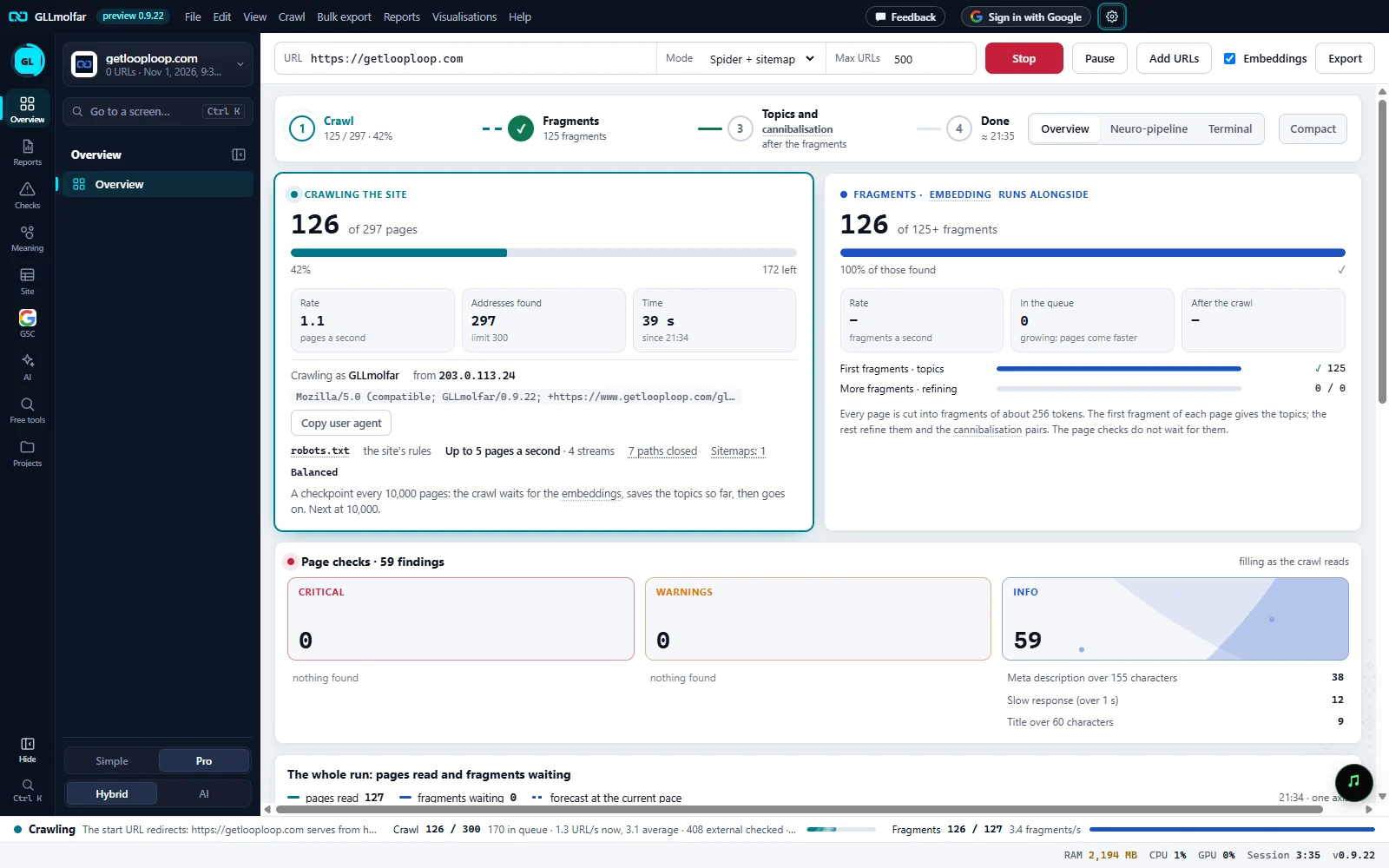
Stages. Crawl, Fragments, Topics and cannibalisation, Done. The stage in progress is marked; a finished one gets a tick. Done shows the forecast end time.
Views. Overview, Neuro-pipeline and Terminal show the same run three ways. Compact keeps each card to its numbers and the load chart as a small strip.
Crawl card. Pages read out of the target, the rate in pages a second, addresses found against the limit, and the time since the start.
Fragments card. Fragments embedded out of those found, fragments a second, the queue, and when the fragments end after the crawl. Two bars: first fragments, which give the topics, and more fragments, which refine them.
Rules of the run. Who the site sees (the user agent, to copy for a log search, and this computer's address), what robots.txt allows, and in Balanced mode the next checkpoint.
Page checks. Critical, warnings and info found so far, with the most frequent checks under each. The counts grow as the crawl reads.
The whole run. One chart of pages read and fragments waiting, with the forecast at the current pace. Below it: every fragment as a cell, the last pages read, and the load by stage.
The four stages
| Stage | While it runs | When it is done |
|---|---|---|
| Crawl | N / target · percent | N pages · time taken |
| Fragments | alongside · percent of those found, then embedding · percent | N fragments |
| Topics and cannibalisation | after the fragments, then building the topics… | N topics · N pairs |
| Done | ≈ the forecast end time | a tick |
Fragments are the pieces of page text the model on this computer turns into vectors. Topics and cannibalisation pairs are built from them, so the third stage waits for the second.
Cards and charts
| Block | What it shows |
|---|---|
| Crawling the site | Pages read of N pages, the pages left, the rate, Addresses found with the limit, and the time since the start. |
| Fragments | Fragments embedded of N fragments, fragments a second, and the queue: growing when pages come faster than the model reads them, falling, or empty. |
| robots.txt | Whose rules the crawl follows (the site's, your own from Settings, or none), the pace, the number of streams, closed paths, sitemaps, and the AI bots the site shuts out. |
| Balanced | In Balanced mode: the next checkpoint, or the one under way, where the crawl waits for the embeddings and saves the topics so far. |
| Page checks | Findings at three levels (critical, warnings, info) filling as the crawl reads, the most frequent checks under each. When the crawl ends, a check opens its pages. |
| The whole run | One chart: pages read, fragments waiting, the forecast at the current pace, and the moment the crawl completed. |
| Fragments mosaic | Each fragment as a cell: first fragments, more fragments, in the queue, and pages not found yet. |
| Last pages read | The last eight addresses with their status code, response time and a note: rendered, redirect or CAPTCHA. Click or Enter opens the page in the browser. |
| Load by stage | Pages a second for each stage over the run. The lines start after the first seconds. |
Views and Compact
- Overview — the cards and charts above.
- Neuro-pipeline — the same run drawn as a network of its stages.
- Terminal — the same run drawn as a terminal, with the topics layer as tiles of dots.
- Compact — in Overview only: each card keeps its numbers, the fragments shrink to a strip, and the run chart and Load by stage stay as small, low strips: the stages' pace and what held them, no more. The run fits beside other work, and the app remembers the choice.
When the site asks for a CAPTCHA
A site may answer with a bot check instead of its pages — in place, or by sending every page to a check page. The crawl then pauses, and a window opens with the site's check for you to pass. A bar over the app says The crawl is paused: the site asks for a CAPTCHA. Once the site lets you through, the crawl goes on by itself, with the check passed.
| Button on the bar | What it does |
|---|---|
| Show the window | Brings the check's window back to the front. |
| I passed it, continue | Tries the page again and resumes the crawl now. |
| Skip checks in this crawl | Goes on without stopping at checks again; pages that answer with one are noted as CAPTCHA. Closing the check's window does the same. |
Settings › Crawling holds the switch, on by default: At a CAPTCHA, pause and open it for me to pass. Off, the crawl does not stop, and such pages are counted as met with a CAPTCHA.
After the crawl
When the crawl ends but the model is still reading fragments, the screen says Stage 2 of 2 · finishing: pages crawled and the time, fragments read out of the total, and about how long is left. Ready now lists the fixes that do not wait for the fragments.
Embeddings are off
Without them there are no topics, cannibalisation pairs or meaning search. Switch them on in the toolbar; the queue keeps what is waiting.
Scored when the crawl ends: the checks need every page.
The score waits for the last page, so the screen does not guess it.
This crawl stops at N URLs; M found so far.
The crawl reached the URL limit set when it started.