

Overview
Describes GLLmolfar 0.9.22current release 0.9.23 · checked 1 Nov 2026
The first tab once a crawl has finished. It shows one score for the site, six counters, the fixes to make first, and what the site is about. Every number on it opens the pages behind it.
- Where
- Overview, the first section of the rail
- Mode
- Simple and Pro
- Built from
- The open crawl
- Changes
- When you open another crawl
On the screen
At the top, the score and six counters. Below them, two columns: on the left what to fix and how deep the site is; on the right the checks by importance, the pages, the topics and the earlier crawls. With Search Console connected, its figures join both columns.
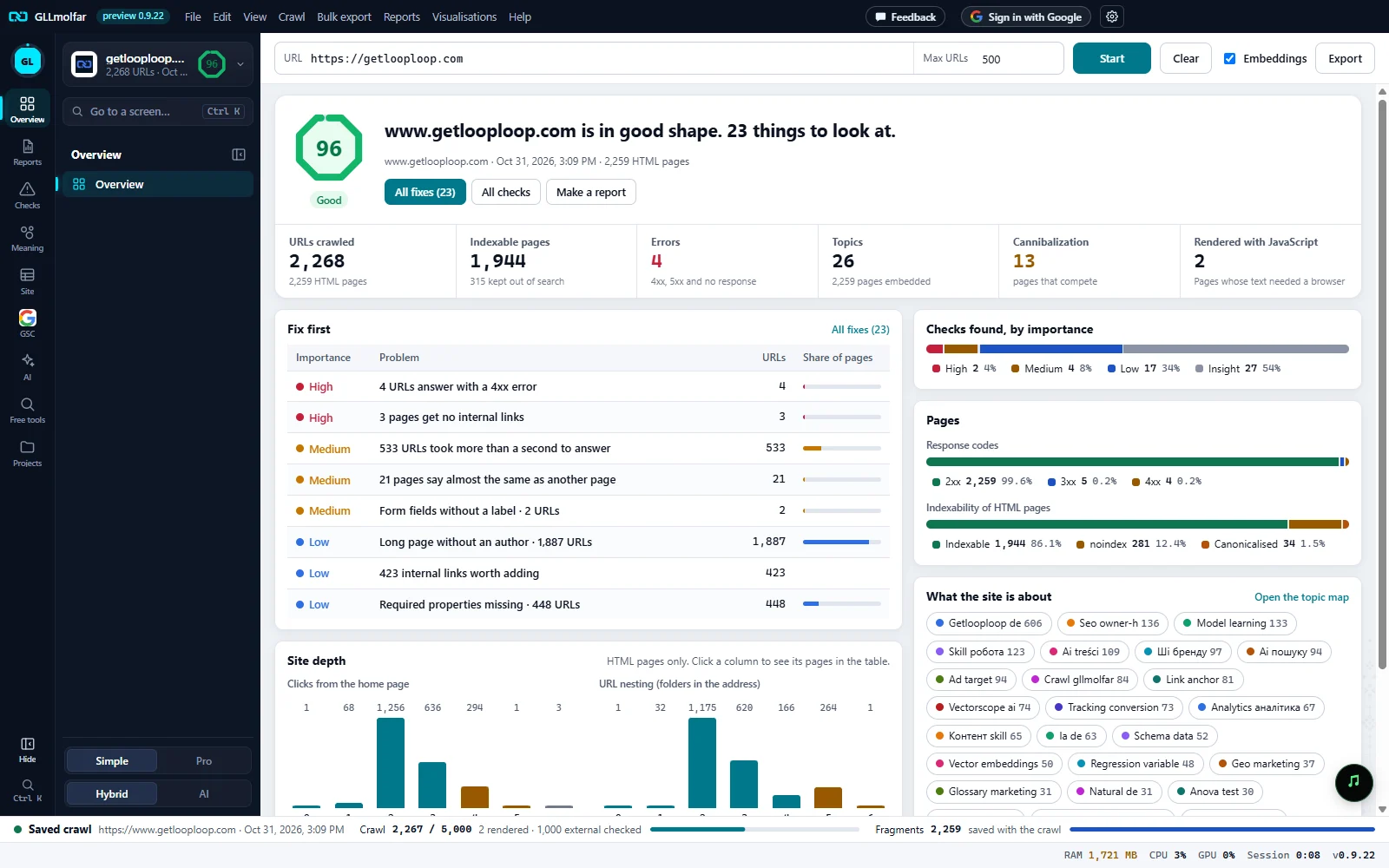
Site health. A score from 0 to 100 with its band, and one sentence about the site with the number of things to fix. Under it: the site, the crawl's date and the number of HTML pages.
Actions. All fixes (N) opens the Fix list, All checks opens Issues, Make a report builds a PDF or HTML report of this crawl.
Counters. URLs crawled, indexable pages, errors, topics, cannibalization and pages rendered with JavaScript. Each opens the pages it counts.
Fix first. The first eight fixes, most important first: importance, the problem, how many URLs, and the share of pages it touches. A row opens the fix with its explanation.
Checks and pages. The checks found, by importance, then two bars: response codes and the indexability of HTML pages. Each part of a bar opens its pages.
What the site is about. The topics, each with its number of pages. A topic opens its pages; Open the topic map opens the map.
Site depth. HTML pages by clicks from the home page, and by folders in the address. A column opens its pages.
Site health
Each failed check takes away points by its importance: critical 5, high 3, medium 2, low 1. Insights take away nothing. A check takes away its full weight once it touches a third of the pages, and part of it below that. The score is the share of points left.
| Score | Band | Sentence on screen |
|---|---|---|
| 80–100 | good | {site} is in good shape. N things to look at. |
| 55–79 | fair | {site} needs some work. N things to fix. |
| 0–54 | poor | {site} has serious problems. N things to fix, most important first. |
Counters
| Counter | What it shows | Click opens |
|---|---|---|
| URLs crawled | Every address fetched: pages, images, files, redirects. The line under it counts HTML pages. | All pages |
| Indexable pages | HTML pages a search engine may index. The line under it counts the ones kept out of search. | The indexable pages |
| Errors | Addresses that answered 4xx or 5xx, or did not answer. Red when above zero. | Those addresses |
| Topics | Groups of pages by meaning. The line under it counts the pages embedded. A dash until topics are ready. | Topics |
| Cannibalization | Pairs of pages that compete for the same meaning. Amber when above zero. | Cannibalization |
| Rendered with JavaScript | Pages whose text needed a browser to appear. | Those pages |
The two columns
| Block | What it shows |
|---|---|
| Fix first | Up to eight fixes, the heaviest first: importance, the problem, the number of URLs, and a bar for the share of pages. All fixes (N) in its head when there are more. |
| Lost in Google | Pages that lost Google clicks, worst first, with clicks before and after and the reason. Shown only with Search Console connected and only when something was lost. |
| Site depth | Two charts of HTML pages: clicks from the home page, and folders in the address. A column opens its pages. |
| Search Console | Clicks, impressions, CTR and position for the last 28 days against the 28 before, a line of daily clicks, and this week's new, lost, rising and falling queries. Not connected: a button to connect it. |
| Checks found, by importance | How many checks failed at each level: critical, high, medium, low, insight. |
| Pages | Response codes (2xx, 3xx, 4xx, 5xx, no response) and the indexability of HTML pages, each with the reason a page is kept out. |
| What the site is about | The topics as chips, each with its number of pages. A chip opens the topic's pages; Open the topic map opens the map. |
| Earlier crawls | How many times the site was crawled before and when last. Open history compares two crawls. |
States and messages
Enter a site address above and press Start.
The start screen takes the tab's place, with the sites already crawled one click away.
Scored when the crawl ends: the checks need every page.
While a crawl runs, the tab shows the run instead. See The crawl screen.
Topics appear once pages are embedded. Turn on Embeddings if they are off.
Topics and Cannibalization show a dash, and the topics block says why.