

Cannibalization
Describes GLLmolfar 0.9.22current release 0.9.23 · checked 1 Nov 2026
Pages of one site that say almost the same thing, so they may compete for the same searches. They are joined into groups. A group opens with the page to keep, the three ways to resolve it, the pages side by side, and their text compared passage by passage.
- Where
- Meaning › Cannibalization
- Mode
- Pro
- Built from
- The open crawl's embeddings and topics
- Changes
- Live during the crawl; final when it ends
On the screen
On the left, the groups, closest first. On the right, the group picked. Visualisation swaps both for charts of every group at once. The separate Cannibalization report is described under Reports.
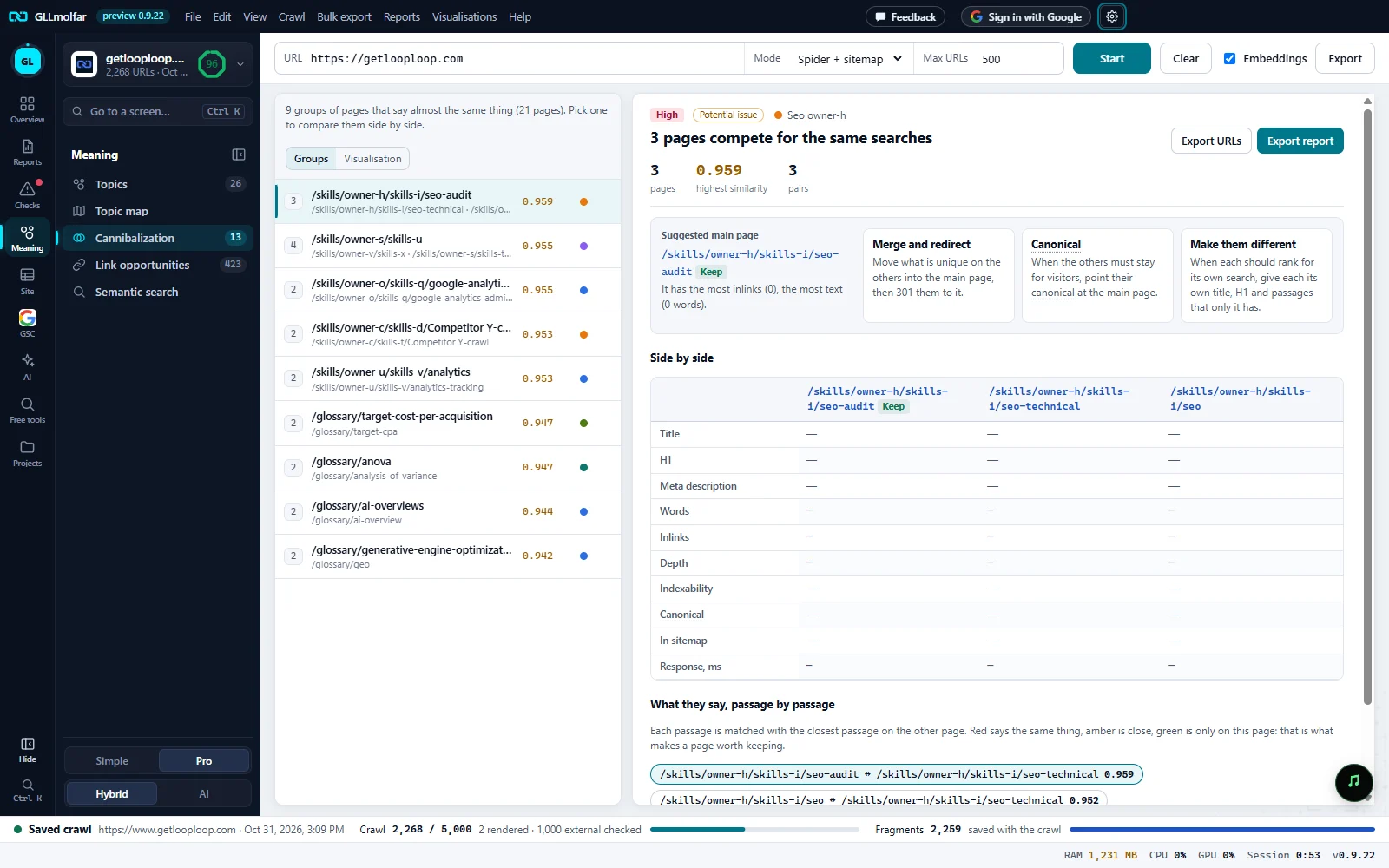
Groups and Visualisation. How many groups and pages, and the switch between the list and the charts.
The group. Its importance, its type, its topic, and how many pages compete.
Export URLs, Export report. The group's pages and pairs as a table, or a report of this group.
Figures. Pages, the highest similarity in the group, and its number of pairs.
Group list. One row per group: its pages, the page to keep, the next two, the highest similarity and the topic's colour.
Suggested main page. The page to keep and why, next to three ways to resolve the group.
Side by side. Up to five pages of the group in columns, field by field. A field with the same text on every page is marked same.
What counts as a pair
Two pages form a pair when their texts are close in meaning: similarity 0.94 or more, on a scale from 0 to 1. Pairs that share a page are joined into one group. A group's number is the highest similarity of its pairs: amber below 0.97, red at 0.97 and above, where the texts are near copies.
- Both pages are in the same topic and in the same language.
- Both pages are indexable, and neither has its canonical pointing at the other.
- One page under two tracking tags, two pages of one paginated list, and a page with its own translation in another language folder are not pairs.
When there are very many, the analysis keeps the strongest pairs. The list then ends with Showing {n} of {total}. Export CSV for the full list., and the export notes that the analysis kept the {n} strongest of {total} similar pairs.
A group, on the right
| Block | What it shows |
|---|---|
| Heading | High and Potential issue, the topic, and N pages compete for the same searches. |
| pages · highest similarity · pairs | The size of the group, its closest pair (red at 0.97 and above), and how many pairs it has. |
| Suggested main page | The strongest page, marked Keep: indexable, most linked, closest to the home page, longest. It has the most inlinks, the fewest clicks from home, the most text, where it does. When no page is clearly stronger: No page is clearly stronger: pick the one that best answers the search. |
| Merge and redirect | Move what is unique on the others into the main page, then 301 them to it. |
| Canonical | When the others must stay for visitors, point their canonical at the main page. |
| Make them different | When each should rank for its own search, give each its own title, H1 and passages that only it has. |
| Side by side | Title, H1, Meta description, Words, Inlinks, Depth, Indexability, Canonical, In sitemap and Response, ms, for up to five pages. A text field equal on every page is shaded and tagged same. A larger group says how many more pages are in the list. |
What they say, passage by passage
Under the table, two pages of the group are read and cut into passages, and each passage is matched with the closest passage on the other page. With more than one pair, chips above it pick the pair, each with its similarity.
| Element | What it shows |
|---|---|
| of A repeated on B, of B repeated on A | The share of each page's text that the other page also says. |
| page vectors alike | The similarity of the two pages as a whole. |
| Words both use, Only on A, Only on B | The words the pages share, and the words only one of them has. |
| says the same | Red: the passage says what a passage on the other page says. It names that passage's number and the similarity. |
| close | Amber: a passage on the other page is close to it. |
| only here | Green: no passage on the other page says this. This is what makes a page worth keeping. |
Pointing at a passage lights the passage it matches. The line under the columns says where the text came from: Text from the saved HTML., or that the page was requested once more to read its text, and Compared with the built-in model on this computer.
Visualisation
| Block | What it shows |
|---|---|
| Figures | Groups; Pages that compete, with their share of embedded pages; Pairs; Near-copy pairs. |
| Cannibalization map | One circle per group, in rows by topic. Its pages sit on the rim; a line joins two pages that say almost the same, red for near copies (0.97 and above). Click a group to pick it, click again to open it in the list. |
| How close the pairs are | Pairs by the similarity of their text. Red bars are near copies. |
| Group size | Groups by how many pages compete in them. |
| Inside a group | The picked group as a grid: each cell is the similarity of two of its pages; an empty cell is a pair below the threshold. Open in the list opens the group. |
| Cannibalization by topic | Pages that compete with another page, per topic, and their share of the topic. |
The toolbar's Export saves every group with its pages and pairs.
States and messages
Pairs appear once pages are embedded.
No topics have been worked out yet. Turn on Embeddings in the toolbar if they are off.
No pages that mean the same. Good.
No two pages pass the rule above.
Embeddings are off. Turn them on to compare by meaning.
Shown in place of the passages: the comparison passage by passage needs the model.
A tab with a lock is not open on this account; pressing it says what opens it.
The tab keeps its place in the Meaning panel with a lock.