

Projects
Describes GLLmolfar 0.9.22current release 0.9.23 · checked 1 Nov 2026
Every site crawled on this computer, as a card or a table row. Numbers compare the last crawl with the one before, and one line on each card says what to read first.
- Where
- Projects › Projects in the rail
- Mode
- Simple and Pro
- Built from
- The saved crawls on this computer
- Changes
- After each crawl, deletion or domain lookup
On the screen
At the top, four numbers for all sites together. Under them, a search box, filters, the order and the view. Then one card per site.
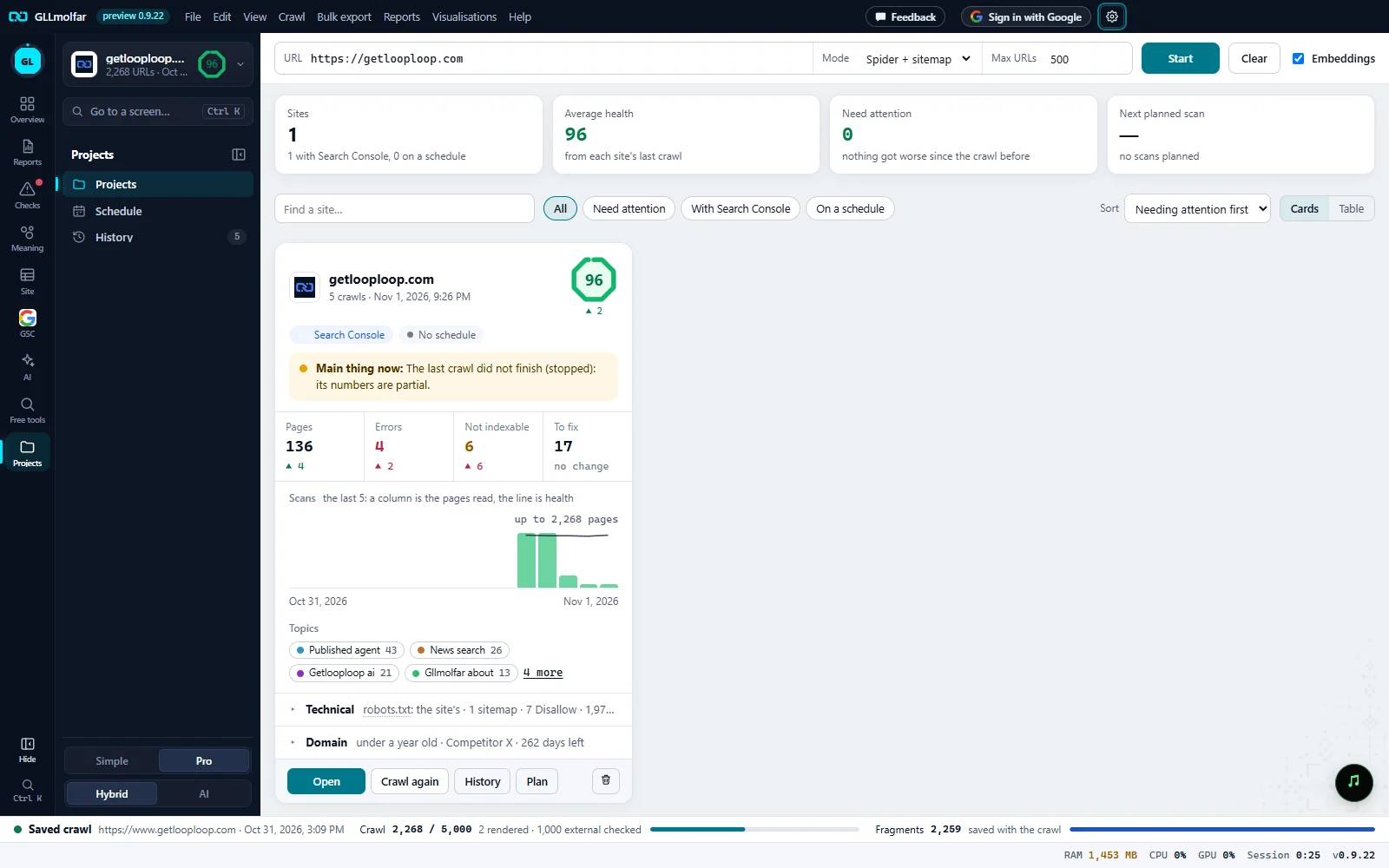
Summary. Sites, Average health, Need attention and Next planned scan, for every site together.
Toolbar. Find a site…, the filters, Sort and the switch between Cards and Table.
Card head. The site, its number of crawls and the date of the last one, the health score with its change, the schedule, and Main thing now:.
Four numbers. Pages, Errors, Not indexable and To fix from the last crawl, each with its change since the crawl before.
Scans and topics. The last scans as columns: the height is the pages read, the line is health. Under them, the site's topics.
Technical and Domain. robots.txt, the sitemap and the user agent of the last crawl; the domain's age, the registrar and the days left before it expires.
Actions. Open, Crawl again, History, Plan and the bin, which deletes the project.
The four numbers at the top
| Tile | What it shows | Line under it |
|---|---|---|
| Sites | How many sites have saved crawls. | {g} with Search Console, {s} on a schedule |
| Average health | The average health score of each site's last crawl. | from each site's last crawl |
| Need attention | Sites whose Main thing now is a problem that got worse. | The first such site and its line, or nothing got worse since the crawl before |
| Next planned scan | The date of the next planned crawl of any site. | The site and the time, or no scans planned |
Search, filters, order and view
| Control | Options |
|---|---|
| Find a site… | Keeps the sites whose name contains the text. |
| Filter | All, Need attention, With Search Console, On a schedule. |
| Sort | Needing attention first (the default), Health, lowest first, Last crawl, Name. |
| View | Cards or Table. The choice is kept while the app is open. |
The table has one row per site: Site, Health, Pages, Errors, Not indexable, To fix, Last crawl, Next scan and Delete. The site's name opens its last crawl.
One card
| Part | What it shows or does |
|---|---|
| Icon | The site's own favicon; its first letter while it loads or when there is none. |
| Health | The score of the last crawl, with ▲ or ▼ and the change since the crawl before. A dash until the crawl is opened once. |
| Search Console | Shown when the site is connected to Search Console. |
| Schedule | The next planned crawl, such as Every day at 02:00, which opens Schedule; or No schedule. |
| Main thing now: | One line about what to read first. See the table below. |
| Pages, Errors, Not indexable, To fix | From the last crawl. Under each, the change since the crawl before, or no change. |
| Scans | the last N: a column is the pages read, the line is health, with up to N pages for the tallest column. A column's colour is its health; a column opens that crawl. With one crawl: Crawl again to see the trend. |
| Topics | The first four topics with their number of pages; N more shows the rest and fewer folds them. A topic opens the crawl and shows that topic's pages. |
| Technical | robots.txt (the site's or custom, sitemaps, Disallow lines, Crawl-delay), the sitemap (N URLs listed or not found), the user agent the site was last crawled as, and CAPTCHA pages if there were any. |
| Domain | The domain's age, the registrar and the days left. Opened: Registered, Expires, Record changed, Registrar, Owner, Name servers, Server IP, Email (MX), Protection (DNSSEC and transfer lock) and where the record came from. ↻ looks it up again. |
Main thing now
The app checks these in order and shows the first that applies.
| Line on the card | When |
|---|---|
| The last crawl did not finish ({state}): its numbers are partial. | The last crawl was stopped, failed or was interrupted. |
| N pages with errors, N more than the crawl before. | Errors grew. |
| N pages not indexable, N more than the crawl before. | Non-indexable pages grew. |
| Health fell by N since the crawl before. | The health score dropped. |
| N pages answered with a bot check (CAPTCHA): the crawl did not see them. | Pages answered with a bot check. |
| N pages answer with an error. | There are errors, but no more than before. |
| Open this crawl once to get its health score. | The last crawl has no score yet. |
| Nothing got worse. N fixes left on the list. | There are fixes on the list. |
| Nothing got worse and nothing is on the fix list. | Nothing to fix. |
More errors, more non-indexable pages and falling health are shown in red; those are what Need attention counts.
Buttons
| Button | What it does |
|---|---|
| Open | Opens the last crawl on the Overview. |
| Crawl again | Starts a new crawl of the site's address. |
| History | Opens the last crawl in History. |
| Plan | Opens Plan a crawl with the site's address filled in. See Schedule. |
| Delete project | Deletes every saved crawl of the site, its planned crawls and its domain data, after one confirmation. A Search Console link stays. |
States and messages
No crawls saved yet. Crawl a site and it will get its card here.
Nothing has been crawled on this computer yet.
No site matches this filter.
The search or the filter left no site.
Looking up…
The domain record is being read.
Delete the project {site}?
Asks first, with the number of scans and of planned scans. After it: Project {site} deleted: N scans.
Stop the running crawl first.
A project, a topic or Crawl again cannot be used while a crawl runs.
This topic is not in the crawl's analysis any more.
The topic on the card was not found when the crawl opened.