

Issues
Describes GLLmolfar 0.9.22current release 0.9.23 · checked 1 Nov 2026
Every check the crawl failed, in one list, most important first. Pick a check to see why it matters, how to fix it and exactly which URLs have it. The checks that passed are one click away.
- Where
- Checks › Issues
- Mode
- Pro
- Built from
- The open crawl
- Changes
- When you open another crawl
On the screen
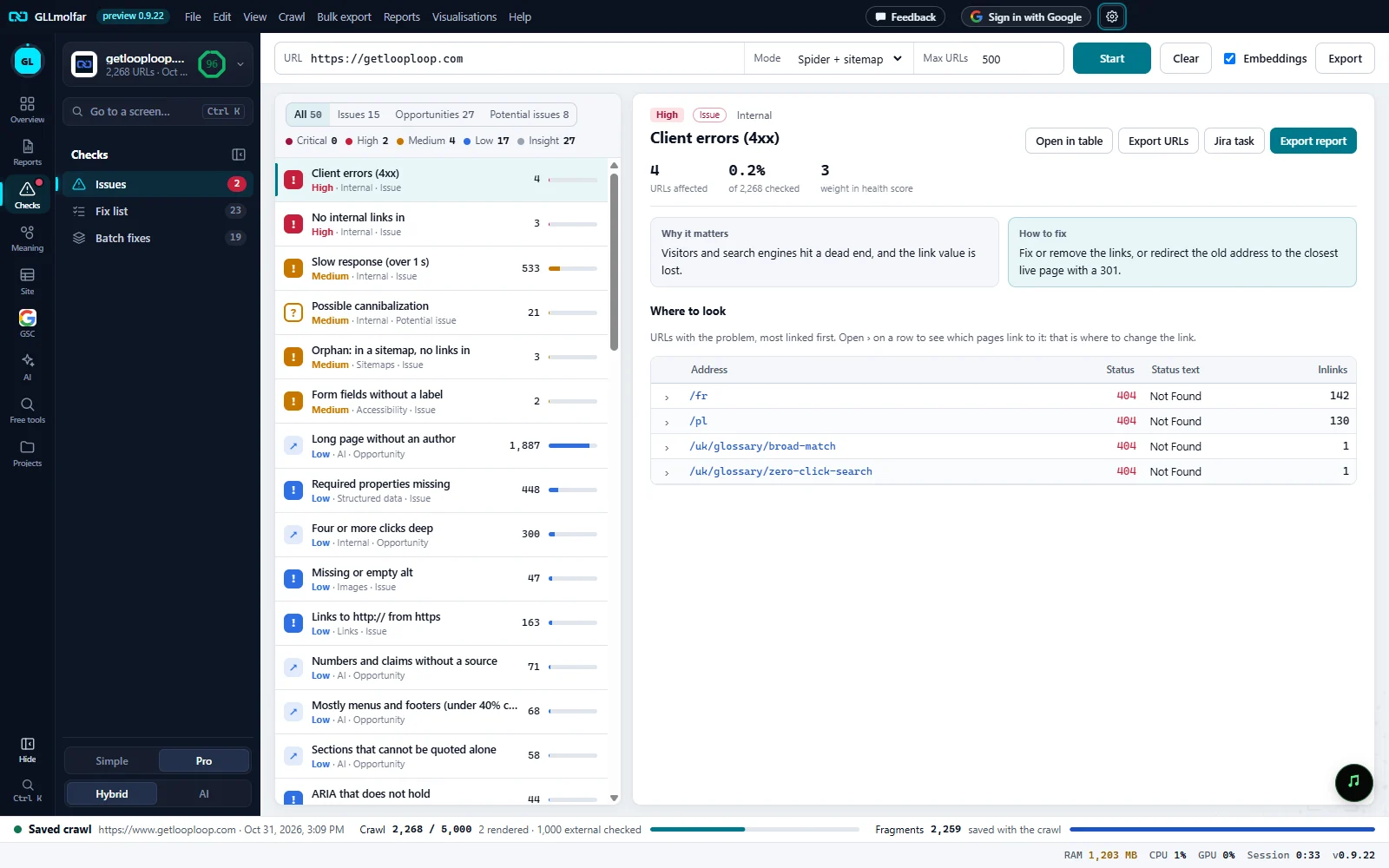
On the left, the checks with findings. On the right, the one you picked: what it is, how many URLs it touches, why it matters, how to fix it, and where to look.
Checks section. The Checks section in the strip of sections; the panel beside it holds Issues, Fix list and Batch fixes. A red dot marks it while critical or high checks have findings.
Type and importance. All, Issues, Opportunities and Potential issues, each with its count. Under them, how many checks failed at each level: Critical, High, Medium, Low, Insight.
Checks. One row per check with findings: its name, its importance, the column set it belongs to and its type, the number of URLs and a bar for the share of pages.
The check. Importance, type and column set, the check's name, and three figures: URLs affected, the share of N checked, and the weight in health score.
Actions. Open in table, Export URLs, Jira task and Export report.
Why and how. Why it matters and How to fix, written for this check.
Where to look. The URLs with the problem, most linked first, with the columns that show it.
The list of checks
| Part | What it shows |
|---|---|
| Type buttons | All, Issues, Opportunities, Potential issues. Each shows how many checks of that type have findings; pressing one limits the list to it. |
| Importance line | Critical, High, Medium, Low and Insight, each with the number of checks found at that level. |
| Row | An icon for the type (! issue, ↗ opportunity, ? potential issue), the check's name, a line with importance · column set · type, the number of URLs, and a bar for the share of the pages it was checked on. |
| Order | By importance, then by the share of pages the check touches. |
| Show passed checks (N) | At the foot of the list. Opens the checks that found nothing, each with a ✓. Hide passed checks folds them again. |
| Importance | Weight in health score |
|---|---|
| Critical | 5 |
| High | 3 |
| Medium | 2 |
| Low | 1 |
| Insight | 0: shown, never weighed |
The detail of a check
| Block | What it shows |
|---|---|
| Head | Importance, type and the column set the check belongs to (Internal, Response codes, Images…), then the check's name. |
| URLs affected | How many URLs fail the check. |
| of N checked | Their share of the URLs the check applies to. |
| weight in health score | The check's weight: 5, 3, 2, 1 or 0. |
| Why it matters | What the problem costs. |
| How to fix | What to change. |
| Not counted | Shown when service pages were left out of the check: Not counted: N service pages (privacy, terms, login…). Show them lists them in the table. |
| Where to look | The URLs with the problem, most linked first, with the columns that show it. A click on an address opens the page in the table. |
Where the proof is a link — broken pages, redirects, insecure links — each row has ›. Opening it lists the links themselves: From or To, Anchor text, Where and Rel.
| Kind of check | Where to look shows |
|---|---|
| Most checks | A table of URLs, up to 200. Showing 200 of N. Open in table or export for all. below it when there are more. |
| Duplicates (titles, descriptions, H1, H2, exact copies) | N groups, each with the value the pages share and its pages: Address, Indexability, Inlinks, Depth, Words. Keep marks the strongest page of each group: indexable, most linked, closest to the home page, longest. Up to 40 groups. |
| Pages that mean the same | Groups of pages that compete, N pages compete, with the highest similarity and Compare, which opens the group in Cannibalization. |
Actions
| Button | What it does |
|---|---|
| Open in table | Opens the check's filter in All pages, on the column set it belongs to. |
| Export URLs | Saves the affected URLs with the columns of the detail. For a duplicate check, one row per page with its group; for a check proved by links, one row per link. |
| Jira task | Opens the check as a Jira ticket, its fields and files on the left. |
| Export report | Saves a PDF about this one check: why, how, where the pages are, and every affected URL. |
| Export (toolbar) | Every check with findings, one row per affected URL: Importance, Type, Check, Section, URLs affected, Address. |
Arrow keys move through the list. A right-click on an address offers the same actions as in the table.
States and messages
Enter a site address above and press Start.
The tab is empty until a crawl is open.
Nothing to fix in this crawl.
No check of the chosen type has findings.
Pick a check on the left to see why it matters, how to fix it and where to look.
The detail pane before a check is chosen.