

All pages (Internal)
Describes GLLmolfar 0.9.22current release 0.9.23 · checked 1 Nov 2026
Every URL of the crawl in one table. Filter it by a check, search it, sort it, and pick a row to inspect that page below. In Pro mode the same table opens other column sets, compares with an earlier crawl and carries an overview panel.
- Where
- Site › All pages (Internal in Pro)
- Mode
- Simple and Pro
- Built from
- The open crawl
- Changes
- Live during a crawl
On the screen
From the top: the column sets, the filter bar, the table with the overview panel beside it when it is open, and the inspector for the picked page. With dozens of columns, this table scrolls sideways like a spreadsheet, where most tables in the app wrap or stack their rows to fit the window.
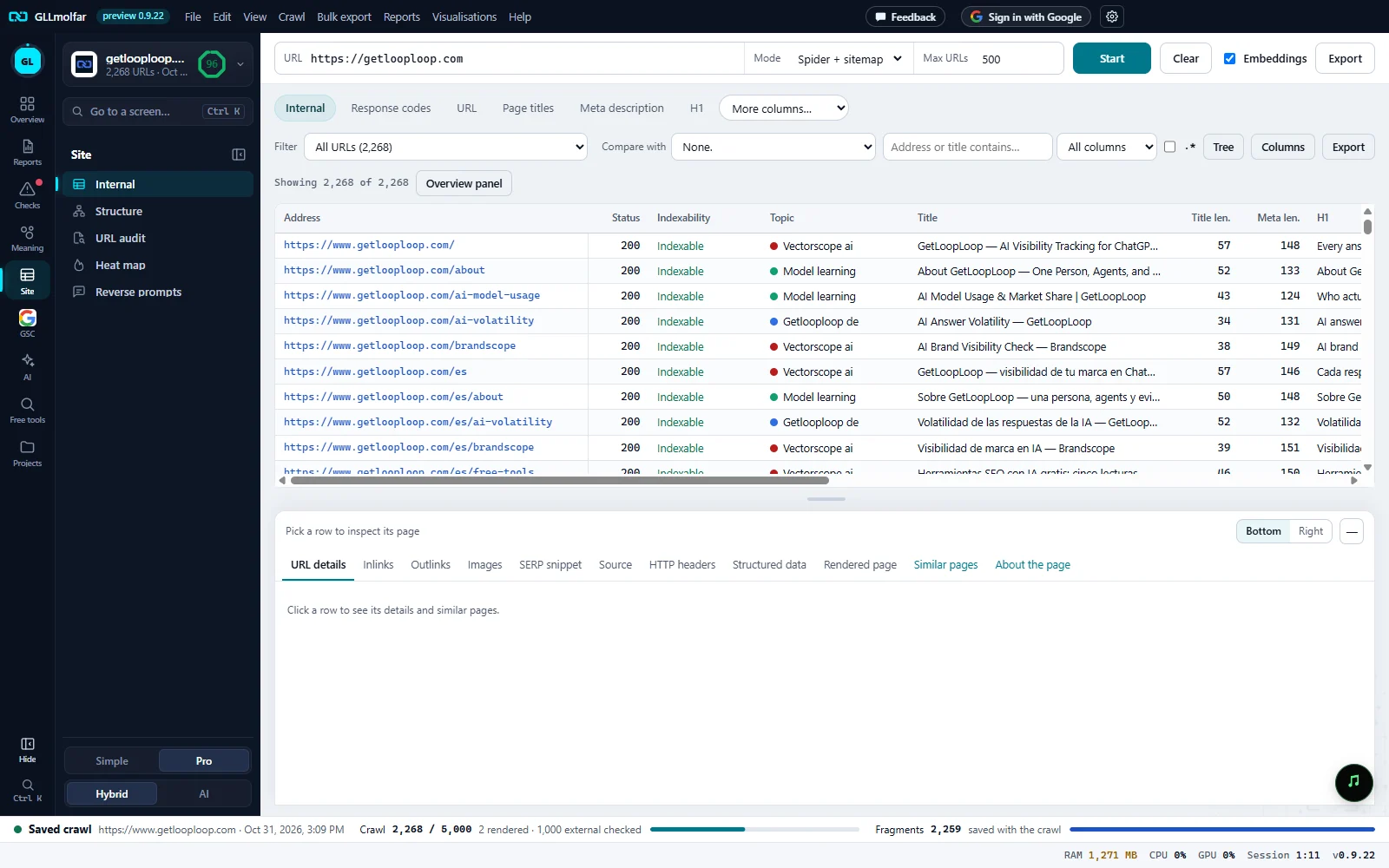
Column sets. Internal, Response codes, URL, Page titles, Meta description, H1, and More columns… for the rest. Pro mode.
Filter and compare. Filter: all URLs or one check, each with its count. Compare with: an earlier crawl of the site.
Search and tools. Search by address or title, in all columns or one, with
.*for a regular expression; then Tree, Columns and Export.The table. Showing N of M above it. One row per URL; a header sorts, drags and resizes its column.
Overview panel. Opens and closes the panel of Overview, Site structure and Response times beside the table. Closed in this picture.
Inspector. The picked page: its address and state, and its tabs, from URL details to About the page.
Simple and Pro
| Part | Simple: All pages | Pro: Internal |
|---|---|---|
| Column sets | Internal only | All of them |
| Filter, search, Export, Showing N of M | Yes | Yes |
| Compare with | — | When the site has an earlier crawl |
| Search in one column, regular expression | — | Yes |
| Tree, Columns, Overview panel | — | Yes |
| Inspector | Yes | Yes |
The Internal columns
| Column | What it shows |
|---|---|
| Address | The URL. |
| Status | The HTTP response code. |
| Indexability | Indexable, or why the page is kept out of search. |
| Topic | The page's topic, with its colour, once pages are embedded. |
| Title, Title len. | The page title and its length. |
| Meta len. | The length of the meta description. |
| H1 | The first H1 heading. |
| Words | Words on the page. |
| JS | Whether the page was rendered with JavaScript. |
| Depth | Clicks from the start page. |
| Inlinks | Internal links to the page. |
| Page type, Service page | What kind of page it is, and whether it was taken for a service page. |
| Response, ms; Size, KB | Time to answer and size of the response. |
| In sitemap | Whether the sitemap lists it. |
| Embedded | Whether the page has an embedding. |
Columns opens Columns · {set}: tick the columns to show and drag them into order. Reset to default brings back the set's own columns. With a crawl to compare, Change since compared crawl joins the table.
The other sets under More columns…: H2, Content, Canonicals, Directives, Hreflang, JavaScript, Links, Sitemaps, Structured data, Images, External, Accessibility, AI, Service pages, Security, Headers & cookies, Pagination, and Custom when extraction rules are set.
Filter, search and compare
| Control | What it does |
|---|---|
| Filter | All URLs (N), then each check with its count and share. Other column sets have their own filters. |
| Compare with | None. or an earlier crawl, by date and URL count. Picking one adds the Change column and three filters: New since the compared crawl, Changed since the compared crawl, Unchanged. |
| Search | Address or title contains…. All columns or one column; .* reads the search as a regular expression. |
| Tree | Groups the rows by host and folder. A folder row shows N URLs and N with errors; a click opens or folds it. |
| Showing N of M | Rows shown out of the URLs in the set; N selected when several rows are selected. |
| Export | Saves the rows on screen with the visible columns. |
A filter set from elsewhere — a topic, a depth column, a batch — shows as a chip beside the filter, with ✕ to clear it.
Working with rows
- Click picks a row; Shift and Ctrl add to the selection; Ctrl+A selects all.
- Double-click or Ctrl+Enter opens the page in the browser.
- Ctrl+C copies the URLs; Ctrl+Shift+C copies the rows with headers, to paste into a spreadsheet.
- Del removes the selected URLs from the saved crawl, after asking. The site itself is not touched.
- Right-click: Open in browser, Copy URL, Copy rows, Show inlinks, Show outlinks, View source, SERP snippet, Quick audit, Mark as service page…, Re-crawl, Remove from crawl, index checks in Google and Bing, Wayback Machine, Rich Results Test, PageSpeed Insights, W3C HTML validator, Open robots.txt, Export selected.
Overview panel
| Tab | What it shows |
|---|---|
| Overview | Every column set with its count, and under it each filter with its count and share. A filter opens it in the table. |
| Site structure | Top folders: Folder, URL, Indexable pages, Errors. Then Clicks from the home page and URL nesting (folders in the address) as columns. A folder or a column filters the table. |
| Response times | Average N ms, median N ms. and the URLs by response time, from 0–0.2 s to 5 s and more. A band filters the table. |
Inspector
Its head shows the picked page: favicon, address, status, indexability, service page and topic, with ↑ and ↓ for the previous and next row, Open ↗, Bottom or Right for where it sits, and — to fold it.
| Tab | What it shows |
|---|---|
| URL details | Response, indexing and content of the page: status, redirects, canonical, robots, depth and links, hreflang, title and description with their length, headings, words, topic, page type, schema. |
| Inlinks, Outlinks | Links into and out of the page: From or To, anchor text, Where, Rel, Status. |
| Images | The page's images and their alt text: N images, M without alt. |
| SERP snippet | The result as a search engine would show it, with the title and description editable and measured in pixels. |
| Source | Raw HTML, After JavaScript, and the lines JavaScript added, with a search and Copy. |
| HTTP headers | The response headers, grouped, and the security headers present or missing. |
| Structured data | The schema types and each JSON-LD block. |
| Rendered page | A screenshot of the page, Desktop or Phone. |
| Similar pages | The pages closest in meaning, with their similarity; 1.000 means the same meaning. |
| About the page | What the page is about, passage by passage, read by the model on this computer. |
States and messages
Enter a site address above and press Start.
The table is empty until a crawl is open or running.
Click a row to see its details and similar pages.
The inspector's head says Pick a row to inspect its page.
Several rows selected. Select one to see its details.
The inspector shows one page at a time.
The Change column and the New / Changed filters show what is different from that crawl.
Shown once when a crawl is picked in Compare with.