

Custom extraction and search
Describes GLLmolfar 0.9.35current release · checked 8 Nov 2026
Rules that read something from every page's HTML — a price, a tag, a count of links, whether a script is there — and put it in a column of its own. Each rule is tested on one page before you save it.
- Where
- Crawl › Custom extraction & search… (Ctrl+Shift+K); the values in the Custom tab
- Mode
- The dialog in both modes; the Custom tab in Pro
- Built from
- Each page's HTML, after JavaScript when the page was rendered
- Changes
- On the next crawl, or on rows you re-crawl
On the screen
The dialog holds the rules, one per row, and a test on one page. Here four rules read getlooploop.com/vectorscope.
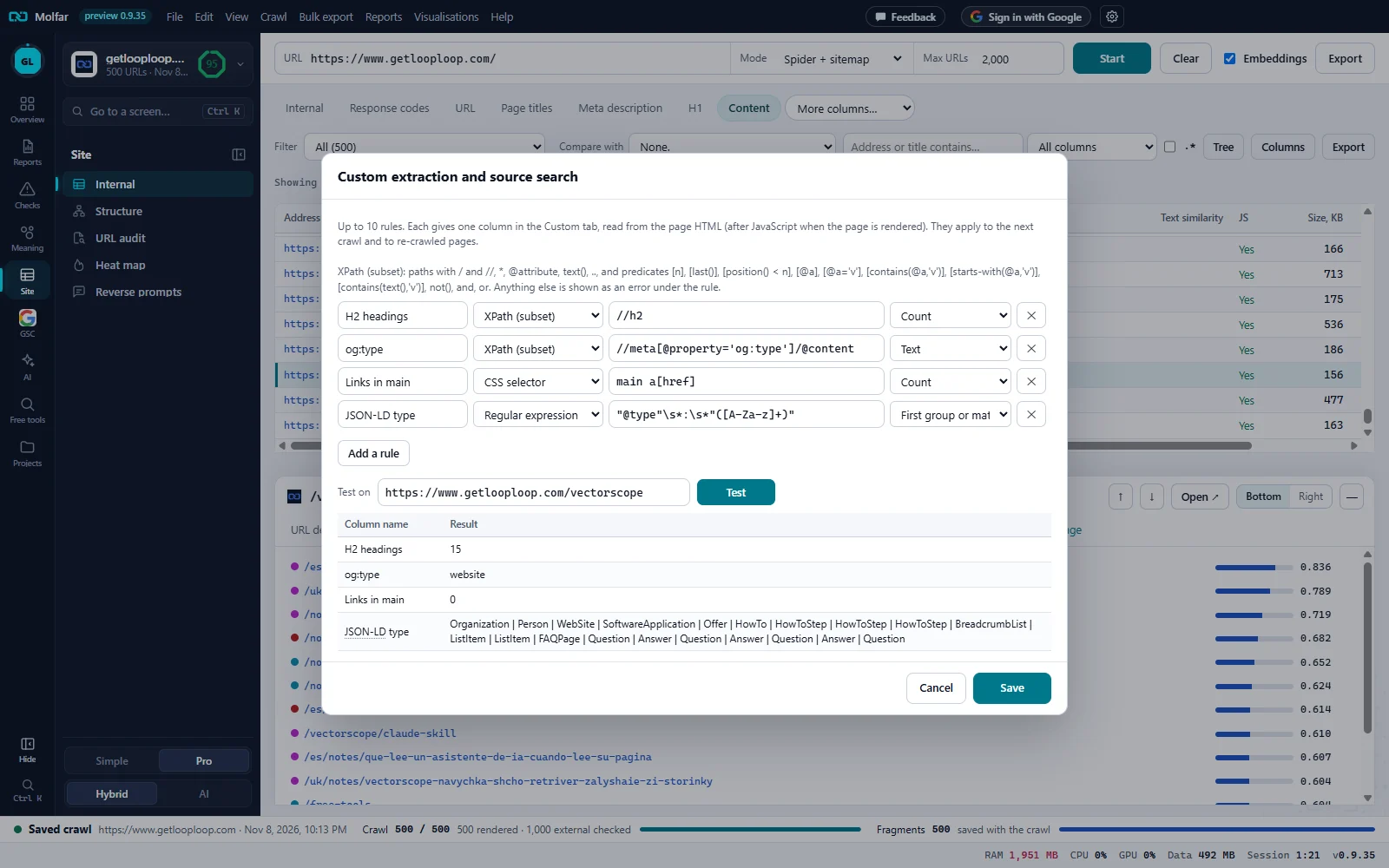
What the rules read. Up to 10 rules; each is one column in the Custom tab, read from the page HTML (after JavaScript when the page is rendered).
XPath (subset). The line lists the XPath the app understands. Anything else is shown as an error under the rule.
Column name. The name of the column the rule fills: here H2 headings, og:type, Links in main and JSON-LD type.
Rule type. XPath (subset) twice, a CSS selector and a Regular expression; HTML contains and does not contain are the other two.
The expression. The path, selector or pattern. The regular expression keeps its first group: the JSON-LD types.
Take. What to keep from the matches: Count, Text, First group or match and the others the rule type allows.
Remove. Drops the rule. Add a rule adds a row, up to 10.
Test on. A page address and Test: each rule's result on that page, before anything is saved.
Result. One row per rule: 15 H2 headings, og:type website, 0 links inside main, and every JSON-LD type on the page.
Save. Keeps the rules for the next crawl and for re-crawled pages.
Rule types
| Rule type | What it matches | Take |
|---|---|---|
| CSS selector | Elements, e.g. .price or meta[property="og:type"]. | Text, Attribute value, Inner HTML, Count, Yes / no |
| XPath (subset) | Nodes, e.g. //div[@class='price']/span[1] or //link[@rel='canonical']/@href. A path that ends in an attribute or text() gives that value. | Text, Attribute value, Inner HTML, Count, Yes / no |
| Regular expression | A pattern over the HTML, case-insensitive, e.g. gtag\('config', '([^']+)'. | First group or match, Count, Yes / no |
| HTML contains | Plain text in the HTML, case-insensitive, e.g. googletagmanager.com. | Count, Yes / no |
| HTML does not contain | Text that should be on every page. | Yes / no |
Text and attribute values keep up to 20 matches, joined, and up to 1,000 characters.
The XPath subset
Molfar evaluates XPath with its own small reader, not a full XPath 1.0 engine. What it reads, and what it refuses with a message under the rule instead of an empty column:
| Supported | Refused |
|---|---|
Paths with / and //, ., ..; element names, *, @name, @*, text(), node() | Axes written out (child::, ancestor::…) |
Predicates [n], [last()], [position() < n] (=, !=, <, <=, >, >=) | Unions (|), arithmetic, variables |
[@a], [@a='v'], [@a!='v'], [contains(@a,'v')], [contains(text(),'v')], [contains(.,'v')], [starts-with(@a,'v')] | Other functions: count(), normalize-space(), translate()… |
A relative path inside a predicate ([a/@href]), not(...), and, or, brackets, several predicates in a row | A function or a literal as the whole expression |
The Custom tab
Each saved rule is a column of the Custom tab, one value per page; columns from Prompt on pages appear there too, marked · AI. Each column has two filters: {name}: found and {name}: not found.
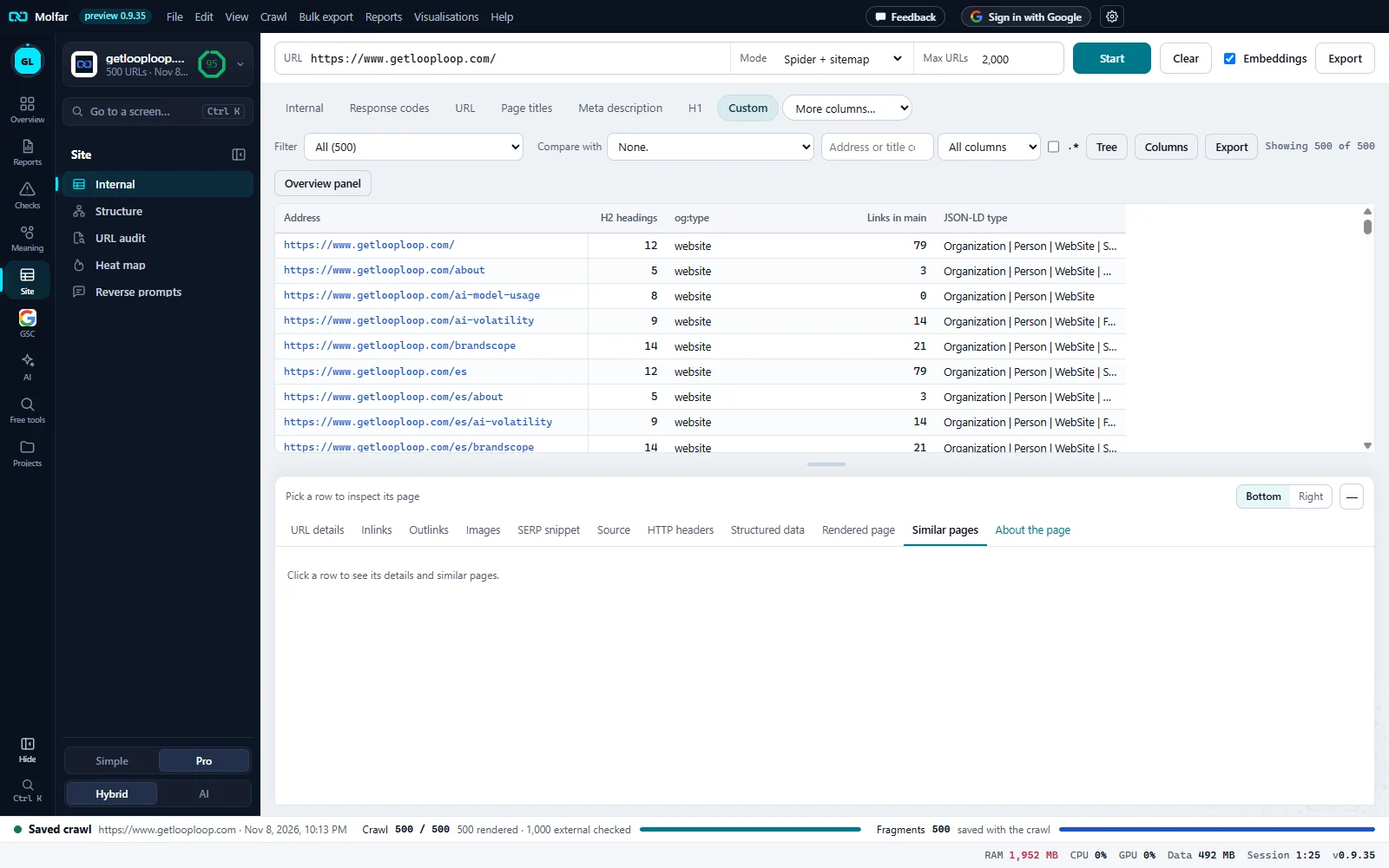
Custom. The column set the rules fill, in the row of tabs.
Filter. All, or for each column {name}: found and {name}: not found.
H2 headings, og:type. The two XPath rules: a count and an attribute's value, per page.
Links in main. The CSS rule: links inside the main element, counted on each crawled page.
JSON-LD type. The regular expression's first group from every match, joined.
States and messages
Rule problem: {why}
Shown under the row while you type: a selector or pattern that does not parse, or XPath outside the subset. A rule like this is saved as typed, and the toast names it.
Rules saved. Crawl again, or select rows and Re-crawl, to fill the Custom tab.
Rules read pages when they are crawled; the open crawl is not read again by itself.
Test on
The test reads the page from the open crawl's saved HTML when it has it, else asks the site once.