

Prompt on pages
Describes GLLmolfar 0.9.35current release · checked 8 Nov 2026
Ask your own model one question about many pages of the open crawl. Each page's answer becomes a value in a column of the Custom tab and is saved with the crawl. One model call per page, and nothing runs until you press the button.
- Where
- Agent · test › Prompt on pages
- Mode
- Simple and Pro
- Built from
- The open crawl's pages and a model you connected in Settings › AI models
- Changes
- Only when you press the button
On the screen
A form: the column's name, the question, which pages, how many at most, and the number of model calls the run would make. The result of the last run shows below it. In the picture no model is connected yet, so the notice above the form says where to connect one, and nothing has run.
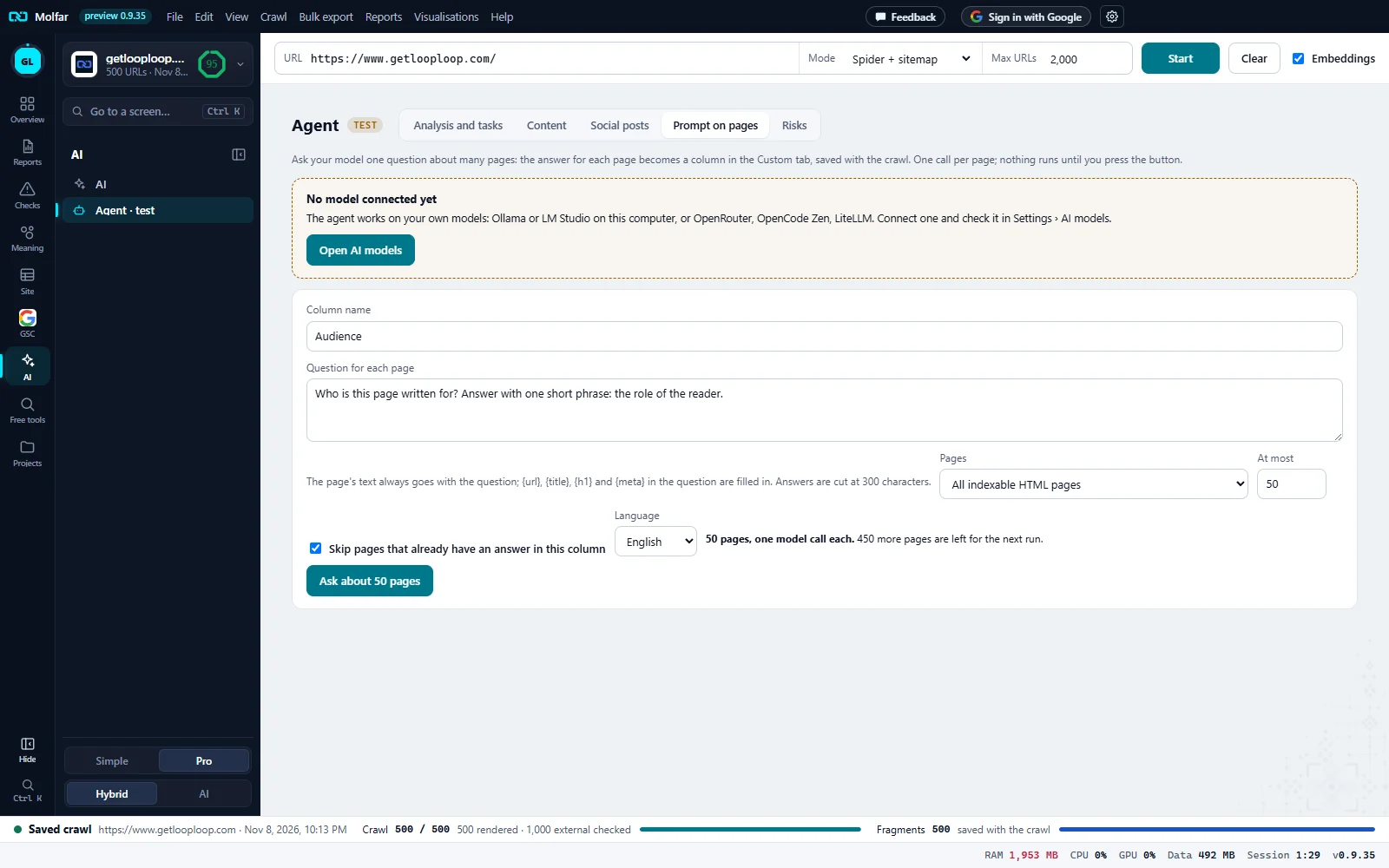
Sections of the agent. Prompt on pages is one of five: Analysis and tasks, Content, Social posts, Prompt on pages, Risks.
No model connected yet. The agent works on the person's own models. Open AI models goes to Settings › AI models to connect one.
Column name. Here Audience. It becomes the column header in the Custom tab, with · AI after it.
Question for each page. Asked about each page with the page's text; {url}, {title}, {h1} and {meta} are filled in.
Pages and At most. All indexable HTML pages, or the pages of one check; at most 50 in this run.
Skip, Language. Leave out pages that already have an answer in this column; the language the answers are written in.
Calls before the start. 50 pages, one model call each. 450 more are left for the next run. The count is shown before anything runs.
The button. Ask about 50 pages starts the run. Nothing is sent to a model before it is pressed.
Fields
| Field | What it does |
|---|---|
| Column name | Up to 60 characters. The column is shown in the Custom tab as {name} · AI. Questions you ran before are listed above the form under Your columns:; a click fills the form again. |
| Question for each page | The page's text always goes with the question. {url}, {title}, {h1} and {meta} in the question are filled in. Answers are cut at 300 characters. |
| Pages | All indexable HTML pages, or the pages of one check from the fix list, with its count. |
| At most | Pages in this run: 50 by default, 500 at most. The rest are counted: N more pages are left for the next run. |
| Skip pages that already have an answer in this column | On by default: a second run fills only the pages still empty, and says N already answered, skipped. |
| Language | The language the answers are written in. |
What a run does
- One call per page, to the model chosen for writing in Settings › AI models: Ollama or LM Studio on this computer, or a provider you connected with your own key. Molfar has no model of its own here.
- The page's text is read from the crawl's saved HTML (after JavaScript when the page was rendered).
- A page the model cannot answer, or that cannot be read, is recorded with its reason, and the run goes on.
- The answers go into the open crawl's pages and are saved with it. Open in the Custom tab shows them as a column you can sort, filter ({name}: found, {name}: not found) and export.
- A cloud provider bills your own key. The window shows which models are local and which are in the cloud; Molfar shows no prices.
States and messages
Open a finished crawl first: the plan is built from its fix list.
The form needs a finished crawl to count pages.
No model connected yet
Connect a model in Settings › AI models; Open AI models goes there.
{ok} answered · {bad} failed
Shown above the first 50 answers of the last run; N more answers are in the Custom tab.