

Linking map
Describes GLLmolfar 0.9.35current release · checked 8 Nov 2026
Internal linking as a plan for the whole site rather than a list of page pairs. The map groups pages into sections or topics, shows which groups link to which, finds the groups that are close in meaning and barely linked, and plans the links that would join them: template edits first, then hub lists, then single pages. Then it recalculates internal PageRank and click depth with those links added, so you see what the plan changes before anyone edits a page.
- Where
- Meaning › Linking map
- Mode
- Simple and Pro
- Built from
- The finished crawl's internal links and their positions, page and section embeddings, topics, and the Search Console report kept on this computer when there is one
- Changes
- When a crawl ends, another opens, or Group by changes
On the screen
A toolbar, a strip of figures, a line of notes, then two panels: the Group matrix on the left and, on the right, Effect or Pages.
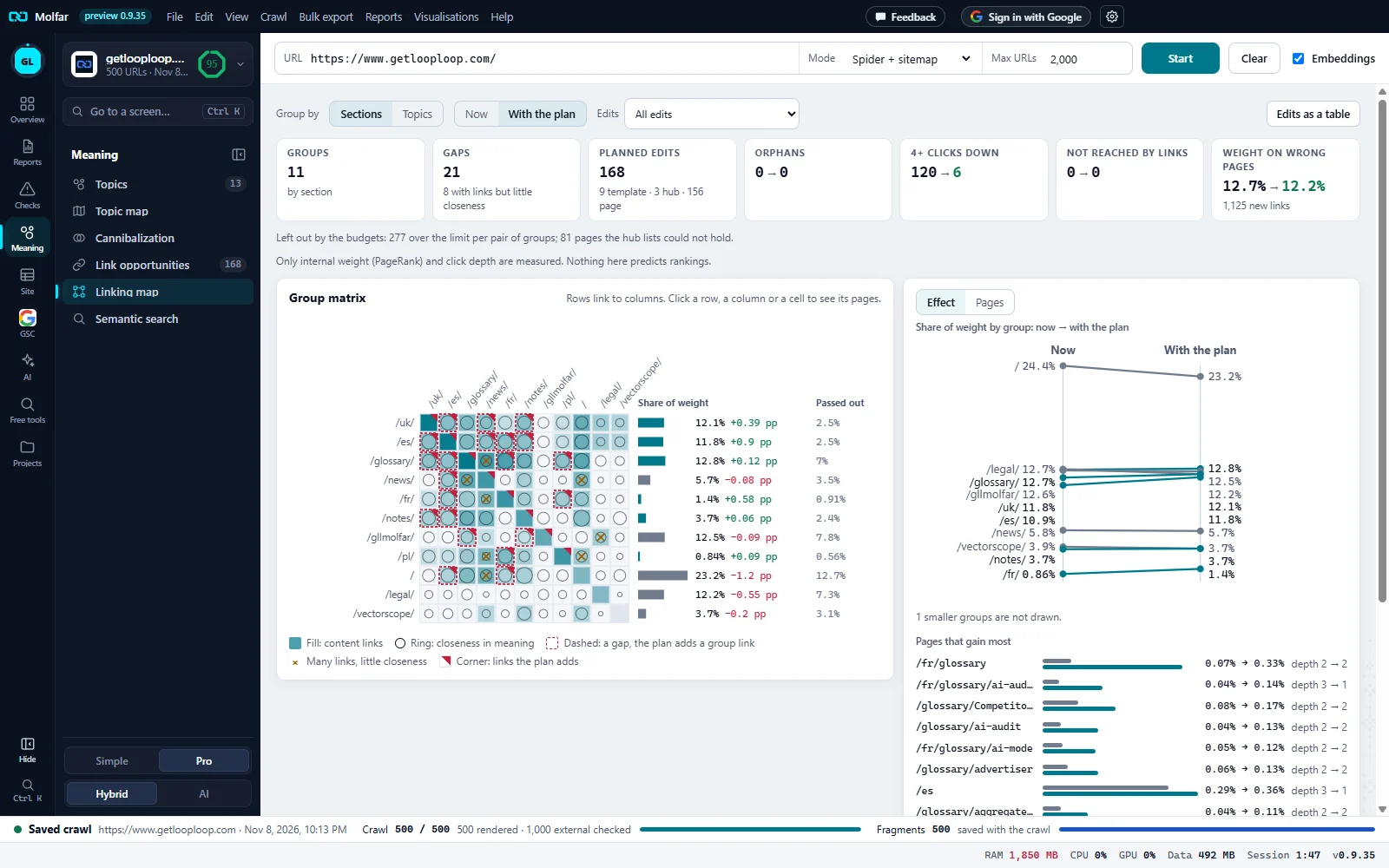
Group by. Sections (URL folders, here) or Topics (meaning).
Now, With the plan. Here With the plan: the matrix, the share column and the strip show the plan applied. Edits picks which part of the plan: here All edits.
Edits as a table. Opens Link opportunities: the same plan, one edit per row.
Groups, gaps, planned edits. 11 sections; 21 gaps (and 8 pairs with many links but little closeness); 168 planned edits: 9 template, 3 hub lists, 156 page edits.
Now → with the plan. Orphans 0 → 0; pages 4+ clicks down 120 → 6; not reached by links 0 → 0; weight on wrong pages 12.7% → 12.2%, with the 1,125 links the plan adds.
Left out by the budgets. What the budgets cut, counted: here 277 links over the limit per pair of groups and 81 pages the hub lists could not hold.
What it measures. Only internal weight (PageRank) and click depth. Nothing here predicts rankings.
Group matrix. Rows link to columns. Fill is content links; a ring is closeness in meaning; a dashed border is a gap the plan fills; × is many links with little closeness; a corner mark is links the plan adds.
Share of weight. Each section's share of the site's internal PageRank with the plan, and the change in points: /uk/ 12.1%, +0.39 pp.
Passed out. The weight each section passes to other sections.
Effect. Share of weight by group as a slope chart, now → with the plan: the root folder gives some away, /fr/ gains.
Pages that gain most. Each with its share now → with the plan and its click depth now → with the plan. The pages that give most away and the weight on wrong pages follow below.
Groups: sections or topics
| Group by | What a group is |
|---|---|
| Sections | A URL folder: the first path segment, or one level deeper where one folder holds over 40% of the pages (and 20 or more), as a language folder does. Pages straight under the root form the section /. A subdomain the crawl followed is its own prefix. |
| Topics | A topic of the crawl's analysis (embedding clusters). With no topics yet, the map groups by sections and says No topics yet: grouped by sections. |
At most 60 groups are shown, the largest first. The rest, and pages without a topic, form Other pages, which gets no hub and no group links.
The group matrix
| Mark | What it means |
|---|---|
| Fill | Content links from the row group to the column group, on a log scale. Menu, header, footer and sidebar links are counted apart: they say nothing about relevance. With the plan, the planned links are added to the fill. |
| Ring | Closeness in meaning of the two groups (cosine of their centroids), larger for closer pairs. |
| Dashed border | A gap: the groups are close, fewer than 10% of the row group's pages link to the column group in content, and the column group has a hub. The plan adds a group link. |
| × | Noise: many content links (25% of the pages or more, at least 5 links) between groups below the median closeness. Shown, never removed by the plan. |
| Corner | With the plan: links the plan adds between these two groups. |
| Share of weight | The group's share of internal PageRank, now or with the plan, with the change in points. |
| Passed out | Weight the group's pages pass to pages of other groups. |
Hovering a cell names both groups, the content links and the pages they come from, the menu and footer links, the closeness, and the share of pages for which the other group is the nearest. Clicking a row, a column or a cell opens Pages on the right.
How the plan is made
Each group gets a hub: its folder page when that page can receive links, otherwise the page with the best mix of closeness to the group and PageRank. Four rules, in this order, give candidate links:
| Rule | What it adds |
|---|---|
| Up to the hub | A link from each member page to its hub, where missing. |
| Hub to its pages | A list of the group's pages on the hub, when the hub links to fewer than half of them (at most 40 pages, those in most need first). |
| Nearest pages | A link from each page to its two or three nearest pages in meaning, same language, where missing. |
| Group link | For a gap: the row group's pages closest to the column group link to its hub, or to a page of it that is clearly closer. |
Template edits first. When a rule applies to at least 60% of a group of five pages or more, it becomes one template edit: a breadcrumb or link up to the hub, a related pages block, or a link to another group's hub in the group's template. Then hub lists, then single page edits. A link a page already has, in any position, is never planned.
Budgets. At most 3 new links per source page, 5 per target, and per pair of groups the square root of the group's size, between 3 and 12; page edits stop at 3,000. What a budget refused is counted under the strip: Left out by the budgets: with the count per budget.
Scoring. A candidate weighs the target's need (no or few linking pages, 4+ clicks down or not reached, and search demand: impressions at average positions 4–20 and falling clicks, when Search Console is connected), the source's strength (its PageRank and search clicks), the placement (the source's section closest in meaning to the target) and its cost (a source with very many content links, a non-indexable source, another language).
Anchors. Candidates are the target's H1, its title (the part before " | ") and its top Search Console queries. Generic words, very short ones, addresses and words the target already receives are dropped. When nothing new is left, the H1 stays, marked to vary the words.
Now, With the plan, and which edits
| Control | What it changes |
|---|---|
| Now / With the plan | The matrix, the share column and the graph redraw from the crawl's own PageRank, or from PageRank recalculated with the planned links added. |
| Edits | All edits, Template edits only, Hub lists only, Page edits only, or Ticked in Link opportunities: the effect of each part of the plan, seen apart. Choosing a subset switches to With the plan. |
| Edits as a table | Opens Link opportunities, where the plan is listed edit by edit. |
The summary strip
| Figure | What it counts |
|---|---|
| Groups | Sections or topics, without Other pages. |
| Gaps | Group links the plan adds, and below it the pairs with links but little closeness. |
| Planned edits | All edits, split into template, hub and page. |
| Orphans | Pages no crawled page links to, now → with the plan. |
| 4+ clicks down | Pages four or more clicks from the start page. A page the plan first makes reachable can land here, so this can rise while Not reached falls. |
| Not reached by links | Pages no chain of links from the start page reaches. |
| Weight on wrong pages | The share of PageRank on errors and no response, redirects, non-indexable pages and utility pages (legal, account, system, tag archives), with the number of new links. |
Effect
- Share of weight by group: now → with the plan: a slope chart of the 10 largest groups; groups that gain in the accent colour, groups that give weight away in grey. Smaller groups are counted under it.
- Pages that gain most (8) and Pages that give most away (5): paired bars, now and with the plan, with click depth now → after. Each list has its own scale. A new link splits the weight of the page it is on, which is why some pages lose a little.
- Weight on wrong pages: now → with the plan: two bars.
Pages: the group graph and the page panel
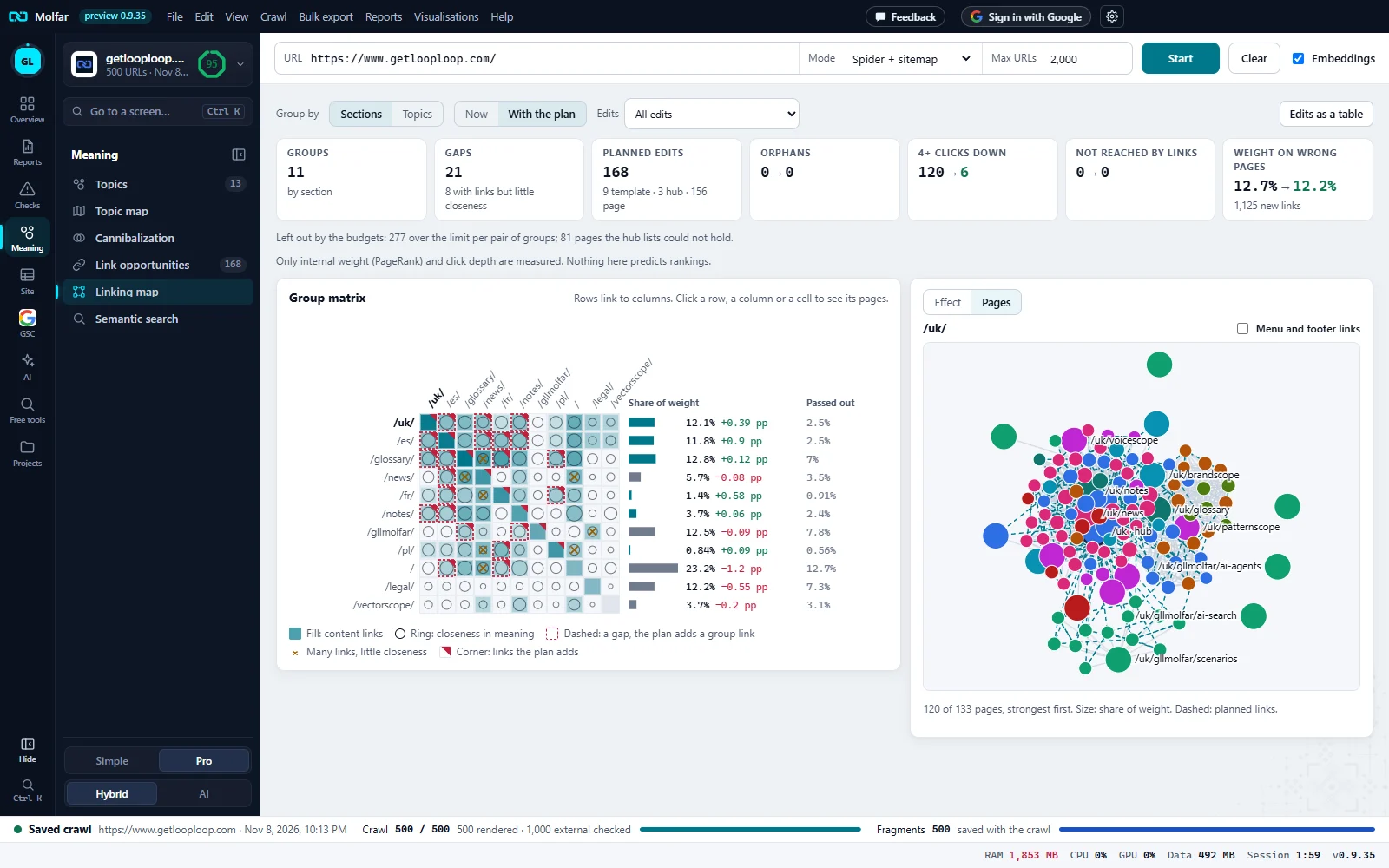
The clicked group. Here the /uk/ row: its label turns bold, and its pages are drawn on the right.
Pages. The side panel switched from Effect to Pages, with the group's name.
Menu and footer links. Off here: menu, header, footer and sidebar links are hidden from the graph until it is ticked.
Group graph. The hub and the strongest pages. Size: share of weight. Colour: topic. Grey: content links. Dashed in the accent colour: planned links.
How many. 120 of 133 pages, strongest first: the graph draws up to 120. Clicking a page opens its page panel.
- Menu and footer links is off by default: menu, header, footer and sidebar links are hidden from the graph until it is ticked.
- Hovering a page shows its title, address, share of weight and depth now → with the plan.
- The page panel lists each planned edit with its kind, Add a link to … or Gets a link from …, its placement (for example in the section “…”, in the body text, in the template: a related pages block) and the anchor. Open in the table shows the page in All pages.
States and notes
The linking map is made from a finished crawl.
The plan needs the whole link graph.
Making the linking plan…
The plan runs on its own thread; it is kept per crawl and options.
This crawl kept no link positions: every link counts as content.
A crawl saved before link positions were kept.
This crawl has no page meaning (embeddings): no gaps and no links to the nearest pages, only the hub rules.
Turn on embeddings and crawl again for gaps and nearest pages.
No section vectors: links are placed in the page body.
Placement falls back to the body text.
Search Console is not connected for this site: search demand is not weighed.
The plan works without it; demand only changes the order.
For AI agents
The MCP tool get_link_plan returns the same plan the map draws: groups with hub and share of weight now and with the plan, gaps, the effect, and the edits page by page with rule, placement, anchor, and the target's Link score, PageRank share and depth now and with the plan. It reads only; see MCP tools.