

JavaScript
Describes GLLmolfar 0.9.35current release · checked 8 Nov 2026
What a page says before and after its JavaScript runs. For every rendered page: words in the served HTML and after rendering, the fields JavaScript changed, internal links that exist only after it, and images that appear only when the page is scrolled.
- Where
- Site › All pages › More columns… › JavaScript
- Mode
- Pro
- Built from
- Each page's served HTML and, when it was rendered, the rendered page
- Changes
- Live during a crawl
On the screen
The JavaScript column set with one of its filters, a page picked, and the inspector's Source pane showing the lines JavaScript added.
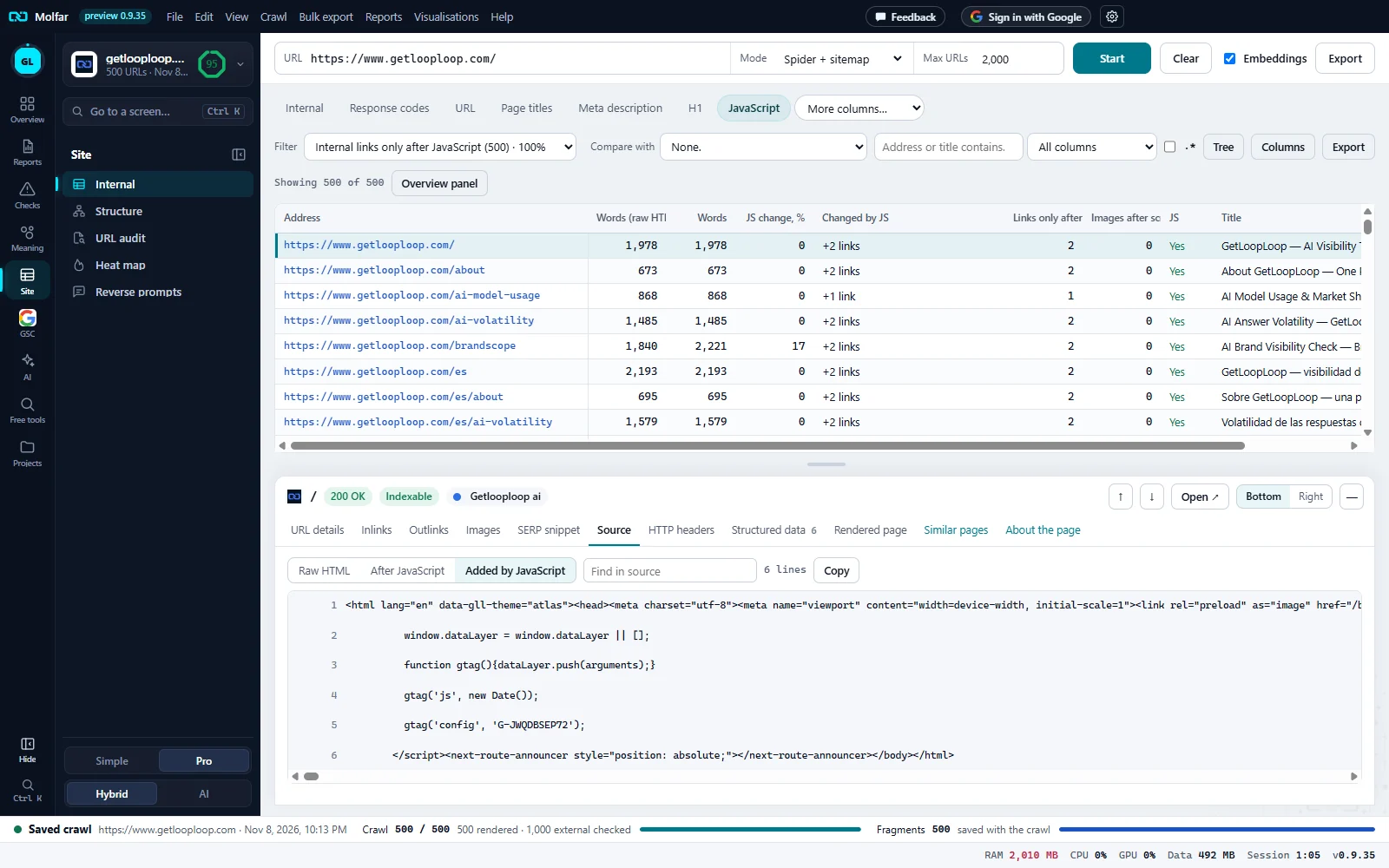
Filter. Which JavaScript difference to list, with the number of pages for each: here Internal links only after JavaScript (500) · 100%.
Words before and after. Words (raw HTML) and Words, and JS change, % between them.
Changed by JS, Links only after. The fields JavaScript changed (here +2 links), the internal links that exist only in the rendered page, and the images that appear only after scrolling.
Source. Raw HTML, After JavaScript and Added by JavaScript: the lines of the rendered page that are not in the served one. Here, for the home page.
Which pages are rendered
Two settings in Settings › Crawling decide it. JavaScript rendering: Off · raw HTML only, Auto · render pages with little text (the default), or All pages (slower). Read a rendered page: when the page stops changing (faster), or when the network is quiet too, for pages that load content late. A page that was not rendered has nothing to compare, so most of this column set is empty for it.
Columns
| Column | What it shows |
|---|---|
| Words (raw HTML) | Words in the HTML as the server sent it. |
| Words | Words in the page as it was read: after JavaScript when it was rendered. |
| JS change, % | How much of the rendered text JavaScript added (negative when it removed text). 0 for a page that was not rendered. |
| Changed by JS | Which of canonical, meta robots, title, H1 and description differ after JavaScript, and +N links. |
| Links only after JS | Internal links found in the rendered page and not in the served HTML. |
| Images after scrolling | Images whose address appears only when the page is scrolled, with no fallback in the served HTML. The tip lists examples. |
| JS | Whether the page was rendered. |
Filters
| Filter | Which pages |
|---|---|
| Rendered with JavaScript | Pages that were rendered. |
| Text appears only after JavaScript | Under 100 words in the served HTML, 100 or more after rendering. |
| JavaScript changes the text by over 20% | The word count moved by more than a fifth. |
| Not rendered | Pages read from the served HTML only. |
| Canonical changes after JavaScript | The canonical in the rendered page differs from the served one. |
| Meta robots changes after JavaScript | The robots directives differ. |
| Title changes after JavaScript | The title differs. |
| H1 changes after JavaScript | The H1 differs. |
| Description changes after JavaScript | The meta description differs. |
| Internal links only after JavaScript | At least one internal link exists only in the rendered page. |
| Images that appear only after scrolling | At least one image found only after the scroll pass, without a fallback in the served HTML. |
Images that appear only after scrolling
After a rendered page has been read, the app scrolls it to the bottom in steps (at most 30 screens and 3 seconds) and records the image addresses that exist only after the scroll. Reading the page itself is unchanged: the text, links and fields come from before the scroll.
- Only rendered pages are scanned. With rendering on Auto, a page with enough text in its HTML is not rendered and has no value here.
- Native
loading="lazy"is fine: the image and its address are in the HTML from the start. Those are counted apart (Native lazy images in the detail) and never flagged. - An image is not flagged when the served HTML carries its address anyway, in a
<noscript>image, asrcor asrcset. - The crawl does not download images: it records that an address is in the page, not whether the picture loads.