

Crawl a list of URLs
Describes GLLmolfar 0.9.35current release · checked 8 Nov 2026
Three ways to say which pages a crawl reads: a list of addresses and nothing else, extra addresses added to a crawl that is running, or a crawl kept inside one folder of the site.
- Where
- Crawl › Crawl a list of URLs… (Ctrl+L); Crawl › Add URLs to this crawl…; Settings › Crawl scope
- Mode
- Simple and Pro
- Built from
- The addresses you give
- Changes
- When the crawl starts
On the screen
The dialog takes addresses one per line, or a file. Here, pages of getlooploop.com pasted in. (The dialog's first line, which names the account level's URL limit, is left out of this picture.)
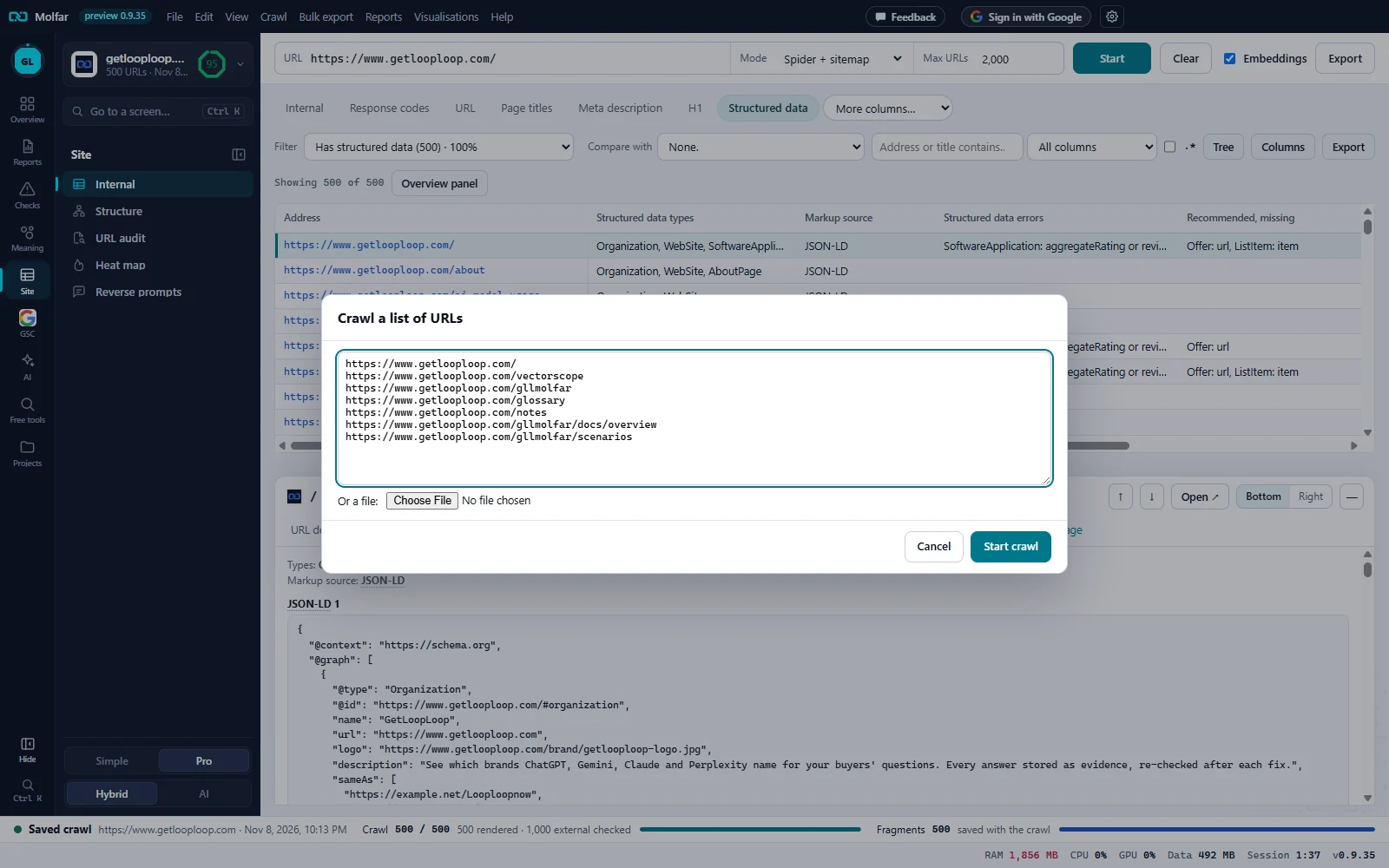
The list. One address per line; here seven pages of getlooploop.com. Anything that looks like an address in pasted text is taken; duplicates count once.
Or a file. A text, CSV or XML file; its addresses are added to what is pasted.
Start crawl. Crawls these addresses and only these.
A list of URLs
- Only these URLs are crawled: the crawl stops when the list is done. Their links are recorded on each page as in any crawl.
- Addresses must start with
http://orhttps://. With none, the app says: No URLs found. Paste full addresses starting with http:// or https://. - A list longer than the account level's limit is cut, and a message says how many were taken of how many.
- Typical lists: the pages Search Console names under Lost clicks, a sitemap's addresses, the pages a developer changed.
- The toolbar's mode selector has List of URLs too; Start then asks for the list.
Add URLs to this crawl
While a crawl runs, Crawl › Add URLs to this crawl… takes more addresses, one per line. They are crawled next, even outside the include and exclude rules. The toast says how many were added to the queue.
One folder of a site
To crawl only /blog/, start at https://site.com/blog/ and turn on Stay inside the start folder in Settings › Crawl scope. Links, redirects and sitemap addresses outside the folder are left out and counted as excluded; the start URL and URLs you add are always crawled. An Include line (/blog/) does the same with a regular expression, for any pattern.
States and messages
No URLs found. Paste full addresses starting with http:// or https://.
Nothing in the box or the file looked like an address.
Add URLs to this crawl…
Available only while a crawl runs.